English
14EN
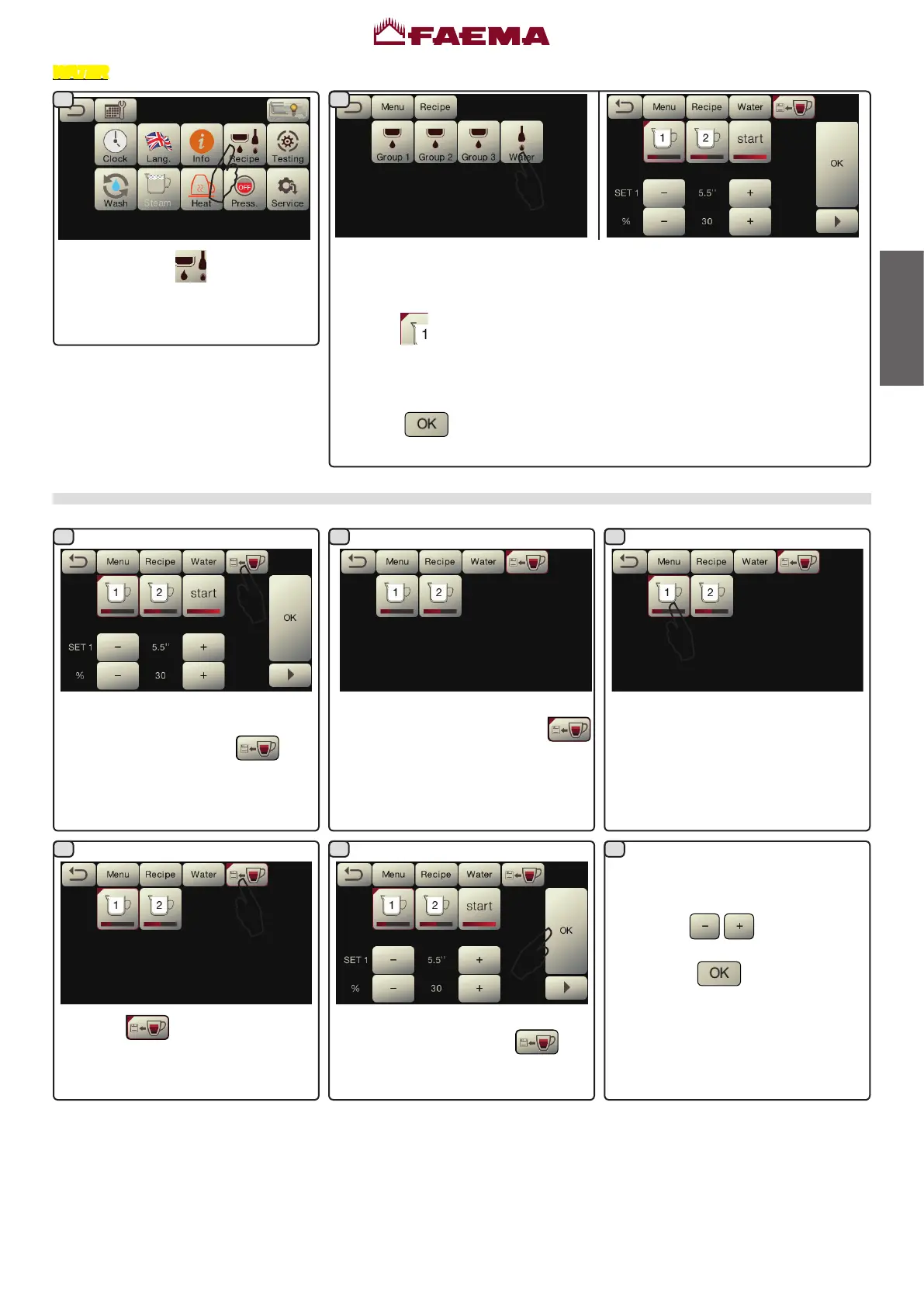
Presstheicon .
WATER
Pressthewaterkey.Theseparameterscanbecongured:
SET...-tosetthedispensingtime;
%-tosetthewatertemperature.
NOTE. -
theredcornerinthetopleftoftheiconshowsthatthekeyisbeing
modied.
-theTEST phaseofthewaterkeysisexactlythesameasthatforthe
coffeekeys
Pressthe
icontoconrmtheinformationentered.
Water dose programming using the "self-learning" function
Thesoundofthebuzzerandthered
corner in the top left of the
iconshowthattheSELF-LEARNING
functionisactive.
Pressthe
icontoexittheSELF-
LEARNINGphase.
Thedispensingtimeandtemperature
of the water added will be displayed
whichcanbecorrectedmanuallyusing
thebuttons
.
Afterwards, confirm the values by
pressingthe
icon.
Place a container suitable for the
amountyouwishtollbeneaththehot-
wateroutletandpressthe
icon.
Press key to be programmed. When
the desired level is reached in the
containerpressthekeyagain.
Continuewithanyadditionalprogram-
mingofthekeys.
Thesoundofthebuzzerandthered
cornerinthetopleftofthe
icon
willdisappear.
21
321
4 5 6



 To Next Page