English
13EN
5. Programming measures function
COFFEE
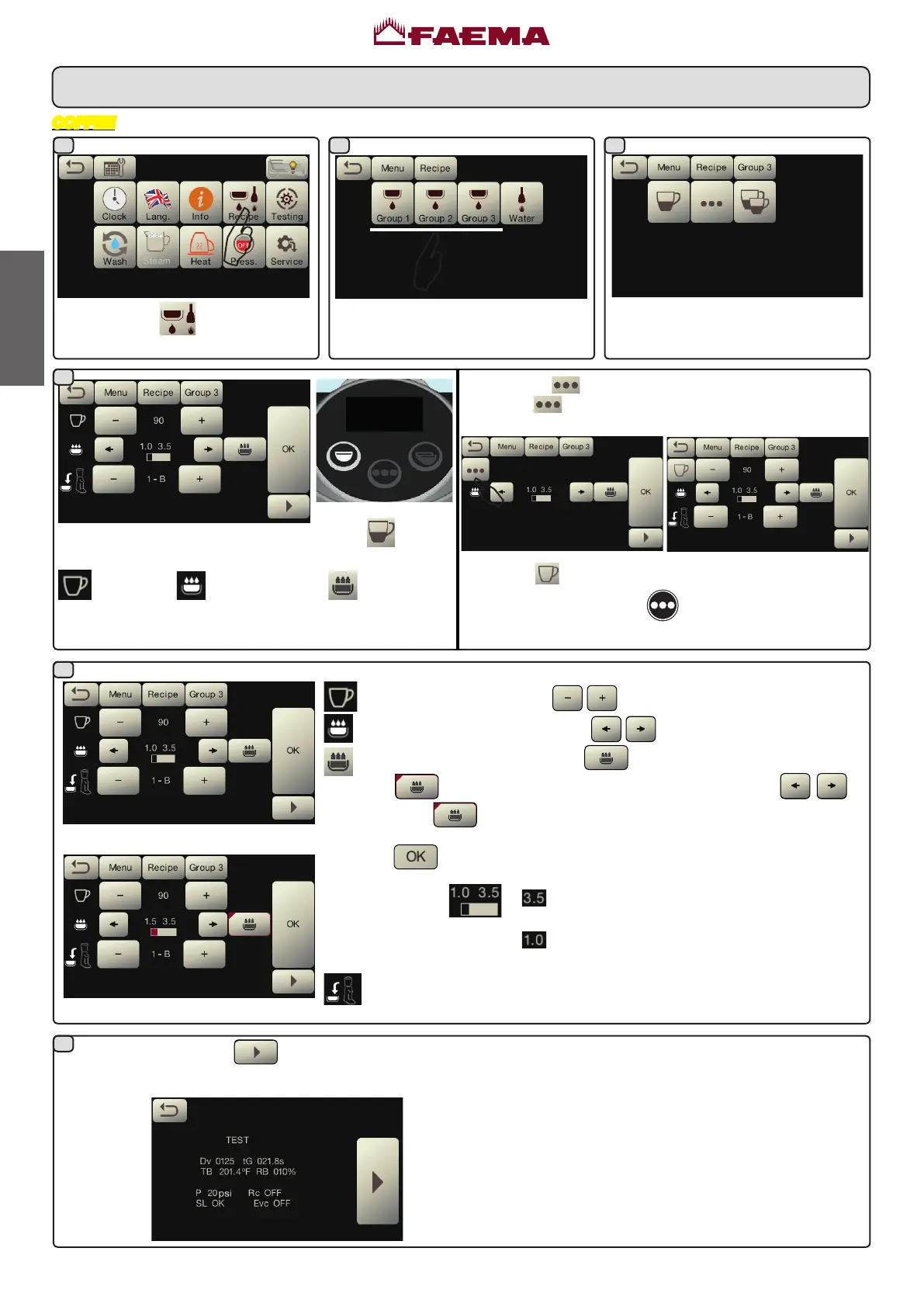
Presstheicon
.
Press one of the coffee keys(ex.
Group3).
Theiconsoftheprogrammablekeys
areshownontheservicesdisplay.
TEST.Bypressingthe key,thedispensingstarts
andthefollowingscreenappearsontheservicesdisplay:
Theparametersdisplayedare:
Dv:Volumetric meter incremental counter
tG:dispensing time
TB:instant coffee boiler temperature
RB:% activation coffee boiler resistance
P:service boiler pressure
Rc:serviceboiler resistance
SL:serviceboiler water level
Evc:serviceboiler load solenoid valve
Whenoneofthecoffeekeysispressed(e.g.the
key),the
followingparametersaredisplayedontheservicesdisplay:
Waterdose; pre-infusiontime; saturationtime.
The key in question will remain highlighted on the unit
display.
Alltheparameterscanbeadjustedbytheuser:
waterdose(usingthekeys );
pre-infusiontime(usingthekeys );
saturationtime(bypressingthe icon,thiswillturn
into
allowing the time tobe adjusted with the keys .
Pressthe
icontoexitthesettingsmenu).
Pressthe
icontoconrmtheinformationentered.
NOTE EXAMPLE
: showsthedurationinsecondsofthe
pre-infusionphase.
showsthedurationinsecondsofthe
saturationphase.
Grinder/dispenserselectedcanbeassociatedwitheachkeytype.
NOTE. THE keycanalsobeprogrammedasDOSED:
pressthe
iconontheparameterdisplayscreen:
Pressthe
icontoreturntoCONTINUOUSmode.
Theotherfunctionsofthe
keywillremainunchanged
inbothcongurations.
1 2
4
3
5
6



 To Next Page