English
34EN
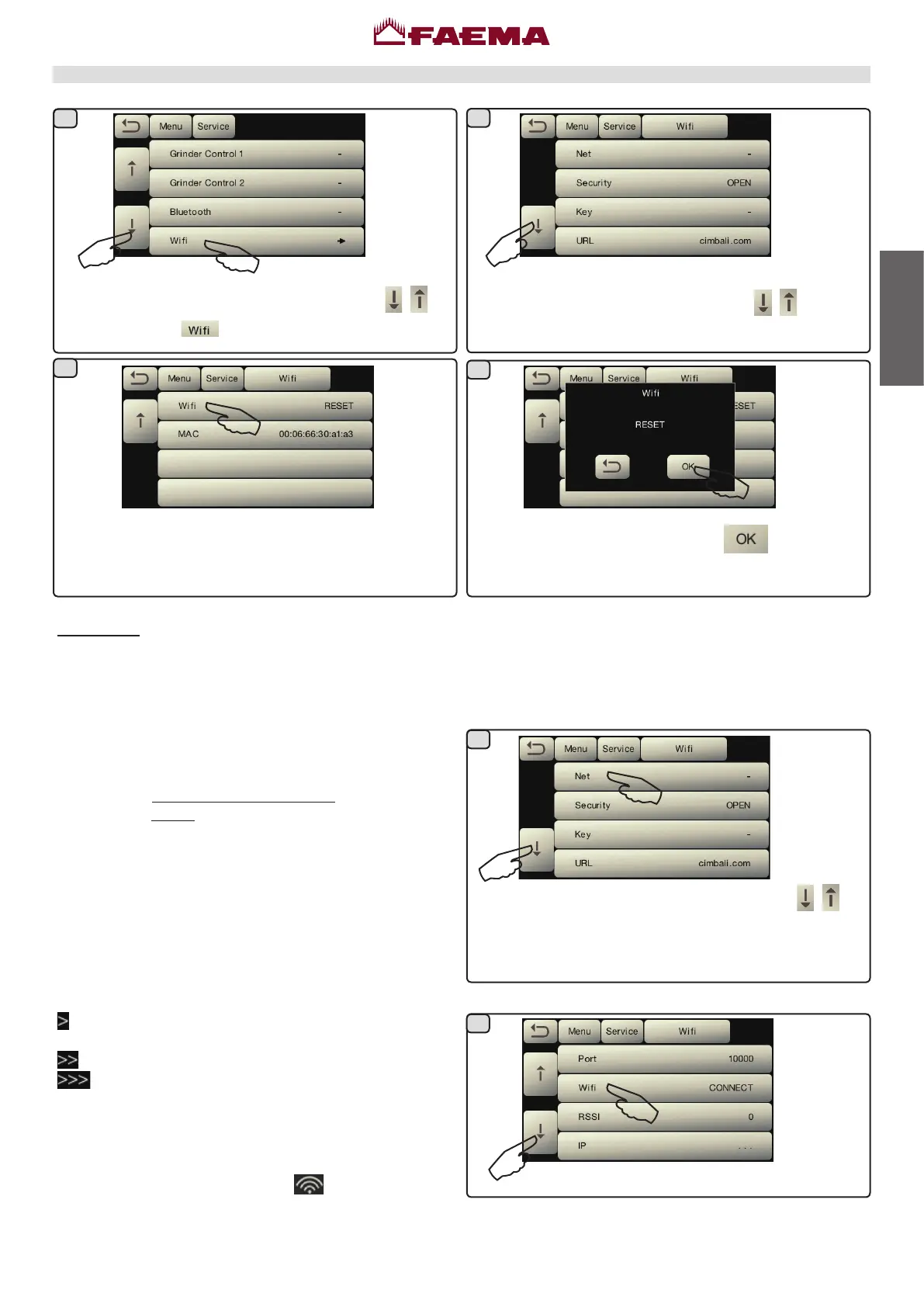
1)Theitemsarescrolledbypressingtheicons .
2)Presstheicon .
Scrollthroughtheitemsusingtheicons
.
Wi-Fi Menu - CongurethefollowingWi-Fiparametersas
shownbelow:
- NETWORK -enterthenameoftheaccesspoint.
- SECURITY -indicatethetypeofwirelessnetworksecurity:
- KEY -enterthepassword to accessaprotectedWi-Fi
network(WPAorWEP)
- URL - enter listener.gruppocimbali.com.
- Port - enter 10000.
- CONNECT - toconnecttotheaccesspointselected.
- RSSI - signalintensity:
- IP -displaystheIPaddressassignedtothemachineby
thewirelessaccesspoint.
- RESET - To restore the parameters to the standard
parameters.
- MAC -
representstheMacaddressoftheWiFimodule
present in the machine. It is a parameterthat is only
displayed,cannotbechanged.
- fTX - reducesdatatransmissiontotheremoteserver:
- transmits all data daily at machine startup, faults/
washingsperevent;
-level1plushourlycounts;
-level2pluspingsevery10min.(default).
Position the cursor on the item CONNECT to manually
connecttotheaccesspointselected;ifthecongurationof
theWiFimoduleiscorrect,theicon
lightsupduringthe
transmissionofthedatatotheserver:
Resettheparameterswiththeicon
-initialization
ofthestandarddata:
1)Theitemsarescrolledbypressingtheicons
.
2)Presstheiconsrequiredtoconguretheparameters.
WiFi conguration
TodeactivatethefunctionpressRESET.
1
2
3
5
6
4



 To Next Page