English
38EN
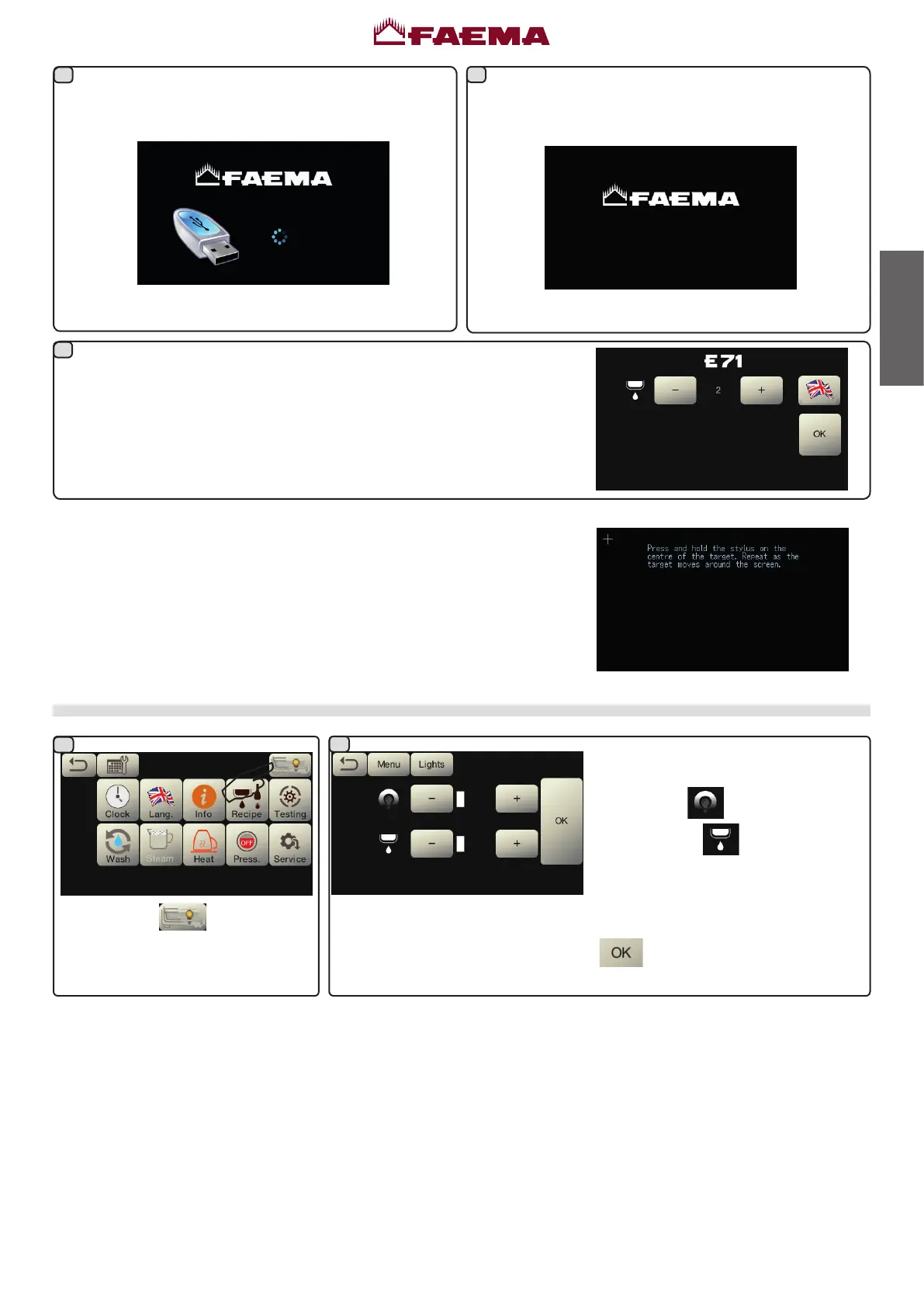
Lights
Presstheicon
.
This menu allows adjustment of the
machinelights.Specically:
- rear panel
- groups light
.
Setthevaluesusingthe"+"and"-"keys.
The changes will be applied after the
dataenteredisconrmedwiththekey
.
Inthenextstep,thedisplayupdatebegins.Thescreen
shownisdisplayedonallofthemachine’stouchscreens.
Whenthestatusindicatorreaches100%theupdate
iscompleteandthemachinerestartsautomatically.
Thefollowingmessageappearswhenrestarting:
RemovetheUSBPenDrive.
UPDATE COMPLETED
REMOVE USB
DISPLAY CALIBRATION
The calibration procedure can be performed at any time by starting the
machinewithDip3ON.
Thefollowingmessageappearsonallthedisplayswhenturnedon:
Usingapenholddownthecentreofthecross;repeattheoperationinallthe
pointswherethecrossappears.
Performthecalibrationonallthedisplaysoronlyonthosewhereitisrequired.
Attheendoftheoperation,turnoffthemachineandreturntheDip3toOFF.
Enterthestandardinformation,updatethemachinedataandreactivate
theresistance.
7
8
9
2
1
UPDATE SOFTWARE
0



 To Next Page