English
39EN
INSERT USB TO
UPDATE DISPLAY
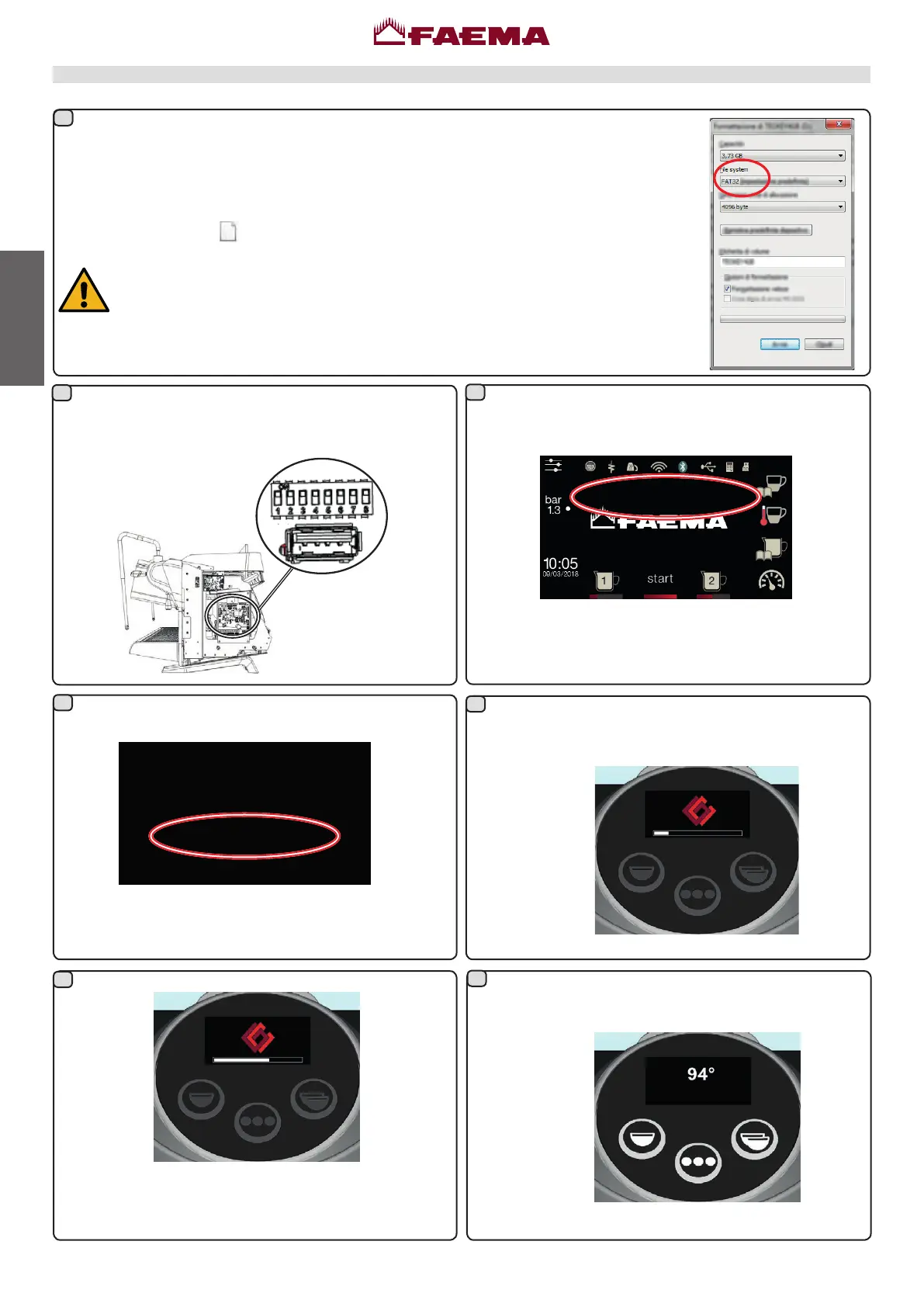
When the update is complete, the display
automatically restarts, and the following screen
appears:
RemovetheUSBdrive.
Donotturnthemachineoffduringtheupdate!
Turnthemachineonagain:
SwitchoffthemachineandremovetheUSBDrive.
Withthemachineon,inserttheUSBdrivecontaining
thesoftwareupdatetobeuploadedontothemachine.
PRELIMINARY OPERATIONS
FormataUSBdriveusingtheFAT32format.IfusingWindows,usethepredenedformatting
settingsasshownintheimage.
Copytheupdateles(
E71EGApp.hex)ontotheUSBdrive’smainpath.
NOTE:DonotturnoffthemachineorremovetheUSBDriveuntiltheupdatehasbeen
completed.IfusingaUSBdrivewithanoperatingLED,itwillashwhentheupdate
iscomplete.
Updating the coffee unit keyboard from a USB drive
Thenextstepstartstheupdateprocess.
Withthemachineon,inserttheUSBdrivecontainingthe
updatelesintotheUSBport.
Whenthefollowingmessageappears,supportles
havebeenidentied:
UPDATE
AVAILABLE
1
4
6
5
3
2
7



 To Next Page