English
24EN
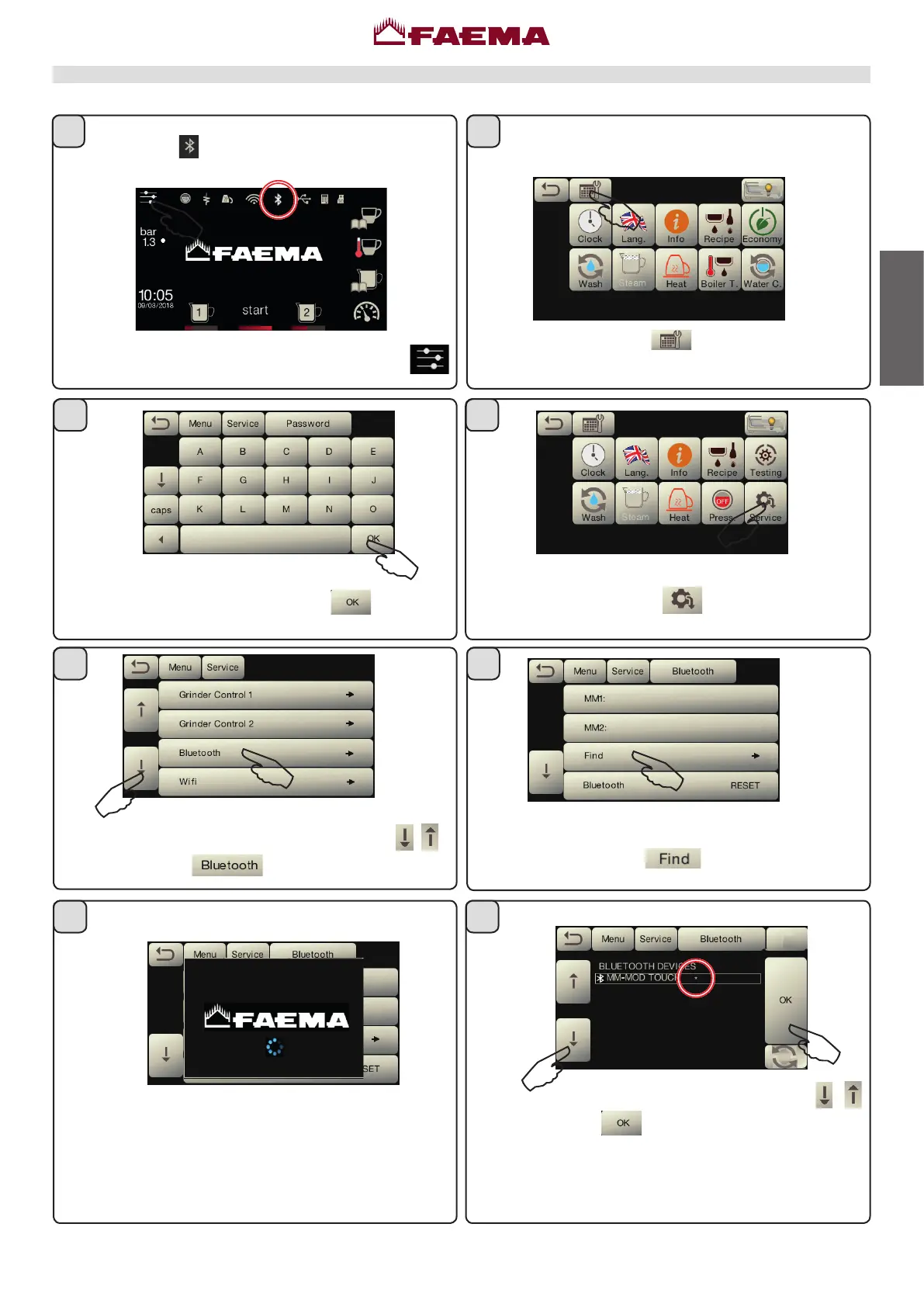
Procedure for Bluetooth connection with the machine-grinder unit
Presstheicon .
1)Theitemsarescrolledbypressingtheicons
.
2)Presstheicon
.
Presstheicon
.
Presstheicon
.
ToenterTECHNICALprogramming,presstheicon .
Typethepasswordandthenpress
.
1)The itemsarescrolled by pressingthe icons
2)Presstheicon
toconrmtheselecteddevice,
anasteriskwillappearnexttothelineofthegrinder/
dispensertoindicatethesuccessfulBluetoothassociation
withthemachine:
ThemachinewillndallBluetoothdeviceswithinarange
of 10 metres.
Find
Turnthemachineon;theinitialmenuappearsonthe
display.The
icon indicatesthatthemachinecan
belinkedtoaBluetoothdevice.
......
6
43
8
5
7
21



 To Next Page