65
Traffic-Control
EN
Program 8
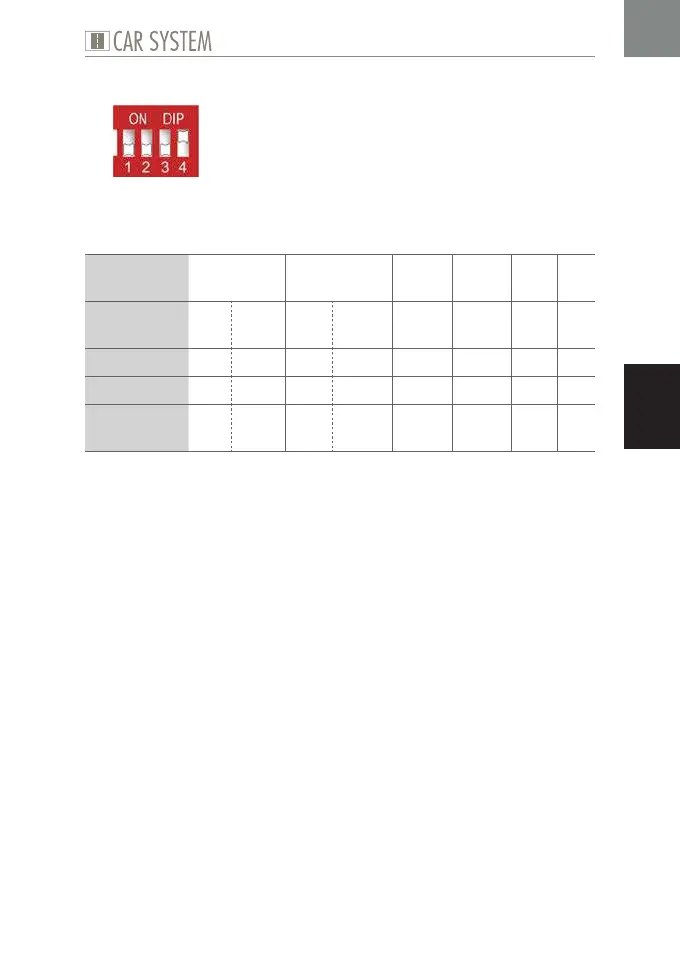
Fig. 13: DIP configuration Program 8
This program allows to control two diagonal parking bays and four further
outputs via a given period of time and the corresponding input.
Possible use Parking
bay 1
Parking
bay 2
X 1 X 2 X 3 X 4
Sensor/But-
ton at input
E1 E2 E3 E4 E5 E6 E7 E8
activates AB P/FR AB P/FR K K K K
at output A1 A2 A3 A4 A5 A6 A7 A8
for the
period of
1 s 2 s 1 s 2 s Poti 1 Poti 2 10 s 15 s
Table 13: Program 8
X
Set the DIP as required, see Fig. 13.
X
Connect the components, see Table 13.
X
Set the desired period using the potentiometers.
ADVICE: Please also take into consideration the schematic illustration »Dia-
gonal parking spaces« in the appendix to the present instruction manual.


 To Next Page