52
Quick Play:
Drum Kits and Voices
An acoustic drum has only a fi xed kit, but the digital has a lot. It
is a particular characteristic of digital drum.
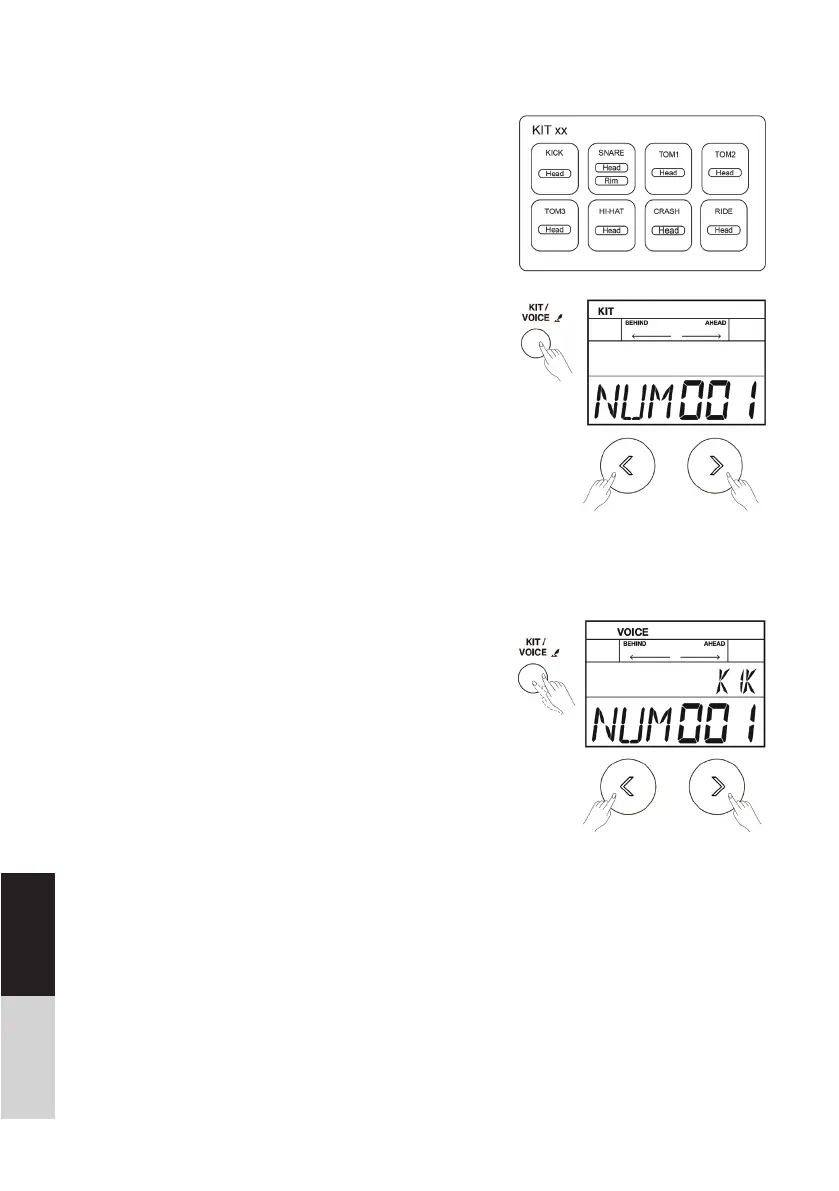
The structure of a drum kit is shown on the right:
1. Shortly press the [KIT/ VOICE] button, enter the drum kit
menu. The screen is shown on the right:
2. Press the []/[] button or turn the [DIAL] to select your
desired drum kit. (Refer to Drum Kit List)
Selecting a Voice:
While striking the pads, you can enjoy the ensemble sound
effect. If you are not satisfi ed with the voice of any pads, change
the voice as you want.
1. Press the [KIT/ VOICE] button for 2 seconds to enter the
voice menu. The screen displayed is shown on the right:
2. Strike the pad you want. The screen will display the name
of current pad.
3. While striking the pad, press the []/[] button or turn the
[DIAL] until you get an appropriate voice for your pads.
(Refer to Voice List)
DEUTSCHENGLISH



 To Next Page