60
DEUTSCHENGLISH
5. Press the [ST/SP] button to start practicing. There
will play a length of one measure count-in before
starting. This system automatic change the style
every two measures. In addition to, the next
rhythm will fl ash for times on the LCD when the
rhythm type is ready to change.
6. If the score setting is “ON”: Auto stops practicing
and displays your score after circularly playing
several times. Or, Press the [ST/ SP] button to stop
practicing and back to the main page of change up
without display your score. If the score setting is
“OFF”: Press the [ST/SP] button to stop the
practicing mode.
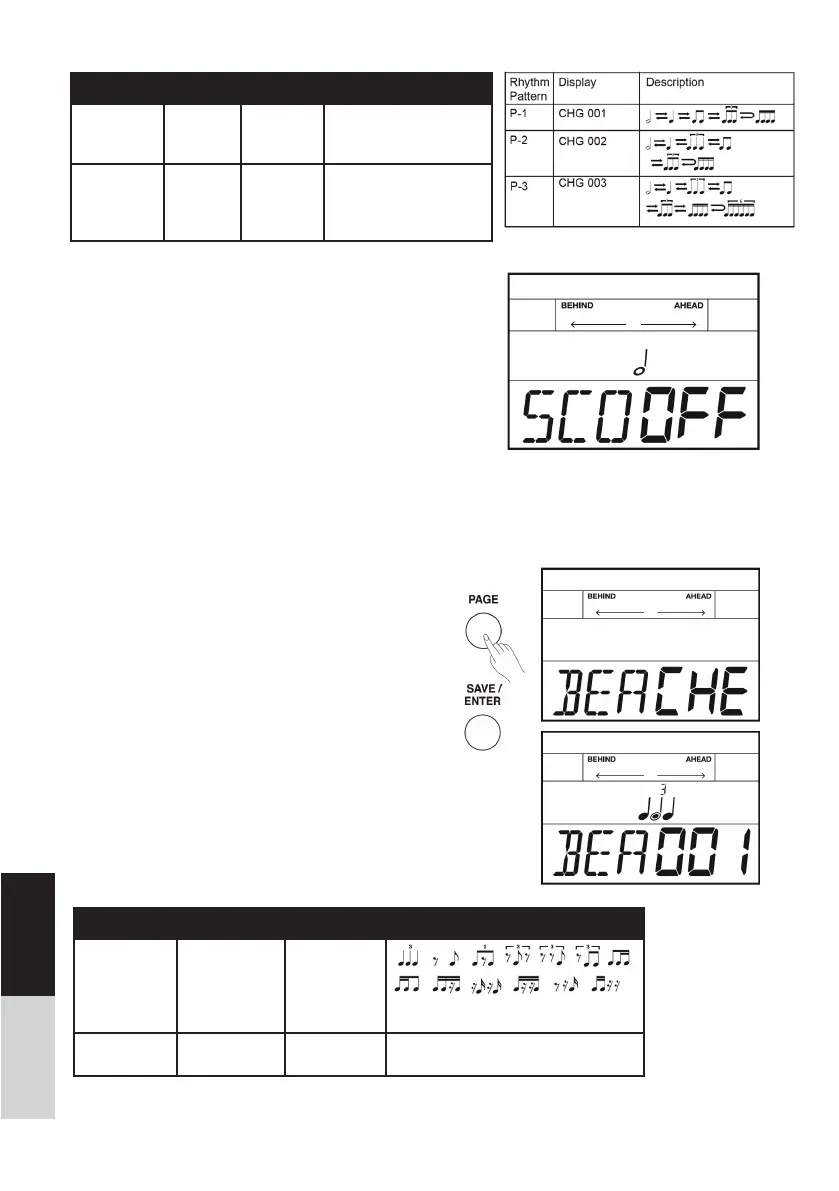
Beat Check
In order to improve playing accuracy of beat, practice
with the metronome basic beat type. If the score func-
tion is on, system will display your practicing score after
you have fi nished.
1. Repeatedly press the [PAGE] button to select beat
check mode.
2. Press the [SAVE/ ENTER] button to enter beat
check mode.
3. Use the []/[] button or turn the [DIAL] to select
a beat type to practice. There are 13 beat types to
choose from.
4. Use the [PAGE] button to switch to score editing,
press the []/[] button or turn the [DIAL] to turn
score function on/ off. The default score setting is
“OFF”.
Change Up Range Display Description
CHG 1~3 CHG XXX
Use the []/[] button or
turn the [DIAL] to select a
suitable rhythm type.
SCO ON / OFF SCO XXX ON: The score setting
is on.
OFF: The score setting
is off.
Beat Check Range Display Description
BEA 1-13 BEA XXX
Use the []/[] button or turn the
[DIAL] to select a suitable beat type.
SCO ON / OFF SCO XXX ON: The score setting is on.
OFF: The score setting is off.



 To Next Page