55
DEUTSCH ENGLISH
Save User Drum Kit
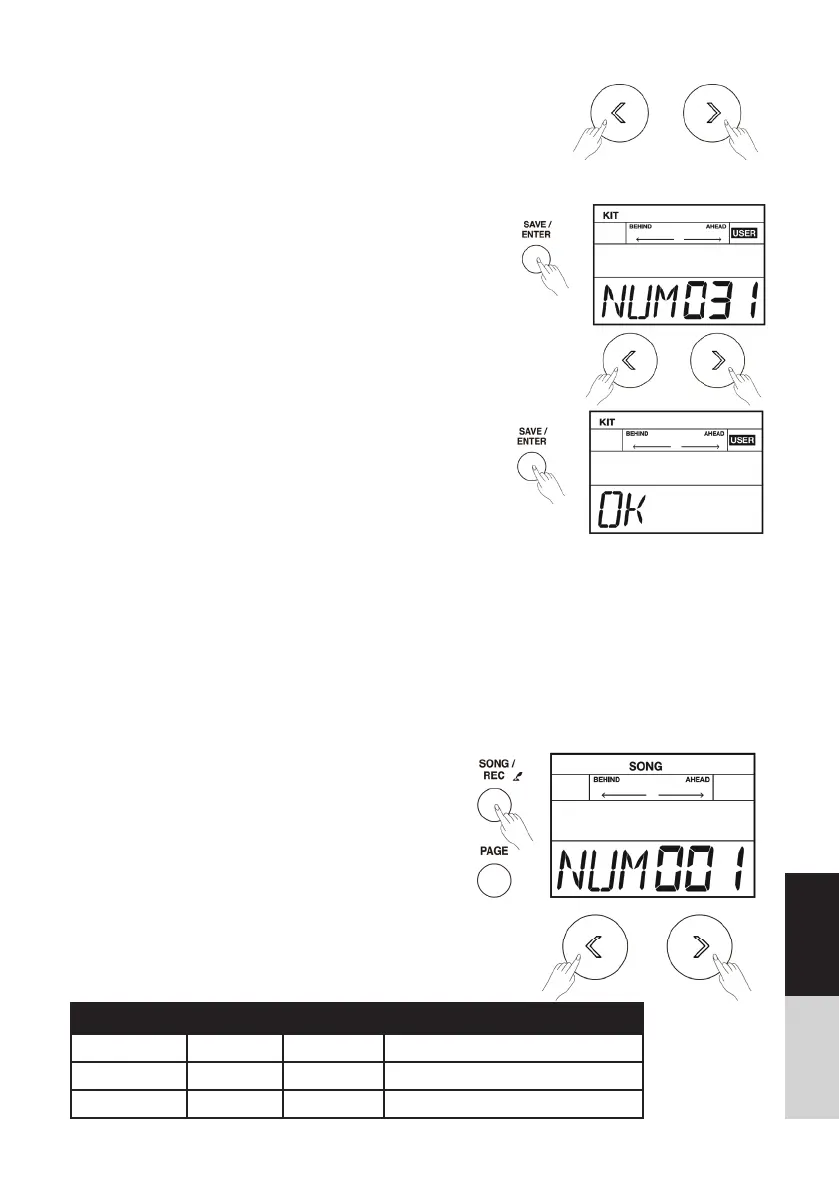
1. While in the drum kit and voice edit menu, press the
[SAVE/ ENTER] button to save all changes.
2. Use the []/[] button or turn the [DIAL] to select a user
drum kit (From NO.31 to 40). The number of kit starts
fl ashing at the same time.
3. Press the [SAVE/ ENTER] button again; the LCD will display
“OK”, which indicates all data has been saved successfully.
4. Press the []/[] button or turn the [DIAL] to adjust
parameter value.
Playing Along with a Song
In order to have a better performance experience, a variety of styles can be selected. Each one offers
you to practice. (Refer to the Song List) You can play the drums while listening to one of these songs.
A song contains Drum part and Accompaniment part. Drum part means the rhythm you played on
the pads; the Accompaniment part means percussion and melody. The volume of each part can be
adjusted.
Playing Along with a Song
1. Press the [SONG] button to enter the selection
menu.
2. Repeatedly press the [PAGE] button to select the
parameter that you want to edit.
Parameter Value LCD Display Description
SONG SELECT 1~85 NUM XXX Select a song.
ACC VOLUME 0~8 ACC XXX Adjust the background volume.
DRUM VOLUME 0~8 DRM XXX Adjust the drum volume.



 To Next Page