57
DEUTSCH ENGLISH
Preparing Record
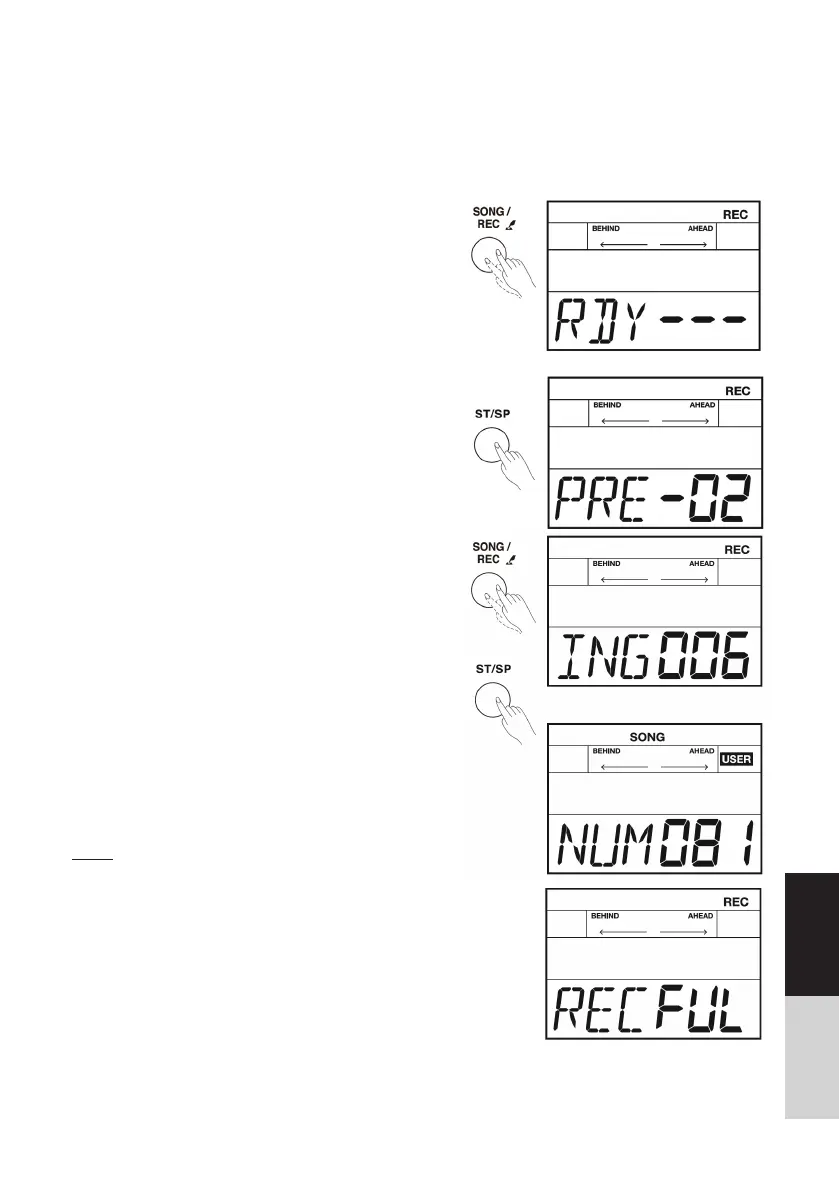
1. Press the [SONG/REC] button for 2 seconds to
enter the Recordprepare mode, the light of the
[SONG/REC] button start fl ashing, please select
which user songs(81-85) you want to record.
2. Press the [ST/SP] button, the LCD displays
“RDY---”. It means the record is standby. If you
want to exit the record-prepare mode, press the
[SONG]/ [KIT] button.
Start / Stop Recording
1. You can start recording in real time while in the
preparing record menu, there are two ways to
start record:
• Press the [ST/SP] button.
• Strike one pad.
2. Recoding begins after 4 beats count-in.
3. While recording, the light of the [SONG/REC]
button keeps lighting all the time, and the LCD
will display “ING xxx”, the “xxx” means measure
number.
4. Press the [ST/SP] button again to stop recording,
and the light of the [SONG/REC] button will be
off.
5. The system returns to the last option automatical-
ly. The LCD will display “NUM 81~85”. Press the
[ST/SP] button to play back the recorded song.
Note:
While the record storage capacity is full, the LCD will
temporarily display “REC FUL”, the recording stops
automatically. The UserKitxx shouldn‘t be changed if
you use it to record, otherwise the record playback may
not be correct.
Record
This digital drum offers you easily record your own performance. Maximize 2500 notes could be
recorded in one user song.
Preparing and starting record, refer to the details bellow:



 To Next Page