63
DEUTSCH ENGLISH
3. Striking the specifi ed pad, select the pad that you
want to edit.
4. Use the []/[] button or the [DIAL] to adjust the
parameter value.
Note:
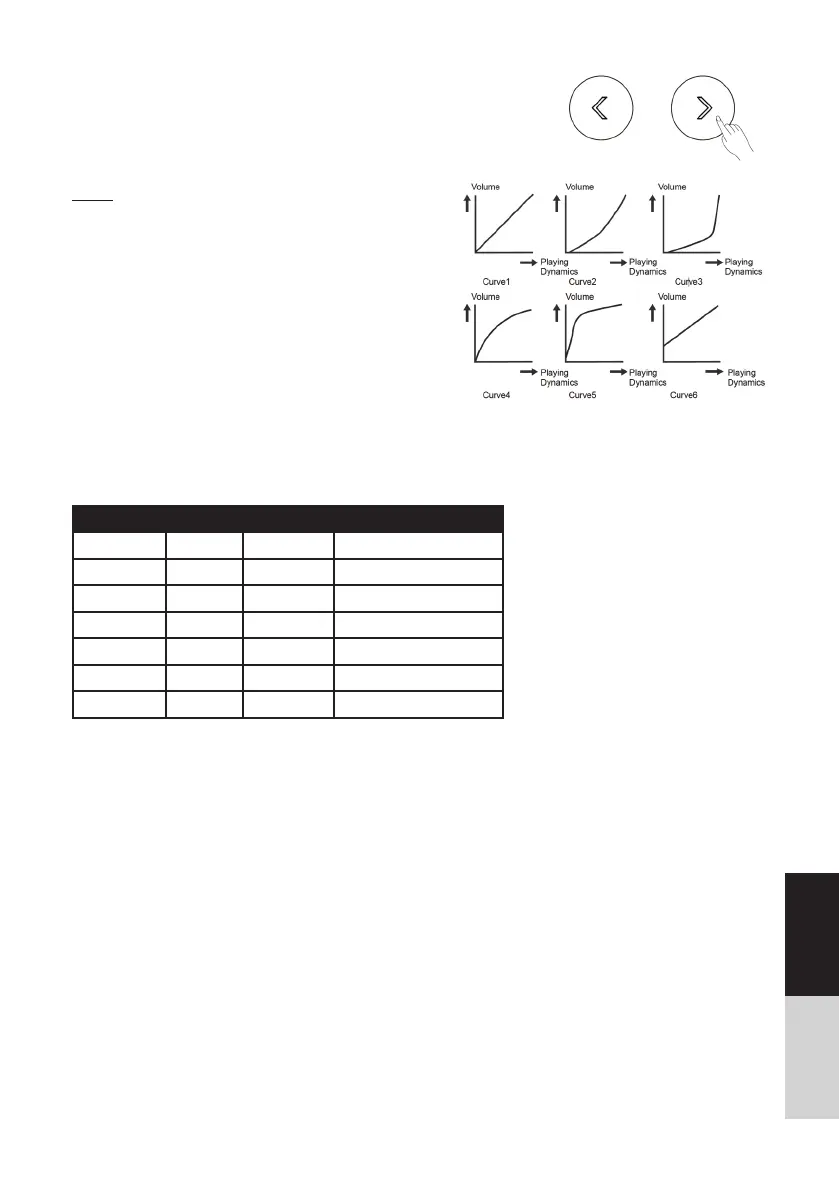
The Curve descriptions are shown below:
Curve 1: The standard setting. This produces the most
natural correspondence between playing dynamics and
volume change.
Curve 2, 3: Compared to Curve 1, strong dynamics
produce a greater
change.
Curve 4, 5: Compared to Curve 1, a soft playing pro-
duces a greater change.
Curve 6: Very little dynamic response, making it easy to
maintain strong volume levels. If you are using a drum
trigger as an external pad, these settings will produce
reliable triggering.
Default Midi Note:
Trigger MIDI Trigger MIDI
Kick 36 Ride Bow 51
Snare Head 38 Crash1 Bow 49
Snare Rim 40 Crash2 Bow 57
Tom1 Head 48 Open Hihat 46
Tom2 Head 45 Close Hihat 42
Tom3 Head 43 Pedal 44
Tom4 Head 41 Hihat Splash 21



 To Next Page