EasyManua.ls Logo

Fanimation PYLON LP8277 Series - User Manual

Fanimation PYLON LP8277 Series
38 pages
Print Icon
To Next Page IconTo Next Page
Loading...
Questions, problems, missing parts? Before returning to your retailer, call our customer
service department at 1-888-567-2055, 8 a.m.-5 p.m., EST, Monday-Friday.
Date Code
Purchase Date
ATTACH YOUR RECEIPT HERE AND REGISTER YOUR FAN AT FANIMATION.COM
READ AND SAVE THESE INSTRUCTIONS
For best and quick service please provide date code. You can find the date code on the Carton,
Handheld Remote (inside of the battery compartment), Receiver or top of Fan Housing.
Net Weight 14.33 lbs (6.50 kgs)
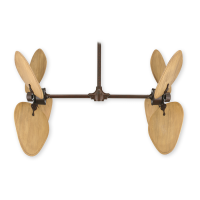
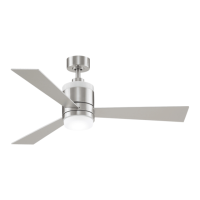
PYLON CEILING FAN
MODEL #
LP8277**
Español p. 20

Questions and Answers

  • A
    Anthony JohnsonAug 4, 2025
    What to do if my Fanimation Fan will not start?
    • G
      Gary WeeksAug 5, 2025
      If your Fanimation Fan won't start, there are several things to check: 1. Make sure that the fuse or circuit breaker hasn't blown. Check both the main and branch circuit fuses or circuit breakers. 2. Inspect the power line connections to the fan and the switch wire connections in the switch housings. Ensure they are secure. Remember to turn off the main power before checking! 3. If you're using a remote control, the battery might be dead. Try replacing it with a new one. 4. The reverse switch might be in a neutral position. Ensure it's fully to one side.
  • V
    vlawsonAug 14, 2025
    Why is my Fanimation PYLON LP8277 Fan so noisy?
    • K
      Kristen BellAug 14, 2025
      If your Fanimation Fan is making excessive noise, here's what you can do: 1. Ensure the blades are properly attached to the fan. 2. Check all screws in the motor housing to make sure they are snug (but not over-tightened). 3. Examine the wire connectors inside the switch housing to ensure they are not rattling against each other or the housing's interior wall. Be sure to turn off the main power before checking! 4. The noise might be due to a solid-state variable speed control. These controls are not recommended, so consider an alternative control method.
  • T
    Tyler JonesAug 23, 2025
    How to fix a Fanimation PYLON LP8277 that wobbles a lot?
    • R
      Richard LiuAug 25, 2025
      If your Fanimation Fan wobbles excessively, check the following: 1. Tighten both setscrews and nuts securely in the downrod support. 2. Ensure the setscrew in the downrod/hanger ball assembly is tightened. 3. Verify that the screws securing the fan blade to the motor hub are tight. 4. Make sure the hanger bracket screws are tightened to the outlet box, and that the outlet box itself is secure.

Summary

General Safety Instructions

Important Safety Guidelines

Critical guidelines to prevent fire, shock, and personal injury during fan installation and use.

Installation Safety Precautions

Further safety precautions, electrical codes, grounding, and installation requirements for safe operation.

Limited Lifetime Warranty Details

Assembly Preparation

Tools and Materials List

Lists necessary tools and components for assembling the ceiling fan.

Unpacking and Parts Check

Guides users through checking all parts before starting assembly.

Energy Efficient Fan Usage

Optimal Mounting Location

Recommends optimal placement of the fan for airflow and safety.

Seasonal Operation Modes

Explains how to use the fan for cooling in summer and warming in winter.

Electrical and Structural Requirements

Electrical Requirements Continued

Ceiling Fan Assembly - Core Components

Downrod and Hanger Ball Setup

Details attaching the downrod, hanger ball, and securing them to the motor assembly.

Motor and Wire Preparation

Covers removing stabilizer tabs and routing wires through the downrod.

Ceiling Fan Assembly - Canopy and Bracket

Wire Routing and Hanger Ball Securement

Guides on routing wires through the canopy and reinstalling the hanger ball securely.

Hanger Bracket Preparation

Instructions for loosening and removing screws on the hanger bracket for installation.

Hanging the Ceiling Fan

Bracket to Outlet Box Mounting

Securing the hanger bracket to the outlet box and ensuring proper anchorage.

Hanger Ball Seating Procedure

Correctly placing the hanger ball onto the bracket, aligning the groove with the tab.

Ceiling Fan Wiring Instructions

Remote Receiver Code Setup

Explains how to set the DIP switches on the receiver and remote for code synchronization.

Wire Connections to Receiver

Guides on connecting wires from the receiver to the fan motor, light, and household supply.

Canopy Housing and Blade Installation

Canopy Housing Securement

Installing the canopy housing and securing it over the ceiling bracket.

Fan Blade Attachment

Steps for attaching the fan blades to the motor assembly using screws and washers.

Light Kit or Steel Cap Assembly

Light Kit Mounting

Mounting the light kit and light kit wire cover to the motor support bracket.

LED or Steel Cap Connection

Connecting the LED assembly or attaching the steel cap to the light kit.

Light Kit Assembly Completion

Fan Operation Basics

Dimmer Switch Usage Warning

Warns against using full range dimmer switches to control fan speed to prevent damage.

Fan Operation with Remote

Remote Transmitter Setup and Code

Installing the battery and setting the remote's code combination with the receiver.

Remote Control Features

Explains fan speed control, light operation, and sleep timer features via the remote.

Fan Direction Adjustment

How to adjust the fan's rotation direction for summer or winter use.

Remote Control Wall Mount

Fan Maintenance and Cleaning

Ceiling Fan Blade Care

Recommends using a soft cloth or feather duster for cleaning blades to prevent damage.

Troubleshooting Common Issues

Fan Fails to Start

Addresses issues like blown fuses, loose wiring, dead batteries, or incorrect reverse switch position.

Resolving Fan Noise

Solutions for noisy fans, including loose screws, rattling connectors, or motor noise.

Wobble and Airflow Solutions

Fixes for excessive wobbling and insufficient air movement, such as tightening screws or using a longer downrod.

Ceiling Fan Parts List

Exploded View of Fan Components

Fanimation PYLON LP8277 Series Specifications

General IconGeneral
CategoryFan
ModelPYLON LP8277 Series
LocationIndoor
TypeCeiling Fan
ReversibleYes
Blade MaterialWood
Light Kit IncludedNo
Blade Sweep52 inches
FinishBrushed Nickel
WarrantyLifetime Motor Warranty

Related product manuals