EasyManua.ls Logo

Fanvil C600 - Pppoe

Fanvil C600
104 pages
Print Icon
To Next Page IconTo Next Page
To Previous Page IconTo Previous Page
Loading...
SecondaryDNS:InputyourassignedAlertDNS
serveraddress.
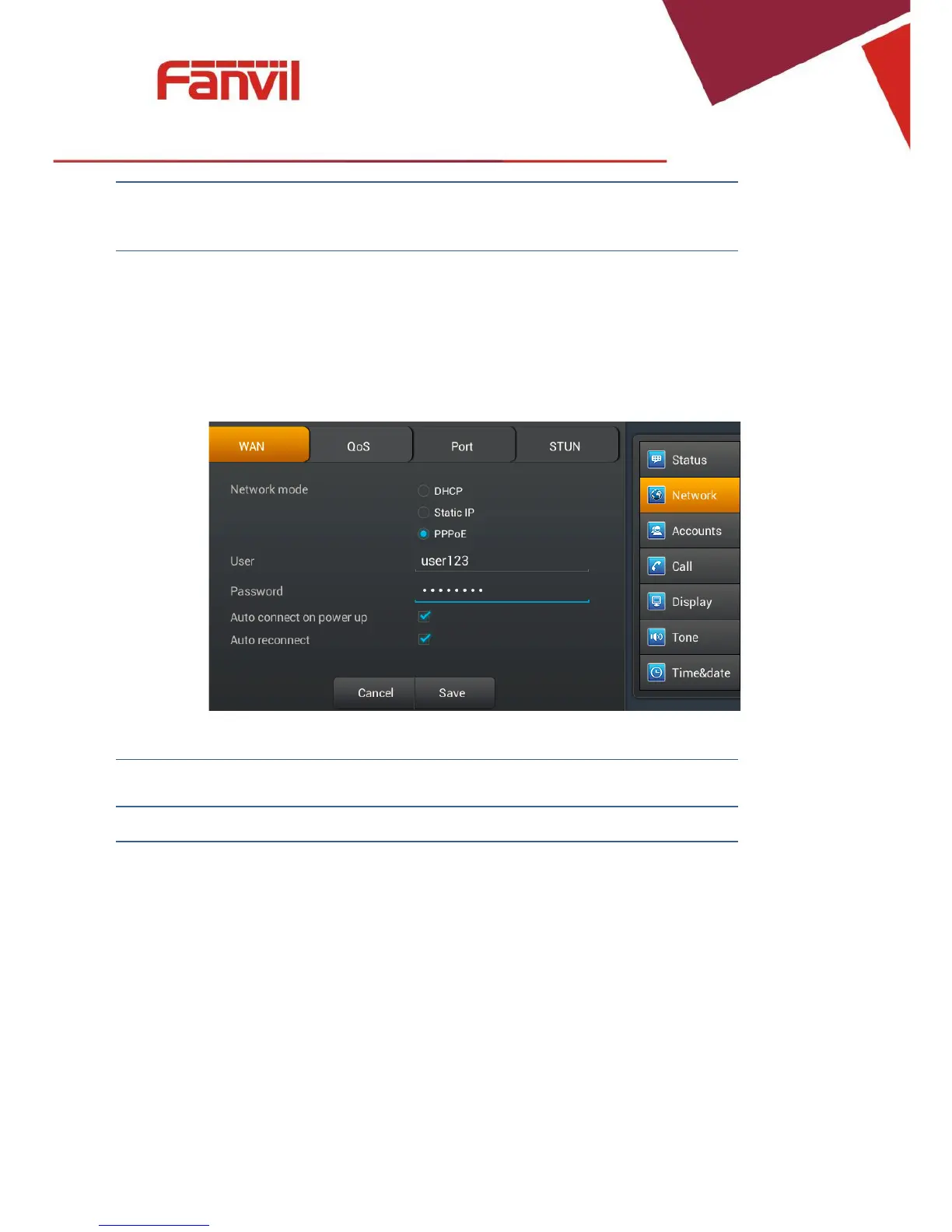
PPPoE
Tap "Network" > "PPPoE". After configuring the parameters, you can click "Save" button
tosave.
PPPoEinterface
Configuration
Meaning
PPPoE
User:InputyourassignedPPPoEUsername.
FanvilTechnologyCo.,Ltd
HQAdd:Level3,BlockA,GaoxinqiBuilding,AnhuaIndustrialPark,Qianjin1Road,35thDistrict,Bao'An,Shenzhen,518101P.R.
China
Tel:+8675526402199Fax:+8675526402618Email:fanvil@fanvil.comwww.fanvil.comBeijingTel:+861057536809
SuzhouTel:+8651265920605SEATel:+60320350737

Other manuals for Fanvil C600

Related product manuals