Fasep 2000 srl Rev. 1.8
Balatron 222/212: User’s Manual 23 January 2020
5-4
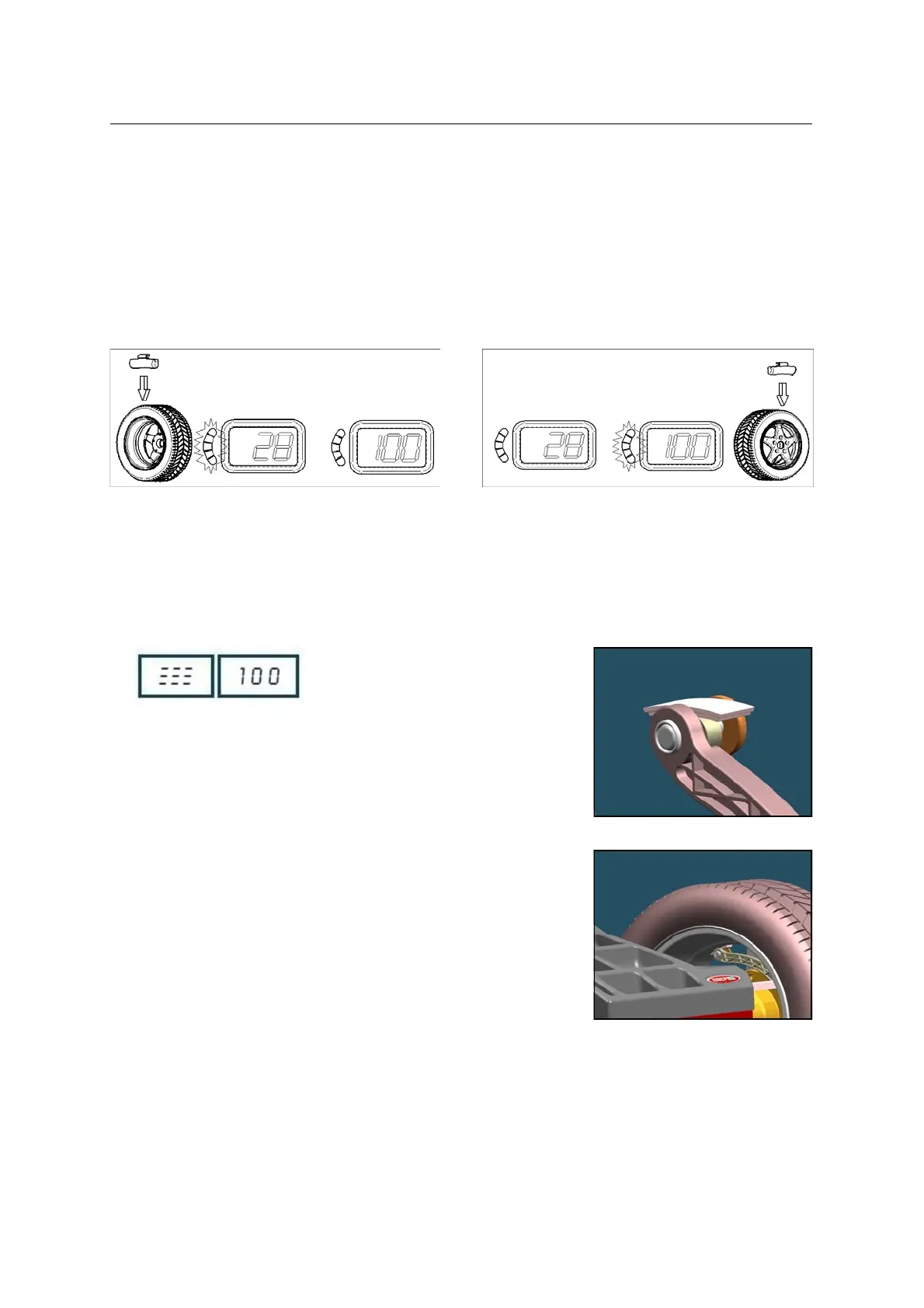
FIG. 34: inside weight indication
FIG. 35: outside weight indication
FIG. 37
FIG. 38
5.4 Detecting and correcting unbalance
5.4.1 After setting wheel dimensions, press <START> or close the safety cover (optional) to spin the wheel and start the
measurement run.
! CAUTION Wheel start automatically when safety cover is closed.
5.4.2 At the end of the spin the wheel will brake automatically and the display will show the weight position and weight
requirement to correct the wheel’s unbalance.
5.4.3 If unbalance shown is GOOD, press 10 <FINE> to show residual unbalance.
NOTE OPT light blinking after the measurement indicates that static unbalance is exceeding more than 20grs.
Optimization procedure is suggested.
5.5 How to apply the weight using ALU-SE indicator
Place the weight (Fig. 37).
Turn the wheel to the position ( Fig. 34,
Fig. 35).
Move the rod until
/// appears on the
display ( picture on the left).
Apply the weight ( Fig. 38).



 To Next Page