13 / 92FAVERO ELECTRONICS - 0259-1060 - FA-15 User Manual - Rev03
ENGLISH
Powering with a POWER BANK (accessory)
FA-15 can be powered using the POWER BANK accessory (art. 268-20). It is also possible to use an
alternative non-Favero Electronics POWER BANK with the following specications:
• USB-out port: current ≥ 2A
• max. dimensions: 130 x 80 x 25 mm (if you want to install it on the back of the FA-15).
For installation:
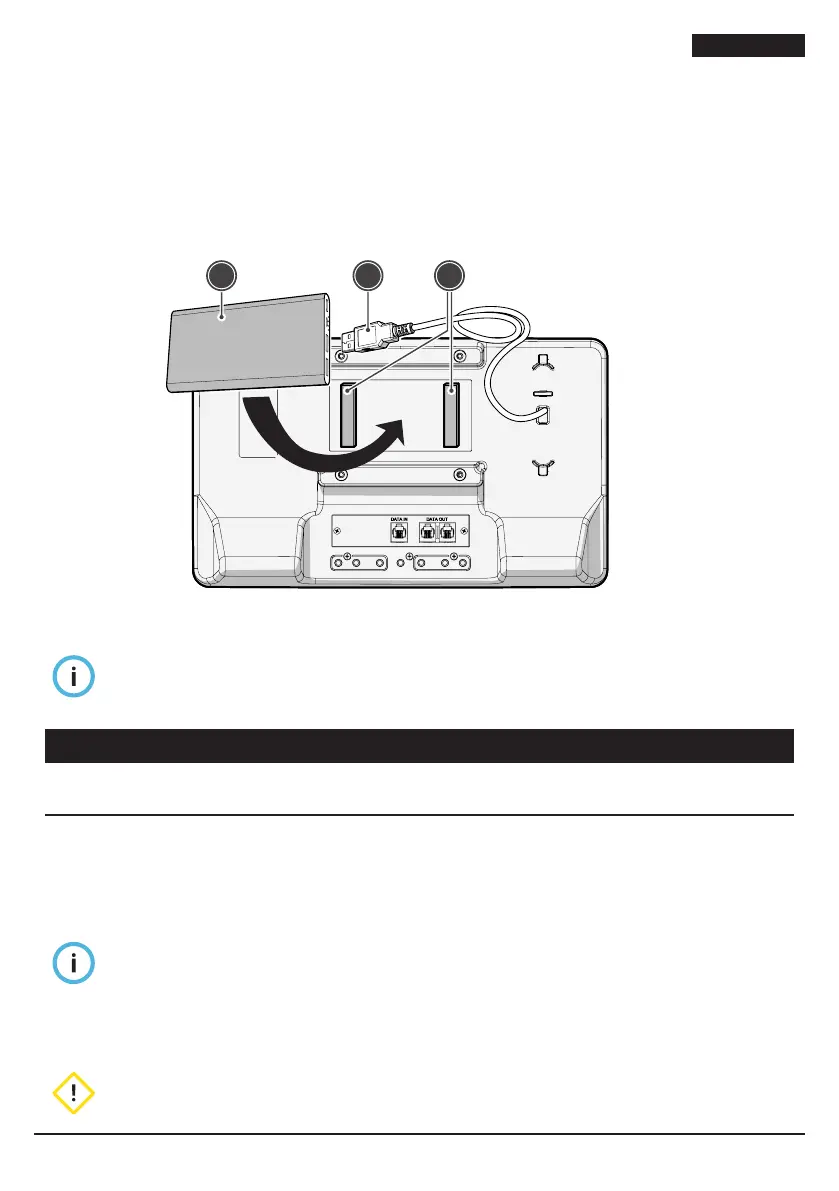
1. apply the VELCRO® (1) provided to the POWER BANK (2) and to the rear of the FA-15 device,
leaving it for at least 24 hours before applying one to the other;
2. connect the USB power cable (3), installed on the back of the FA-15 panel, to the POWER BANK
(
2
)
.
2 3 1
Fig. 5
Powering with a power bank
When the FA-15 device is switched off, power consumption is minimal and the POWER BANK
may switch itself off. To reactivate it, simply press the button on the POWER BANK.
Disconnect the POWER BANK from the FA-15 device when it is not in use.
3. USE
3.1. Turning on and off
To turn the FA-15 device on/off:
• press the [ON/OFF] key on the remote control or on the app
or
• press the [REMOTE] button on the front of the FA-15 panel to switch it on, or hold the button for 5
seconds to switch it off.
Note
• When switched on, the display with present the message “txx”, where “xx” indicates the
rmware version for which a card attached to the device indicates compliance with FIE
regulations.
• Switching off is indicated by a red LED status light (“Fig. 1” on page 6). When switched off
(stand-by), radio communication remains active.
WARNING
If it is necessary to switch off the device for long periods, remove the power supply unit from
the power socket.



 To Next Page