15 / 92FAVERO ELECTRONICS - 0259-1060 - FA-15 User Manual - Rev03
ENGLISH
3.3. Devices in MASTER - SLAVE mode
FA-15, congured as MASTER, can communicate with other FA-15 devices congured as SLAVE and
performing a “repeater” function for the information on the FA-15 MASTER panel.
Connections between different devices can be cabled or wireless.
Note
• Cable connections have priority over wireless connections.
• An FA-15 device, congured as SLAVE, is managed entirely by the FA-15 congured as
MASTER connected to it (cabled or wireless). Any remote control or app associated with
the SLAVE device will have limited functionality.
• The weapons must always be connected to the FA-15 device congured as MASTER.
CABLE connection
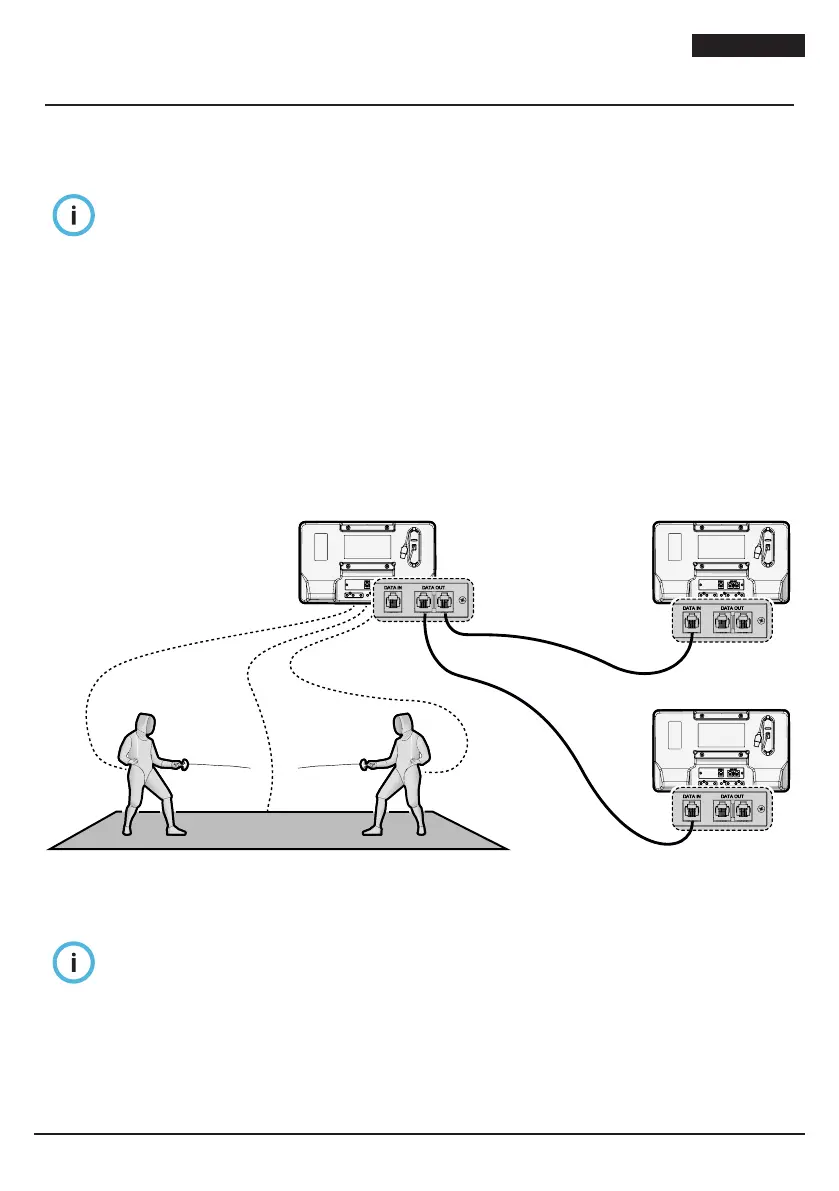
FA-15 is equipped with two “DATA OUT” outputs and one “DATA IN” input for cable connections
between the various devices. 4-way telephone cables with RJ-14 connectors are used.
The cable must leave one of the “DATA OUT” sockets on the MASTER device (transmitter) and feed into
the “DATA IN” connector of the SLAVE device (repeater).
With this set-up, each MASTER device can have up to two SLAVE devices connected to it. It is possible
however, using the special RJ14 splitters, to double each cable, allowing connection of up to four SLAVE
devices.
When the cable is connected, the SLAVE display (repeater) shows the message “CA SL”.
MASTER
FA-15
SLAVE 1
FA-15
SLAVE 2
DATA IN
DATA IN
DATA OUT
Fig. 6
Devices in MASTER - SLAVE mode with CABLE connection
Note
• When the cable is disconnected, the SLAVE devices return automatically to standard
operation (stand-alone).
• Max length of cables is 60 m.
• Operation with cable connection is compatible with products FA-15, FA-05, and FA-07.


 To Next Page