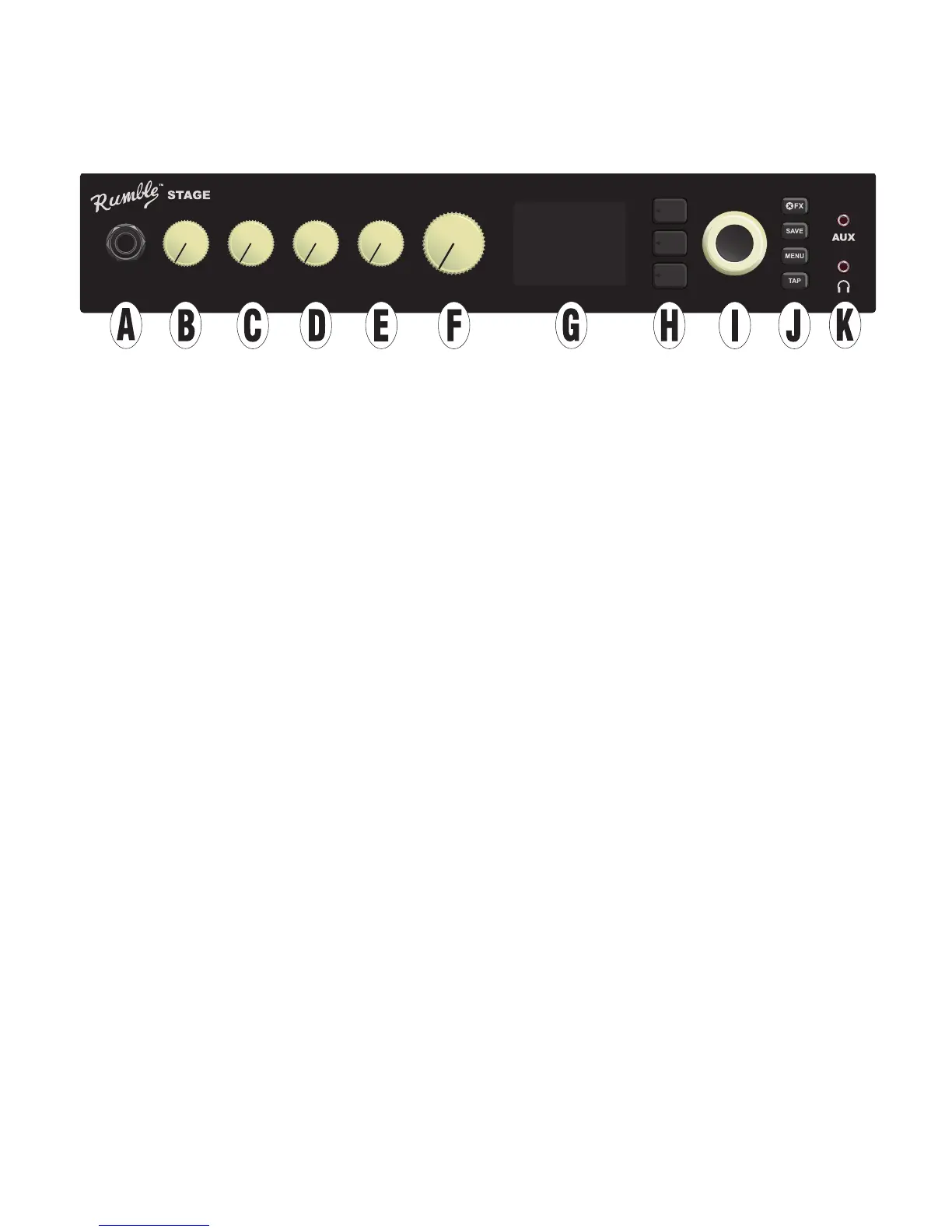
CONTROL PANEL
The Rumble Studio 40/Stage 800 top control panel consists of an instrument input, ve control knobs, a DIS-
PLAY WINDOW, three LAYER pushbuttons, an ENCODER wheel, four UTILITY pushbuttons, an auxiliary input
(1/8”) and a headphone output (1/8”).
A. INPUT: Plug instrument in here.
B. GAIN: Programmable control knob (see page 3) that aects gain setting in each preset.
C. BASS: Programmable control knob that aects bass tone setting in each preset.
D. MIDDLE: Programmable control knob that aects midrange tone setting in each preset.
E. TREBLE: Programmable control knob that aects treble tone setting in each preset.
F. MASTER VOLUME: The only non-programmable knob; controls actual overall output level to the speak-
er(s) and headphone jack.
G. DISPLAY WINDOW: Shows preset in use and all its contents and parameters, amplier and eects
menus, and other functions (i.e., tuner, menu functions, etc.).
H. LAYER BUTTONS
PRESET LAYER: Highlights preset layer, where presets are chosen.
SIGNAL PATH LAYER: Highlights signal path in each preset, where amp models, eects types and order
of eects can be modied.
CONTROLS LAYER: Highlights controls layer, where control knob settings can be modied (except Mas-
ter Volume).
I. ENCODER: Multipurpose rotary control with press-switch function. For viewing, selecting and adjusting
Rumble Studio 40/Stage 800 presets, controls and other functions.
J. UTILITY BUTTONS
X FX: Bypasses all eects.
SAVE: For saving preset modications and new presets.
MENU: For accessing WiFi, Bluetooth, Tuner, Global EQ, cloud presets and other functions (see page 33).
TAP: For setting delay times and modulation rate settings; hold to access built-in tuner.
K. AUXILIARY INPUT, HEADPHONE OUTPUT: 1/8” auxiliary input for connecting external audio devices,
and 1/8” output for headphone use. Headphone output disables internal speaker(s).
2
INPUT GAIN BASS TREBLEMIDDLE MASTER
800















 To Next Page