When the MGT-4 Footswitch is in Presets mode and Rumble Studio 40/Stage 800 is in Setlist mode, the MGT-
4 Footswitch can be used to select presets within a given Setlist.
Thus congured, the rst three presets within a Setlist are assigned to MGT-4 Footswitch FUNCTION buttons
1, 2 and 3; simply step on the button corresponding to the desired preset. If the Setlist has more than three
presets, reach them by using the footswitch “BANK UP” and “BANK DOWN” functions described on page 48.
NOTE: The MGT-4 Footswitch is not used to enter Setlist mode on the amplier, or to select a Setlist from the
Setlist menu. It is used only to select presets within a single Setlist.
49
EFFECTS MODE
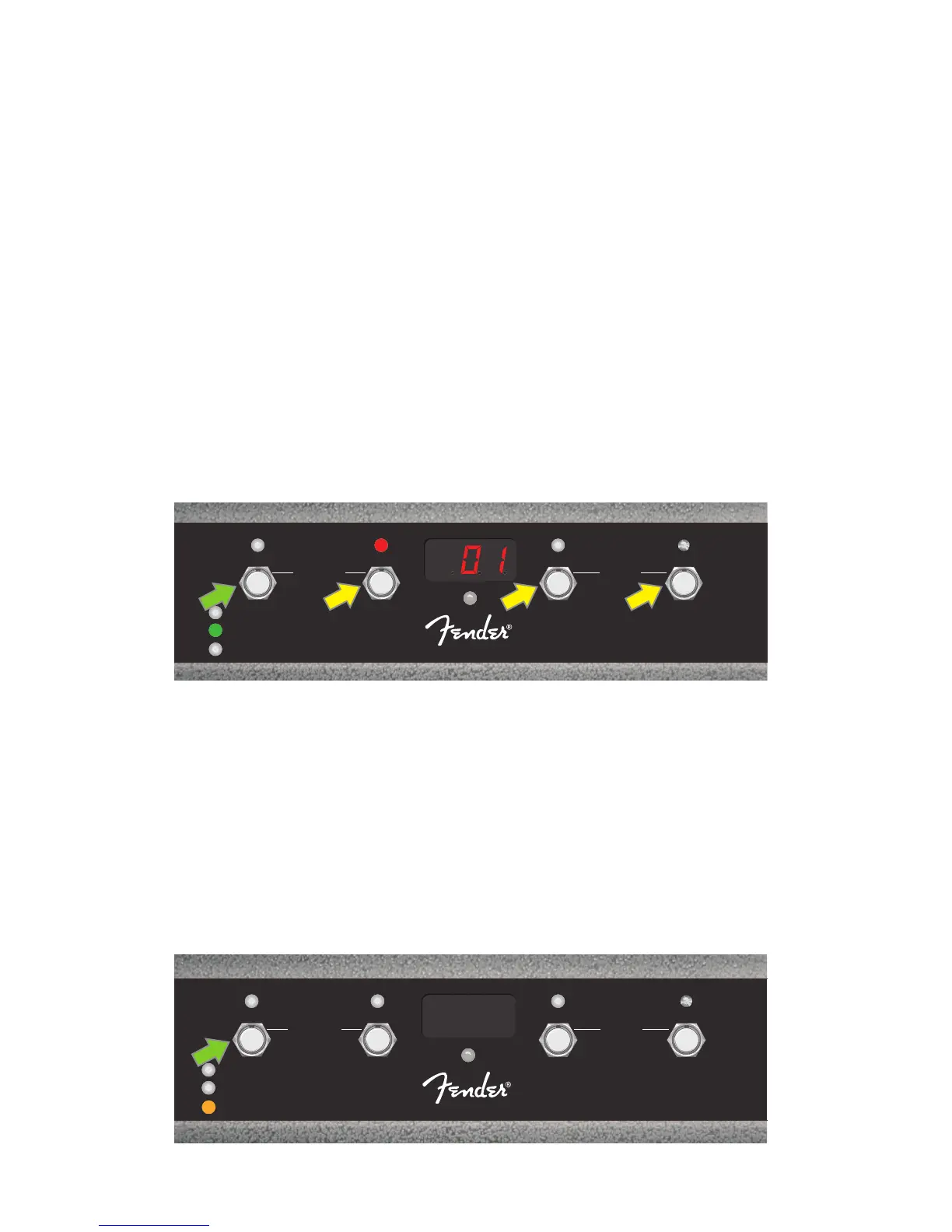
EFFECTS mode enables the user to bypass any of the rst three eects in a preset. To do this, step on the
MODE button until “EFFECTS” mode is activated, as indicated by the illuminated green MODE LED directly to
the left of the label “EFFECTS.” Within whichever preset is already set on the amp, the rst three eects in that
preset (if any) are assigned to FUNCTION buttons 1, 2 and 3 (also labeled on the footswitch as “FX 1,” “FX 2” and
“FX 3” for this purpose). When an eect is on, the corresponding red FUNCTION LED above the eect’s assigned
FUNCTION button will be illuminated. To bypass an eect, step on its corresponding FUNCTION button, at
which point its red FUNCTION LED will turn o (see illustration below).
Step on MODE button (green arrow) to cycle through modes until green “EFFECTS” MODE LED illuminates. The rst three eects in the pre-
set active in the amp are assigned to FUNCTION buttons 1, 2 and 3 (yellow arrows); each with its own red FUNCTION LED to indicate use. In
the example shown above, the preset eect assigned to FUNCTION button 1 (FX 1) is on, and can be bypassed by stepping on that button.
LOOPER MODE
LOOPER mode enables the user to record loops up to 60 seconds long and overdub subsequent parts. Any
number of overdubbed parts can be layered over the original recorded part; however, only the last overdub
created can be undone. To record a loop, step on the MODE button (green arrow in illustration below) until
“LOOPER” mode is activated, as indicated by the illuminated amber MODE LED (see illustration below).
1
FX 1
REC/DUB
PRESETS
EFFECTS
LOOPER
2
FX 2
PLAY/STOP
3
FX 3
UNDO
BANK DOWN
QA
MODE
HOLD
TUNER
BANK UP
MGT-4
ASSY. P/N 7710238000
1
FX 1
REC/DUB
PRESETS
EFFECTS
LOOPER
2
FX 2
PLAY/STOP
3
FX 3
UNDO
BANK DOWN
QA
MODE
HOLD
TUNER
BANK UP
MGT-4
ASSY. P/N 7710238000















 To Next Page