41
BLUETOOTH USE
Rumble Studio 40/Stage 800 features Bluetooth connectivity for easy pairing with streaming audio devices
and the Fender Tone™ application.
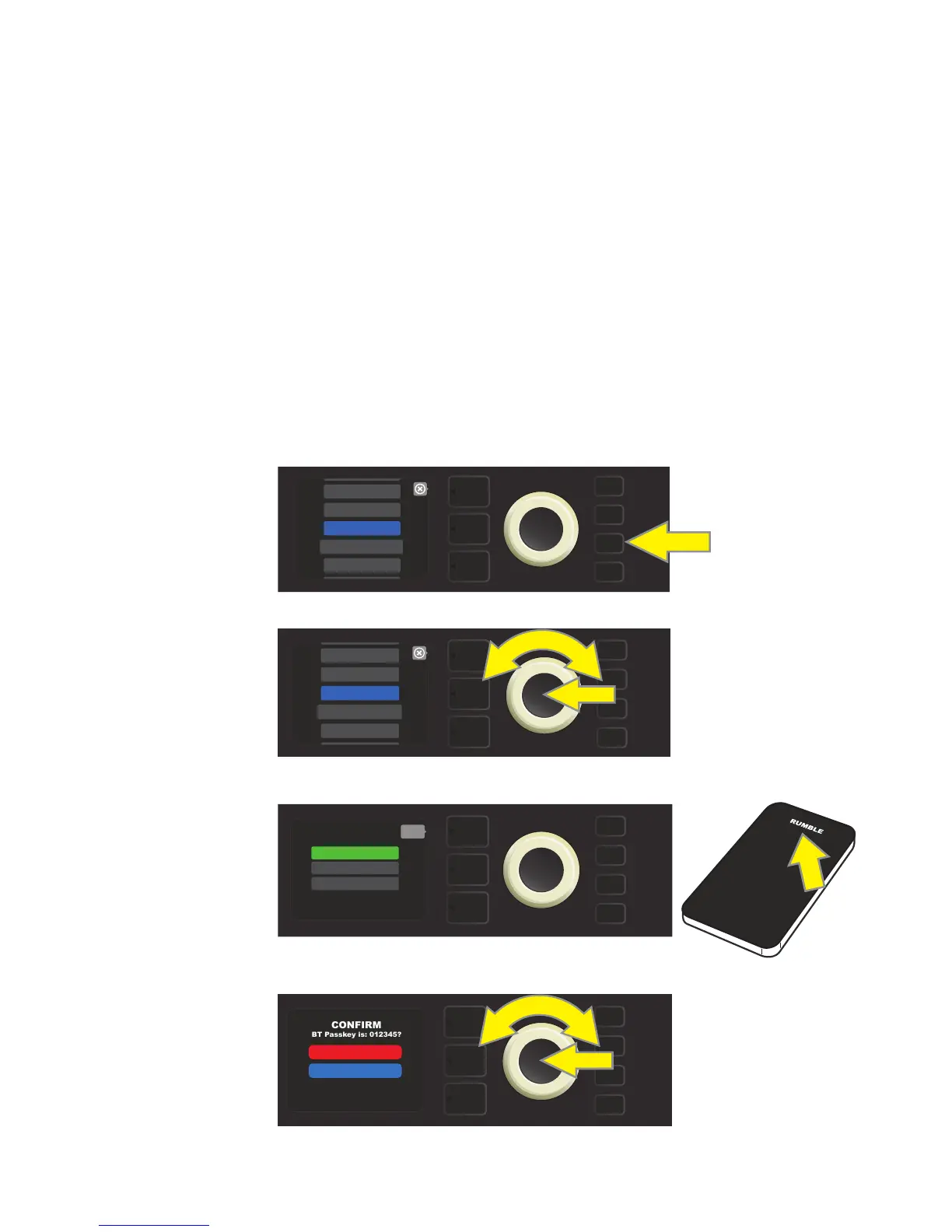
To enable Bluetooth, press the MENU utility button and use the ENCODER to scroll to and select “BLUE-
TOOTH.” The default setting is “on,” indicated by a green box labeled “BLUETOOTH ON”; select “RUMBLE” on
the external device being connected to the amp. Use the ENCODER to scroll to and select this box to turn
Bluetooth o if so desired, indicated by a red box labeled “BLUETOOTH OFF” (see illustrations below).
When pairing a mobile device with Bluetooth with Rumble Studio 40/Stage 800, an onscreen prompt will ap-
pear in the amplier’s DISPLAY WINDOW asking the user to conrm pairing with the device. Use the ENCODER
to scroll to and select either “YES” or “NO.” Once a mobile device has been paired with Rumble Studio 40/Stage
800 for the rst time, the amplier will “remember” that device and will not ask for repeat verication unless
the user subsequently chooses to “forget” Rumble Studio 40/Stage 800 on that mobile device.
Users who wish to rename Rumble Studio 40/Stage 800 on their external devices can do so by using the ENCODER
to scroll to and select “RENAME AMP”; then using the ENCODER to enter a new name using the process described
on page 11. Note that Bluetooth audio streaming and USB audio (page 44) can not be used simultaneously.
To enable Bluetooth, rst press the MENU utility button.
Use the ENCODER to scroll through the menu to “BLUETOOTH,” then press the ENCODER to access Bluetooth settings.
The amp’s default Bluetooth function is “ON” (as labeled in green box);
select “RUMBLE” on external device.
MENU
WIFI
BLUETOOTH
PRESET ORGANIZER
SETLIST
ABOUT THIS AMP
MENU
WIFI
BLUETOOTH
PRESET ORGANIZER
SETLIST
ABOUT THIS AMP
MENU
back
RENAME AMP
BT & AUX VOLUME
BLUETOOTH ON
When rst pairing a Bluetooth device with Rumble Studio 40/Stage 800, an onscreen prompt in the amplier’s DISPLAY WINDOW will
ask for pairing verication; use the ENCODER to scroll to and select either “YES” or “NO.”
MENU
YES
NO















 To Next Page