SETLISTS
For individual convenience, presets can be grouped together in “Setlists.” These are user-created groups con-
taining any arrangement of presets ideal for a particular situation—a gig or rehearsal, a favorites list, genre,
artist list, etc. Simple to create, edit, name and even delete, Setlists personalize and streamline the Rumble
Studio 40/Stage 800 experience so that users can access multiple presets quickly and easily. Presets within a
given Setlist can also be selected using the MGT-4 Footswitch (see page 49).
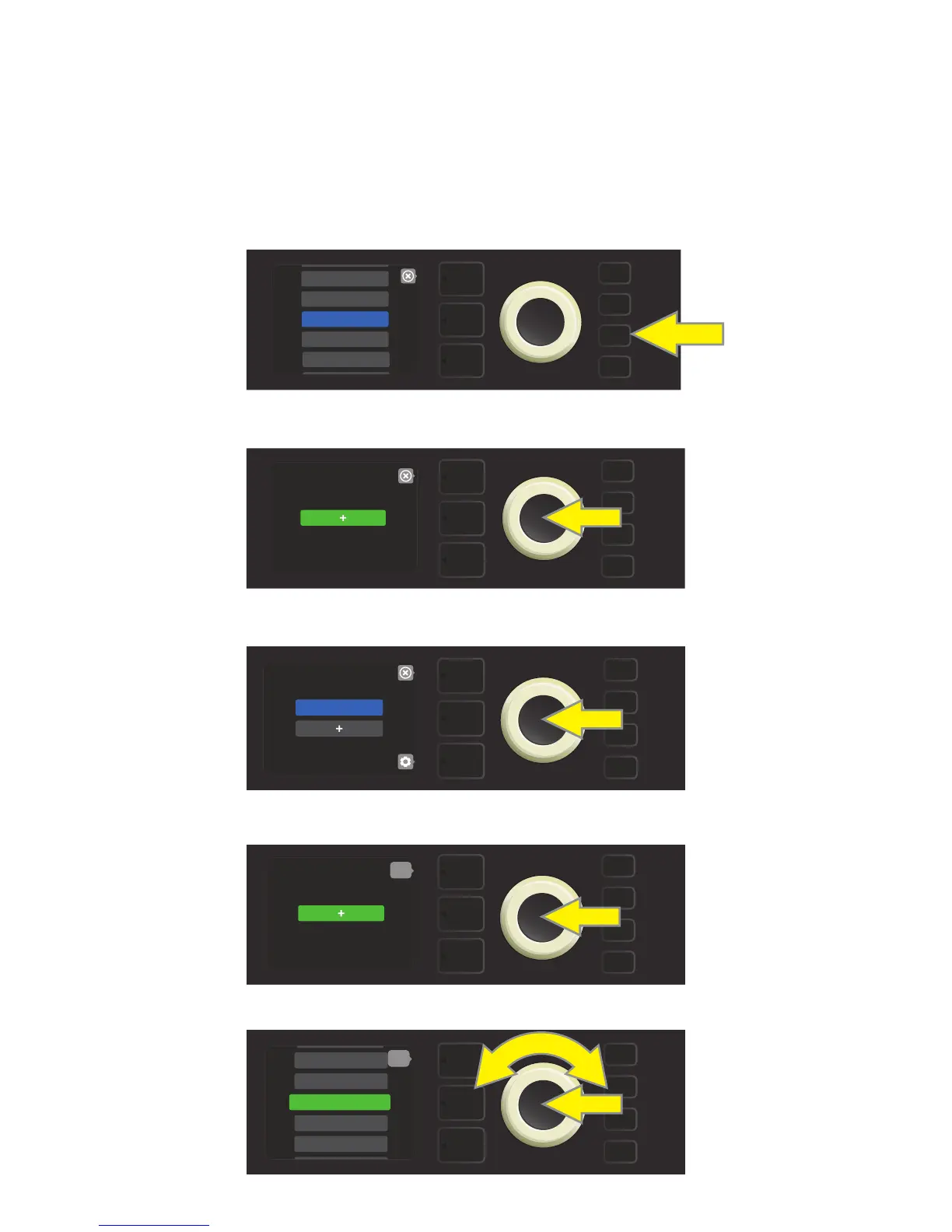
To create a Setlist, rst press the MENU utility button and use the ENCODER to scroll to and select SETLISTS:
A green plus-sign box will appear; press the ENCODER on it to create a new Setlist:
A blue box labeled “SETLIST 1” will appear; press the ENCODER on SETLIST 1 to begin adding presets to it:
The green plus-sign box will then reappear; press the ENCODER on it to see a list of presets to select from:
Use the ENCODER to scroll among presets to add to SETLIST 1, then press the ENCODER to select a desired preset:
34
MENU
CLOUD PRESETS
TUNER
BLUETOOTH
PRESET ORGANIZER
SETLIST
MENU
SETLIST 1
MENU
MENU
back
12 - BRITISH COLO>
13 - BRITISH WATT>
9 - ’59 BASSMAN 4X>
10 - ’70S BRITISH
11 - BASSMAN TV
MENU
back















 To Next Page