50
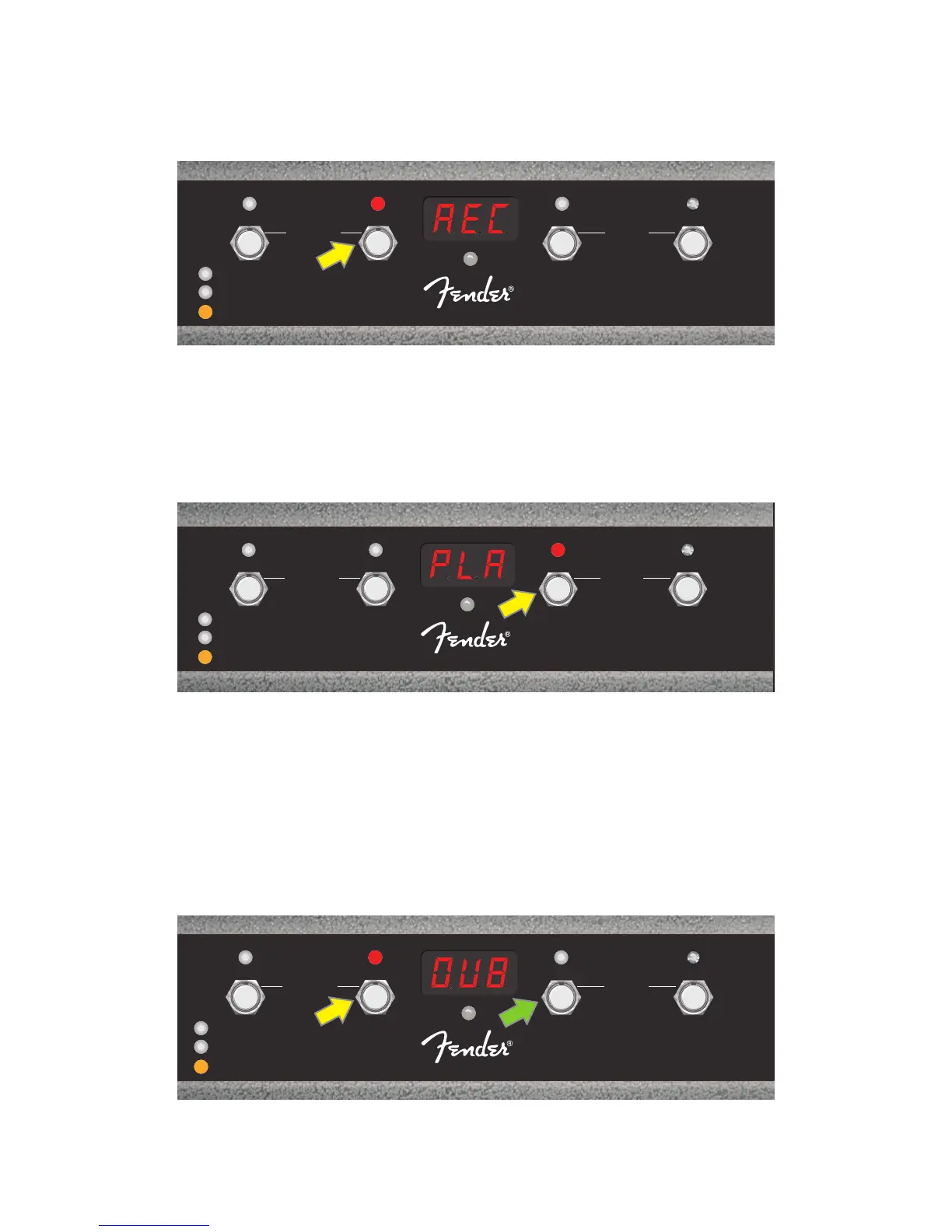
To begin recording the rst musical passage, step on FUNCTION button 1 (yellow arrow in illustration below)
labeled “REC/DUB.” The red FUNCTION LED above FUNCTION button 1 will begin ashing and the DISPLAY
WINDOW will show “REC,” indicating that the LOOPER is in recording mode; play a passage of any time dura-
tion up to 60 seconds (see illustration below).
When nished playing rst musical passage, stop recording and automatically begin playback of rst passage
by stepping on FUNCTION button 2 (yellow arrow in illustration below), labeled “PLAY/STOP.” The red FUNCTION
LED above FUNCTION button 1 will stop ashing, the red FUNCTION LED above FUNCTION button 2 will illumi-
nate, and the DISPLAY WINDOW will indicate playback by showing “PLA” (see illustration below). To stop play-
back, step on FUNCTION button 2 again; the DISPLAY WINDOW will show “STP” (not shown in illustration below).
Alternately, when nished playing the rst musical passage, step on FUNCTION button 1 (yellow arrow in
illustration below) again to go straight into overdub mode; the red FUNCTION LED above FUNCTION button 1
will continue ashing and the DISPLAY WINDOW will show “DUB,” indicating that the LOOPER is now in over-
dub mode and a second musical passage can be recorded over the rst. Overdub mode can also be activated
during playback of the rst passage or after stopping playback by stepping on FUNCTION button 1 again. Con-
tinue overdubbing musical passages as often as desired. After an overdub is recorded, step on FUNCTION but-
ton 2 (green arrow in illustration below) to start and stop playback of all recorded parts (see illustration below).
1
FX 1
REC/DUB
PRESETS
EFFECTS
LOOPER
2
FX 2
PLAY/STOP
3
FX 3
UNDO
BANK DOWN
QA
MODE
HOLD
TUNER
BANK UP
MGT-4
ASSY. P/N 7710238000
1
FX 1
REC/DUB
PRESETS
EFFECTS
LOOPER
2
FX 2
PLAY/STOP
3
FX 3
UNDO
BANK DOWN
QA
MODE
HOLD
TUNER
BANK UP
MGT-4
ASSY. P/N 7710238000
1
FX 1
REC/DUB
PRESETS
EFFECTS
LOOPER
2
FX 2
PLAY/STOP
3
FX 3
UNDO
BANK DOWN
QA
MODE
HOLD
TUNER
BANK UP
MGT-4
ASSY. P/N 7710238000















 To Next Page