51
While recording, playing back or stopped on the rst musical passage, the user can undo the recording if
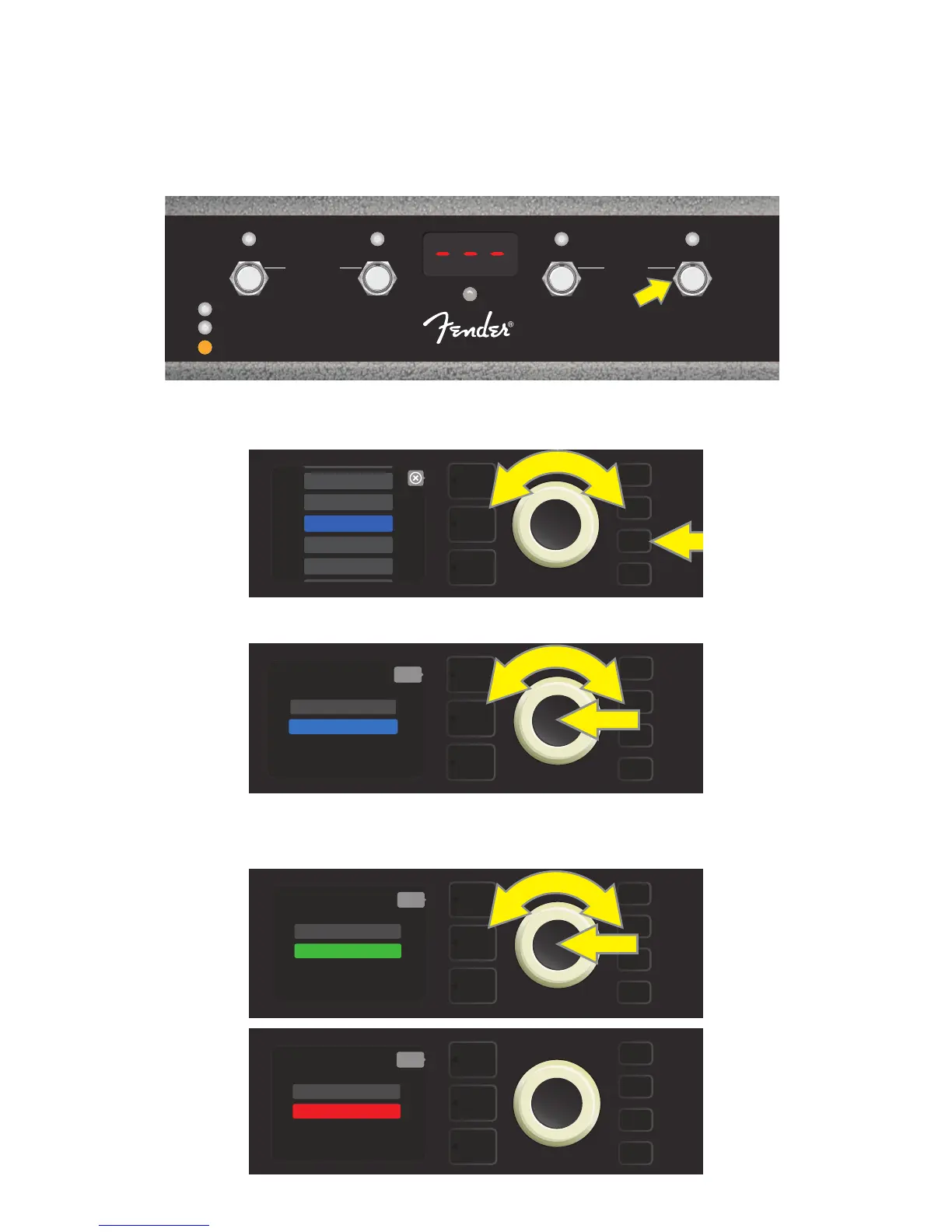
desired by stepping on FUNCTION button 3 (yellow arrow in illustration below), labeled “UNDO.” When doing
so, recording will stop and the DISPLAY WINDOW will show three dashes, indicating that whatever had been
recorded is now erased. Once overdubs have been added, however, the UNDO function applies only to the
last overdub recorded; preceding overdubs cannot be undone (see illustration below). To initiate a new loop-
ing session, from STOP mode simply step on the “REC” button (FUNCTION button 1).
To avoid inadvertently starting the looper while playing, the looper can be turned o. To do so, press the
MENU utility button; then use the ENCODER to scroll to and select “FOOTSWITCH” (see illustration below).
Use the ENCODER to scroll to and select “MGT-4” (see illustration below).
Use the ENCODER to scroll to “LOOPER ON” and press the ENCODER to turn the looper o (see illustrations
below). To turn the looper back on, scroll to “LOOPER OFF” and press the ENCODER.
1
FX 1
REC/DUB
PRESETS
EFFECTS
LOOPER
2
FX 2
PLAY/STOP
3
FX 3
UNDO
BANK DOWN
QA
MODE
HOLD
TUNER
BANK UP
MGT-4
ASSY. P/N 7710238000
MENU
TUNER
GLOBAL EQ
AMP SETTINGS
FOOTSWITCH
ABOUT THIS AMP
MENU
back
MGT-4 (4-BUTTON)
EXP-1 (EXPRESSION)
MENU
back
QUICK ACCESS
LOOPER ON
MENU
back
QUICK ACCESS
LOOPER OFF















 To Next Page