Page 43
BB
BB
B
US2US2
US2US2
US2
BB
BB
B
US2US2
US2US2
US2
Code 97462I-1 V07_09
Video terminals: Monitors
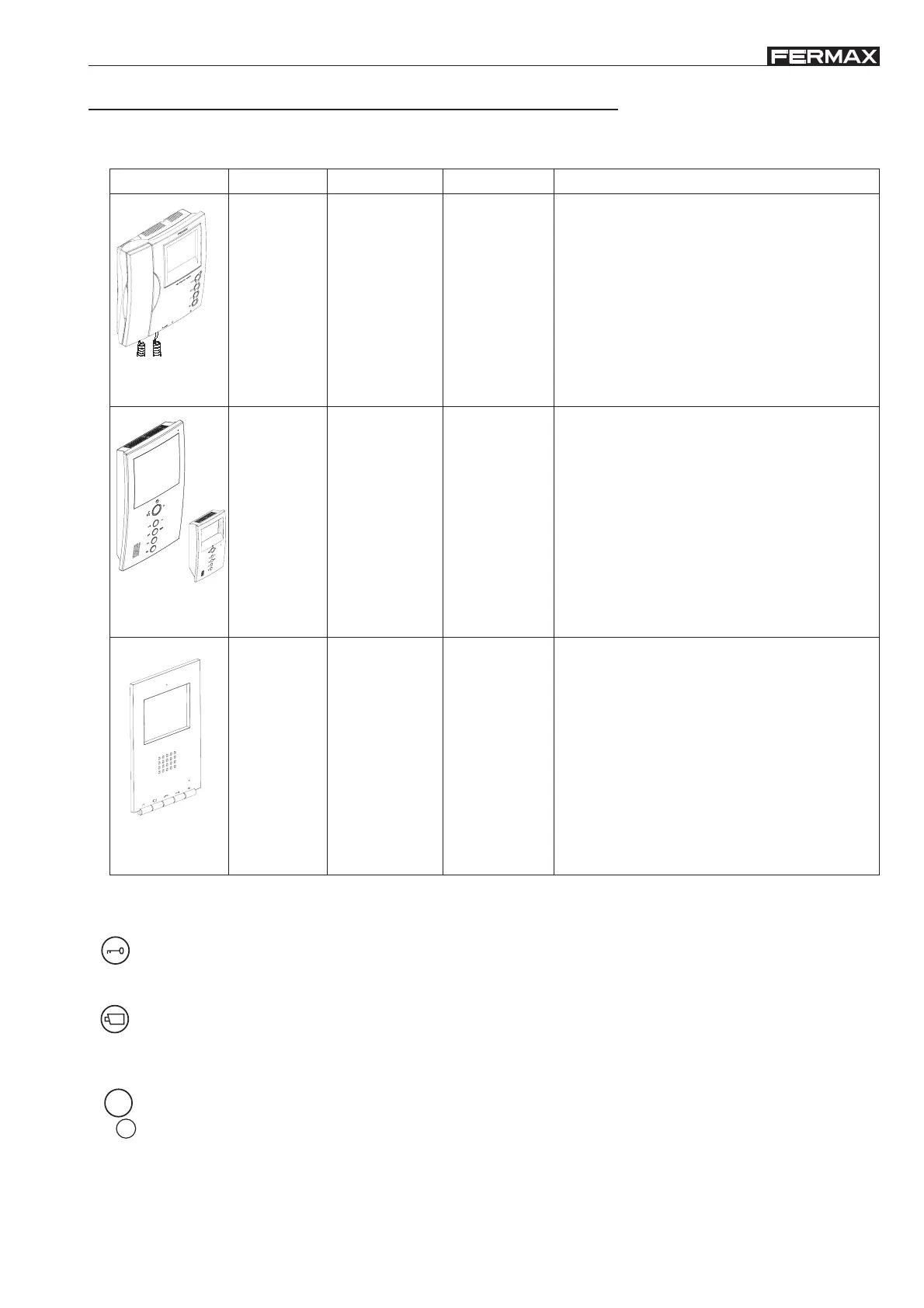
Fermax offers a wide range of monitors for the BUS2 system:
* Communal functions on all BUS2 monitors
Door lock-release / call reception button.
· When conversing with the outdoor entry panel, press to activate the door lock-release mechanism.
· With the monitor hung up, press to make a call to the reception guard (if a reception exists).
Auto-start button: Manual monitor activation
With the monitor on standby, press and hold this button for 1 second to switch the monitor on manually. To
sequentially select between the camera on the main panel and the secondary panel (where one exists), hold
the button down for 2 seconds.
Buttons for additional functions.
Enables activation of relays (BUS2 or conventional) to use additional devices: secondary door opening,
additional lighting activation, etc.
F1
M
E
N
U
INSTALLATION
- 4’’ screen (b/w: flatscreen)
- 3.5’’ screen (colour: TFT)
- Image adjustments: colour, shine and contrast
through controls.
- ON/OFF switch with three positions: off/on
medium volume/on low volume.
- 2 selectable call tones
Surface
COMMUNICATION
Telephone arm
IMAGE SPECIAL CHARACTERISTICS
Black/white
and
colour
Surface
and
flush-mounted
Black/white
and
colour
Hands free:
Half-duplex
(B/W monitor)
Full-duplex
(Colour monitor)
Flush-
mounted
Colour
Hands free
Full-duplex
- Programming from monitor
- 4’’ screen (b/w: flatscreen)
- 3.5’’ screen (colour: TFT)
- Configuration through programming using
monitor buttons:
· Volume adjustors: high-medium-low.
· Call tone selector: various tones available.
· Image adjustments: 4 pre-established
configurations.
· ‘Mute’ option (LED indicated activation).
- Programming from monitor
- Display programming information
- Colour screen: TFT 3.5’’
- Configuration through programming using
monitor buttons:
· Volume adjustors: high-medium-low.
· Call melody selector: various melodies
available.
· Image adjustments: 4 pre-established
configurations.
· ‘Mute’ option (LED indicated activation).
Loft
Ref. 3220-3230
Loft Compact
iLoft
MONITOR
F2
The BUS2 monitors must be installed in BUS2 video systems (with video panels).


 To Next Page