16
Options: High quality (25 fps), low quality (10 fps), Still picture. Important to fi x a
low quality when using 4G networks to connect to the panel in order to earn data
consumption.
- Lock number. You can activate one or two door locks. Only one electric door lock is
activated by default. To activate the automatic door, select 2.
- Wifi setup. You can change the WIFI network to which the master monitor must
connect, in case you have several options.
- Call reception. Enable or disable the call reception from panel. Disable in case you
don’t want to be disturbed. You must be sure that this option is enabled if you
want receive calls from panel.
- Firmware version. Shows current fi rmware version in monitor and indicates if there
is available an improved one, allowing to update it. New fi rmware availability is no-
ticed by a red dot in the setting icon. NOTE: during fi rmware update, it is very im-
portant to keep the power of the monitor ON. If not, the monitor can be damaged.
- Synchronize time. Sets the master monitor with the smartphone date & time.
- Delete. Deletes the device (house) from the app. It is required in case you must
repeat the process of assigning a WIFI network to the monitor if it is changed.
1.6 Call reception in the smartphone
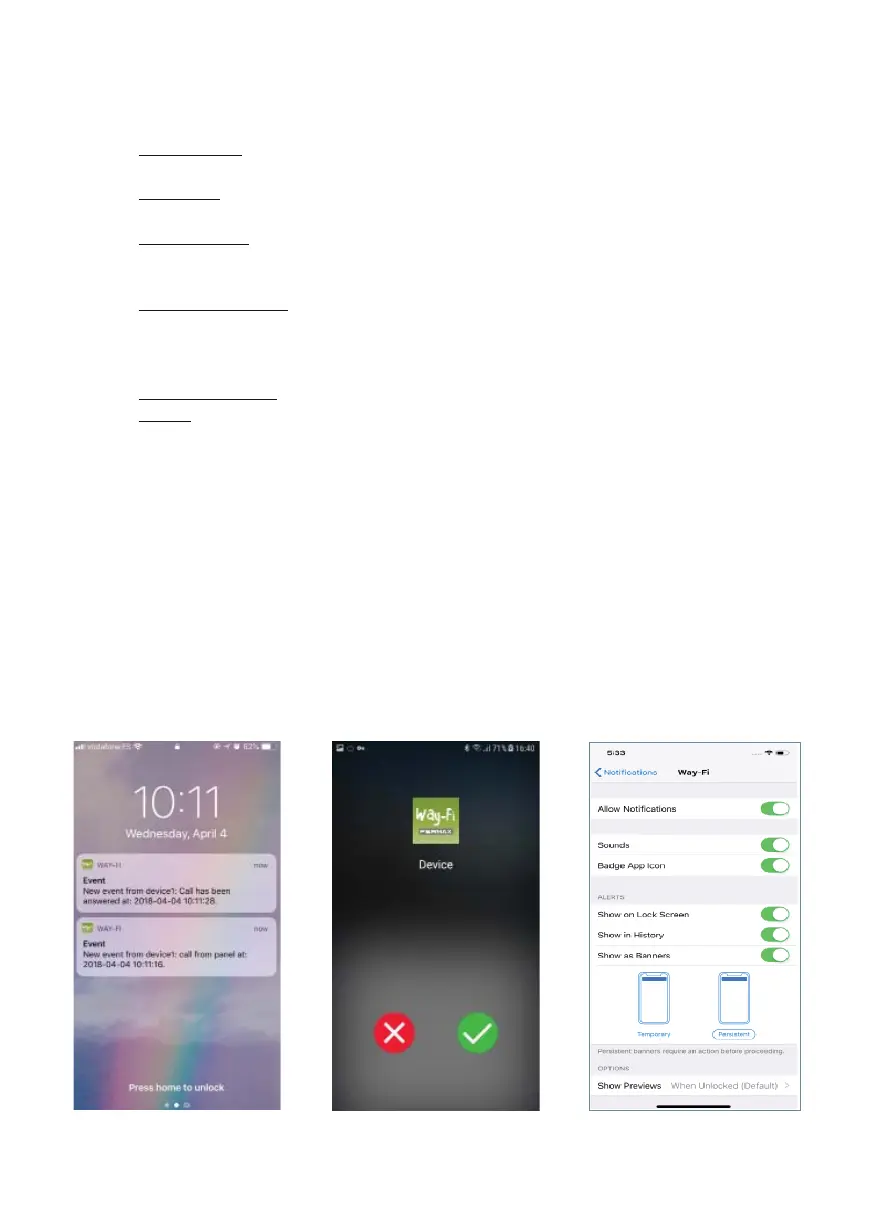
In iOS App call is received through a push notifi cation except if the app is open. You must
press the notifi cation to open the app and access the preview page. The notifi cation gen-
erates a call tone with a long length. Be sure that you confi gure the notifi cation reception
for the Way-Fi App according to the following settings:













 To Next Page