5
GENERAL SPECIFICATIONS
APPLICATION FIELD
We recommend to use of the unit under the conditions described below.
Inner side Outer side
U.M
Operating mode Parameter DB WB DB WB
Cooling
Maximum inlet air temperature 32 23 45 \ (°C)
Minimum inlet air temperature 16 15 18 \ (°C)
Heating
Maximum inlet air temperature 27 \ 24 18 (°C)
Minimum inlet air temperature 20 \ -10 -9 (°C)
All
Supply Voltage 230±10% (V)
Supply Frequency 50±2 (Hz)
DESCRIPTION OF THE REMOTE CONTROL FUNCTIONS AND BUTTONS
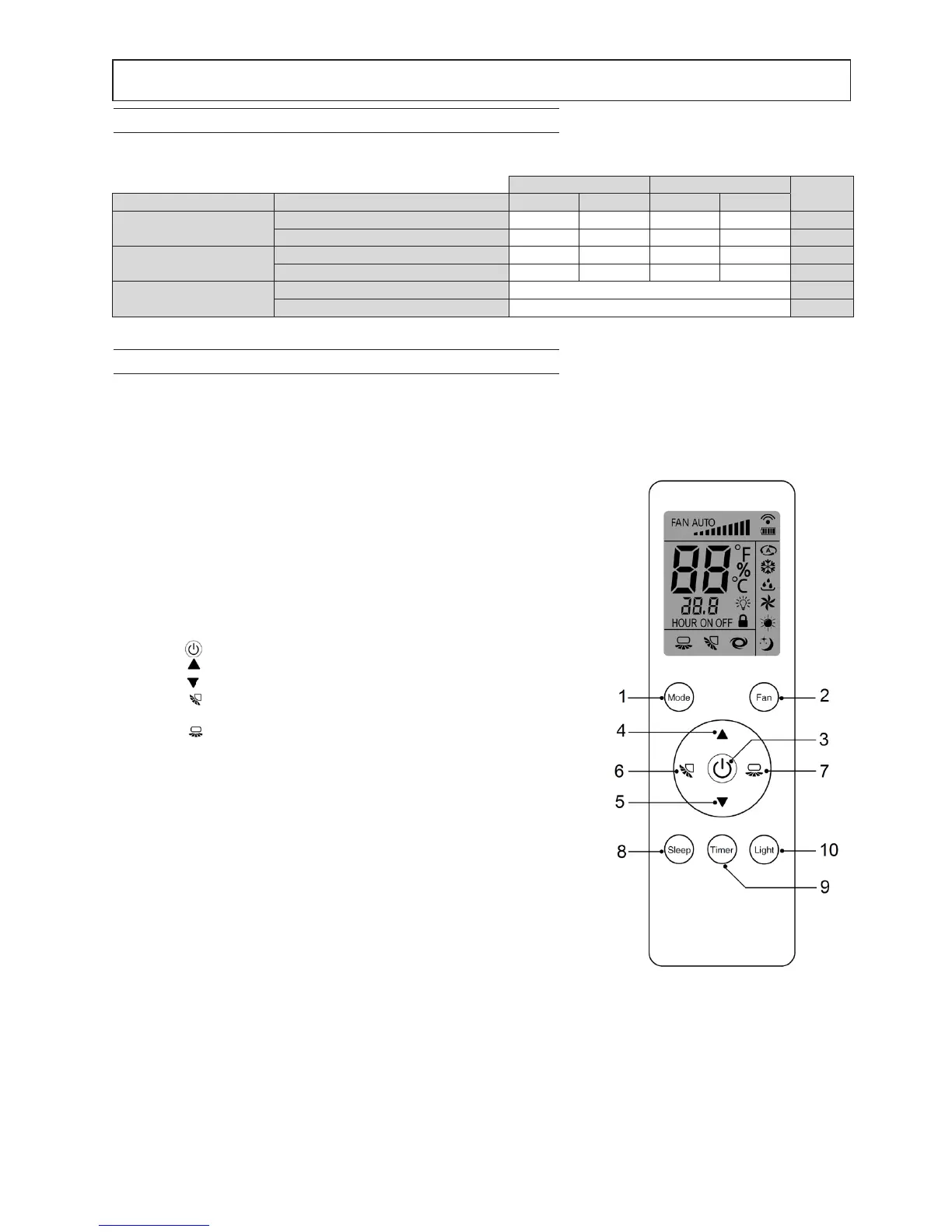
The remote control (Fig. 1) includes a series of buttons and a display showing all the active functions and the different
parameters required by the user or installer to correctly use the unit.
Fig. 1
1. "MODE" button, allows selecting the operating mode:
AUTO - COOL- DRY – HEAT- FAN.
"AUTO": it automatically selects the most suitable operating mode de-
pending on the initial ambient temperature (automatic mode).
"COOL": the unit is activated when the set temperature
is lower than the ambient temperature.
"DRY": used for the dehumidication.
“HEAT": the unit is activated when the set temperature is higher than the
ambient temperature.
"FAN": the unit activates only the fan to allow air circulation.
2. "FAN" button allows selecting the fan speed:
automatic - low - medium - high.
3. Button " ", allows turning the air conditioner on and off.
4. Button " ", is used to increase the temperature or time value.
5. Button " ", is used to decrease the temperature or time value.
6. Button " " is used to activate/deactivate the automatic movement
of the air deector ( vertical )
7. Button " " is used to activate/deactivate the automatic movement of
the air deector ( horizontal ). (not available on these units).
8. "SLEEP" button, is used to set/cancel the
Sleep mode, regardless of the air conditioner operating mode.
9. Button "Timer" allows you to activate the timer function to turn on
or off delayed.
10. Button"Light" toggles the unit's display.



 To Next Page