12
SETTING AND WORK
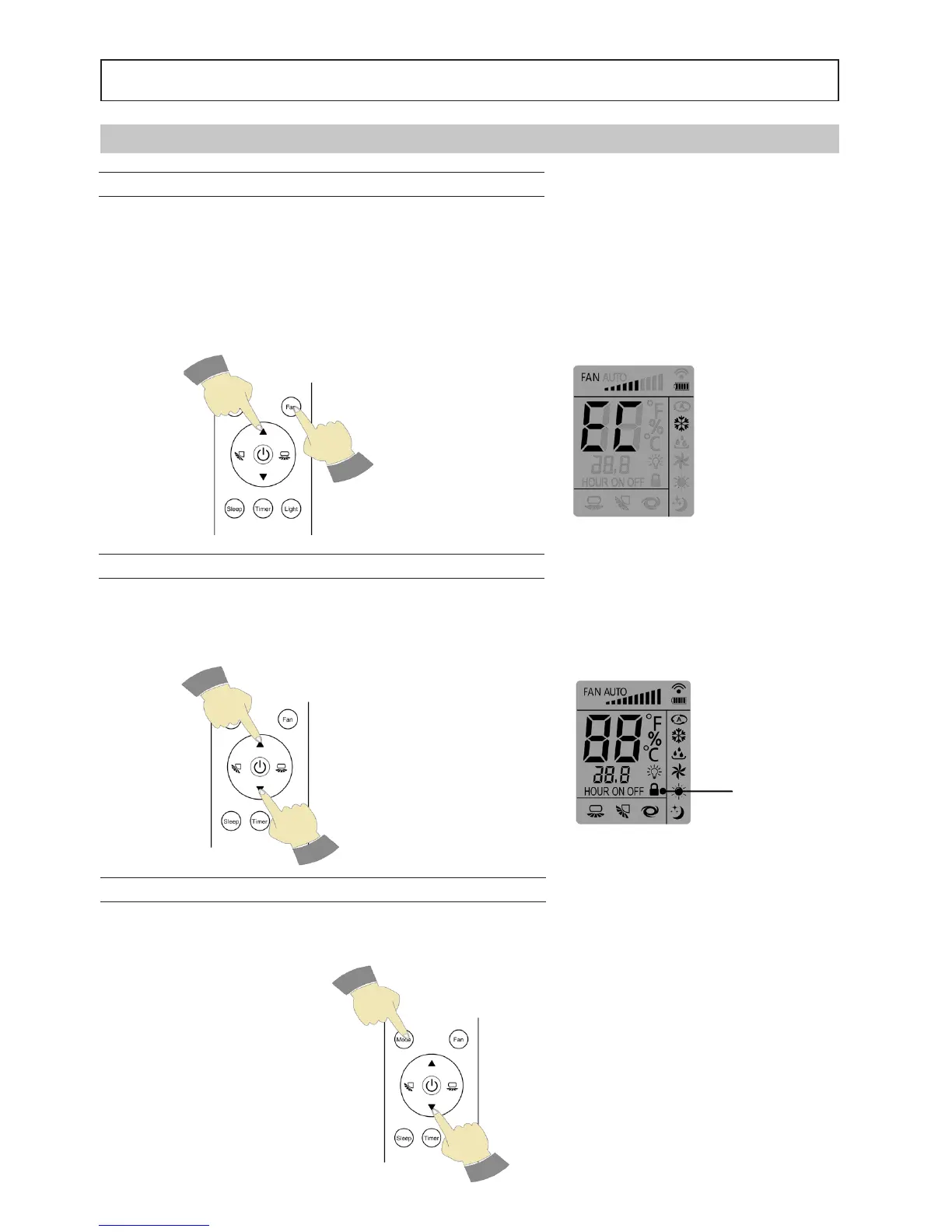
SETTING ECO MODE – “ Fan” + “▲” buttons
In Cool mode, simultaneously press the "Fan" and "▲". (Fig 1) to activate the Economy mode. In this case the ope-
ration, the set point and the air velocity are chosen from the unit and are not editable. ECO mode is highlighted by
the remote control "CE" display (Fig 2).
Notes:
The ECO function is not compatible with the SLEEP function.
FUNCTIONS SET USING THE KEY COMBINATION
KEYBOARD LOCK REMOTE CONTROL – “▼” + “▲” buttons
By simultaneously pressing the "▼" and "▲" (Fig. 3) you can block the operation of the remote control keypad. The
remote control will display the icon shown (Fig. 4) To unlock press the "▼" and "▲".
TEMPERATURE VIEW °C\°F – buttons “▼” + “Mode”
By simultaneously pressing the "▼" and "Mode" (Fig 5) you can change the temperature scale display from °C to °F
and vice versa.
Fig. 1
Fig. 3
Fig. 5
Fig. 2
Fig. 4





 To Next Page