9
SETTING AND WORK
OTHER SETTINGS
REQUESTED TEMPERATURE
Press the "+" or "-" buttons to increase or decrease the requested tem-
perature value.
FAN SPEED SELECTION
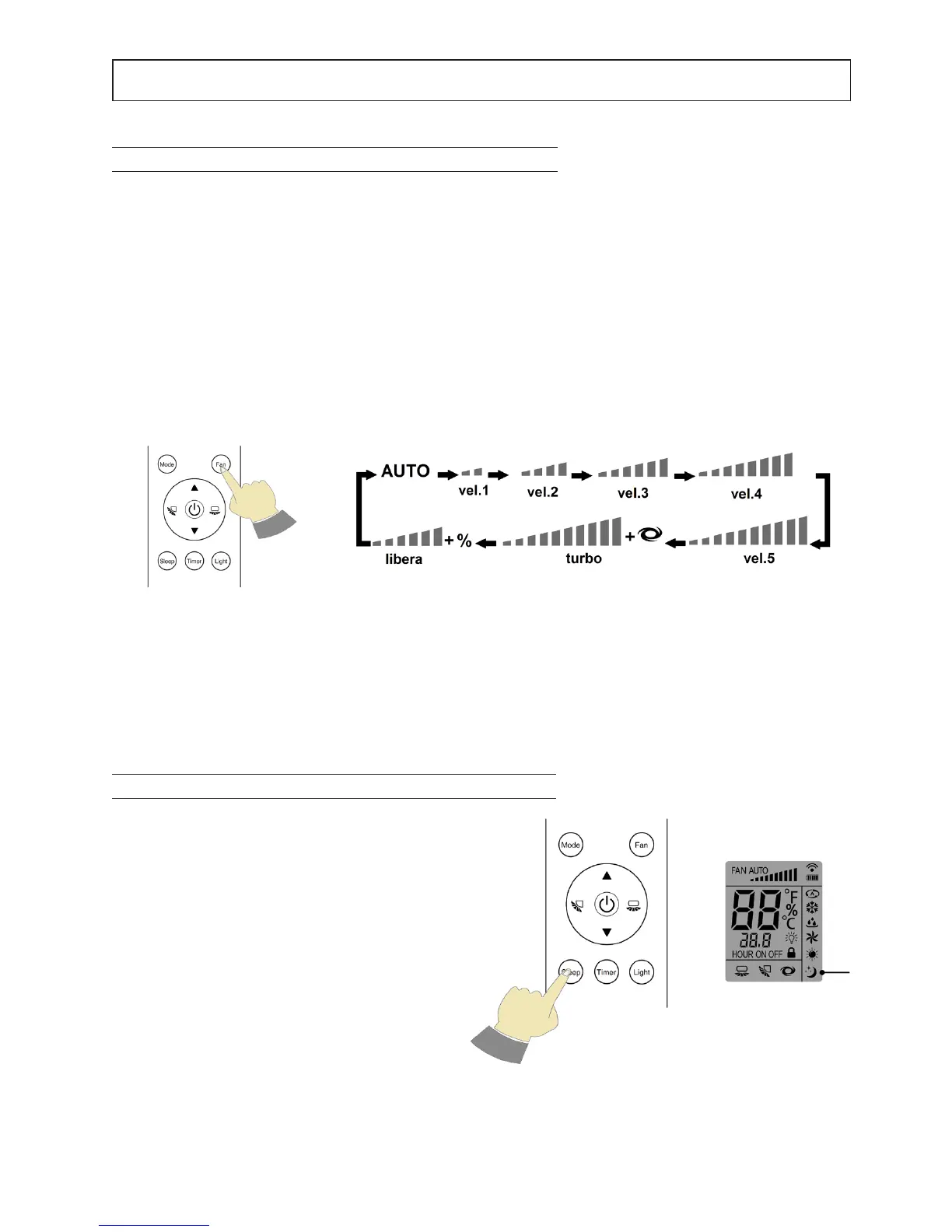
Press the FAN button to set the desired speed.
The setting sequence is:
Notes: when you select:
AUTO - the unit operates according to the factory default speed.
speed 1, speed 2……speed 5 – one of the 5 pre-set speeds is selected.
Innite – the unit selects the best speed according to the ambient conditions, this calculated speed can then be
changed through the "+" and "-" buttons.
Fig. 1
Fig. 2
Fig. 1
KEYBOARD
DISPLAY
SELECTION PROCEDURES NIGHT - "Sleep" Button
By pressing the "SLEEP" button, the machine
sets to the night operating mode, indicated by
the relevant symbol on the display. The set point
temperature increases ("COOL" operation) or
decreases ("HEAT" operation) by 1°C at set in-
tervals for a maximum of 2 °C.



 To Next Page