6
USE OF THE UNIT
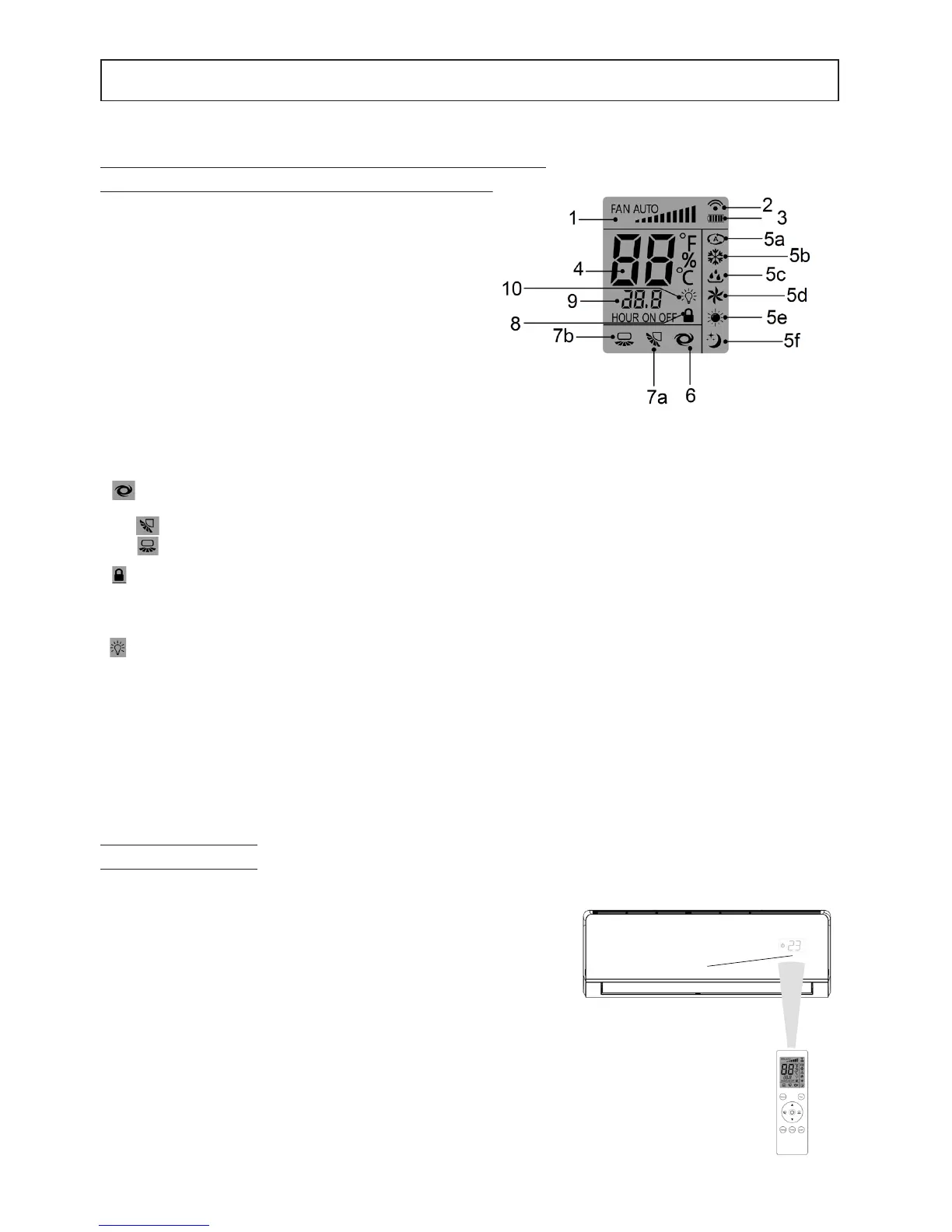
DISPLAY DESCRIPTION
TIPS FOR THE USE OF THE REMOTE CONTROL
For a correct use of the remote control remember what follows:
1. Remove the battery if it is not used for a long time.
2. Point the remote control towards the signal receiver of the indoor unit
(1) when using it.
3. The remote control signal can be received from a distance of up to
7 meters.
4. The emitted signal must not be hindered by any object.
5. Handle the remote control with care.
6. The emitted signal could be disrupted by a rapid starter lamp, an
inverter type uorescent lamp or a mobile phone.
7. The remote control must not be left in a place exposed to direct
sunlight, near a heater or other source of heat.
Note Once removed as described in point 1, the batteries must be
stored in a safe place out of the reach of children.
Fig. 3
Fig. 2
ture is measured in ° C. E 'can possibly change the unit of measurement in ° F.
5.Mode display. Area of the display showing the current operating mode: auto (5a), cool (5b), dry (5c), fan (5d), heat
(5e) and sleep (5f).
6.Icon display:
“ ” enabled when TURBO mode is set .
7. Display of the icons for air ow adjustment:
(7a) “ ” enabled when the horizontal adjustment of the air ow distribution is on (not available on this model)
(7b) “ ” enabled when the vertical adjustment of the air ow distribution is on
8.Visualizzazione funzione Lock:
“ ” enabled when the control buttons are locked
9.CLOCK display :
Indica l’attivazione di un ritardo allo spegnimento-accensione
10.Light Function Display:
" " Active when it requires the switching off of the display lights on the indoor unit.
1.Fan speed display. Area of the display showing the set
fan speed.
2. Transmission indicator. The transmission indicator
lights when remote controller transmits to the indoor unit.
3.Display battery status. It indicates the battery charge
level.
4.Temperature display. Area showing the temperature
setting (17°C~30°C). If "FAN" mode is selected, this value
is not displayed. If the unit is in "TIMER" mode, the "TIM-
ER" turn-on and off settings are displayed. The tempera-
1



 To Next Page