HG6543C Product Manual
Table 3-24 Parameters for Port Forwarding (Continued)
Item Description
Private Port
The range of the LAN ports for forwarding. If only one port exists, enter
the same port number.
Protocol
The protocol used for the port to forward data packets. The options
include ALL, TCP and UDP.
Enable Enables or disables the rule.
3.5.43.5.4 NAT
NAT allows the conversion between intranet IP addresses and public network IP
addresses. NAT converts a great number of intranet IP addresses into one or a
small number of public network IP addresses, so as to save the resource of public
network IP addresses.
The NAT configuration below can take effect only when the NAT function
is enabled in Network→BroadBand Settings→Internet Settings.
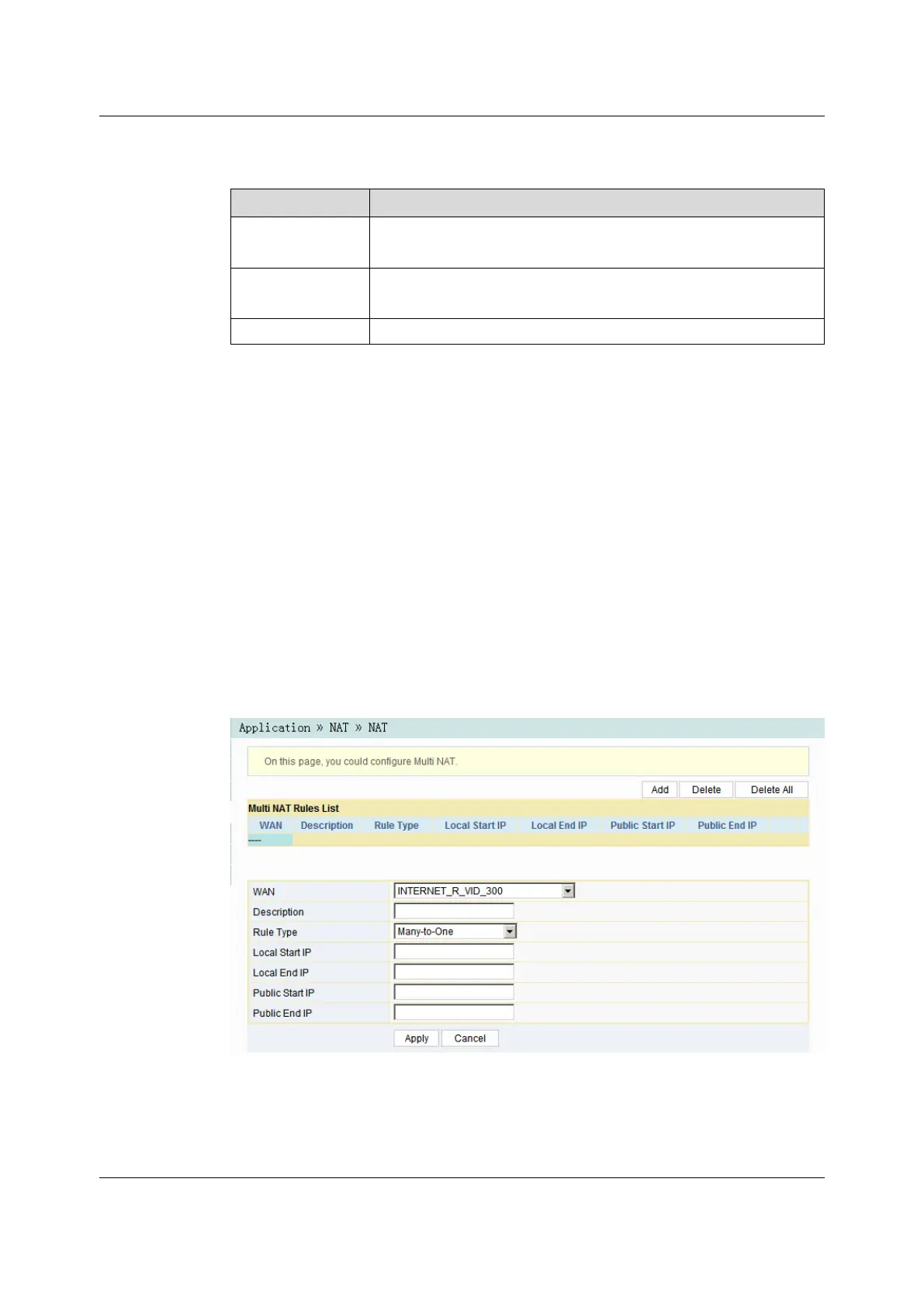
1. Select Application in the navigation bar and select NAT→NAT in the left link
bar. Then click Add to open the NAT rule list configuration page, as shown in
Figure 3-42.
Figure 3-42 NAT
70
Version: A

 To Next Page
 Loading...