WORKING PROGRAMS
SCRUBBING WITH DRYING
To perform a scrubbing and drying program, proceed as follows:
1. Carry out all the checks listed in the chapter “PREPARING TO WORK” on page 15.
2. Sit on the driver’s seat.
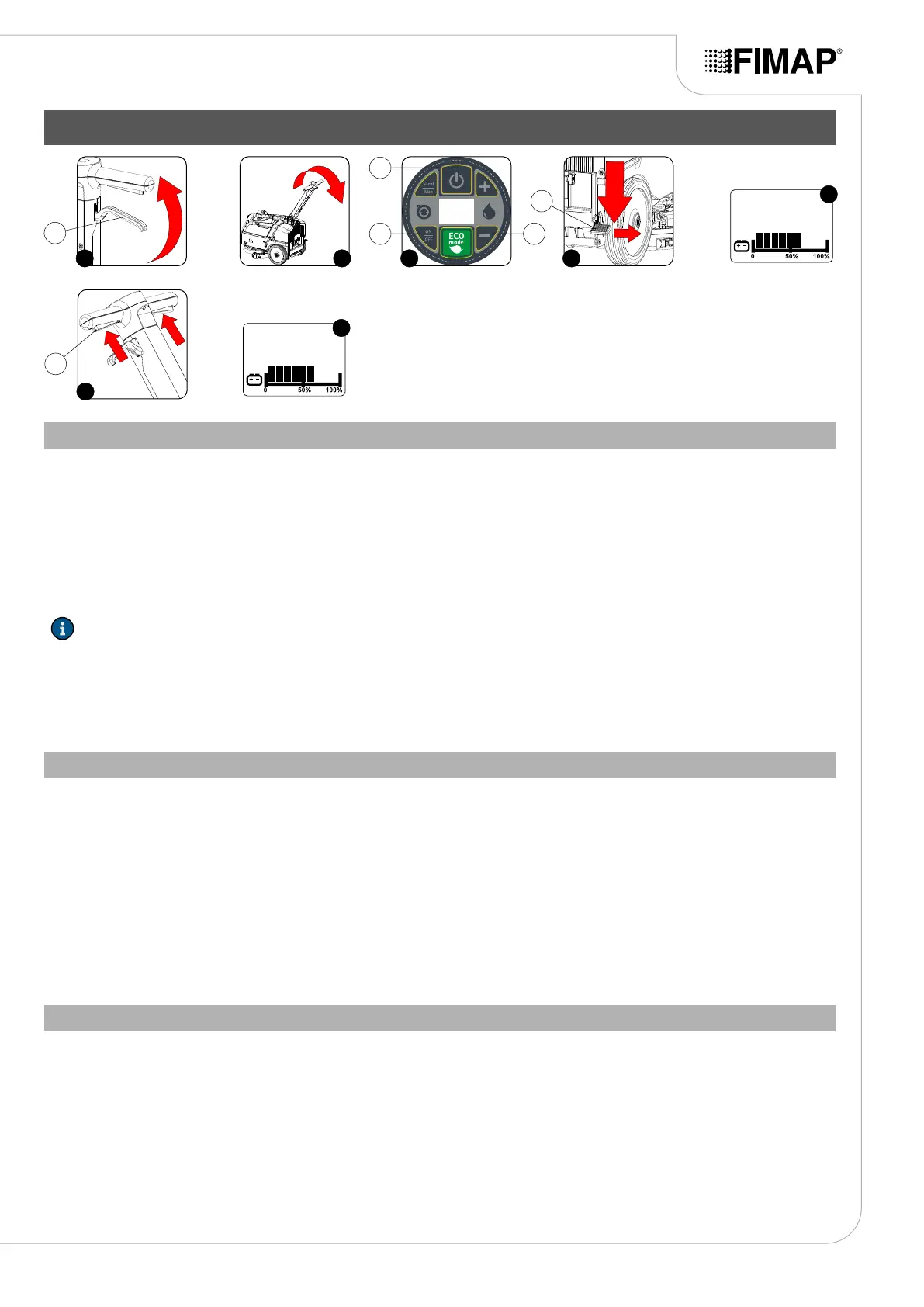
1. Release the control column from the vertical position, press the stop lever (1) (Fig.1) and turn the control column towards yourself (Fig.2).
2. Turn the column towards yourself to nd the optimal position, this position must provide a sensation of comfort when using the machine.
Once the ideal position has been found, release the stop lever (1) to lock the column.
3. Activate the machine by pressing the button (2) located on the control panel (Fig.3).
4. Lower the squeegee, activate the pedal (3) located at the rear right of the machine (Fig.4).
5. Activate the suction motor by pressing the button (4) located on the control panel (Fig.3).
N.B.: As soon as the button (4) is pressed, “ON” will appear on the control display (Fig.5).
6. Press the operator presence lever (5) (Fig.6).
7. As soon as the operator presence levers are pressed, the brush head motor and the suction motor will start working. As a result, also the
pump in the water system will start to operate and detergent solution will be delivered to the brush. During the rst few metres, check that
there is sucient solution and that the squeegee is drying correctly.
8. The machine will now begin to work with full eciency until the battery is at or until the detergent solution has nished.
SCRUBBING WITHOUT DRYING
To perform a scrubbing program without drying , proceed as follows:
1. Carry out all the checks listed in the chapter “PREPARING TO WORK” on page 15.
2. Sit on the driver’s seat.
1. Release the control column from the vertical position, press the stop lever (1) (Fig.1) and turn the control column towards yourself (Fig.2).
2. Turn the column towards yourself to nd the optimal position, this position must provide a sensation of comfort when using the machine.
Once the ideal position has been found, release the stop lever (1) to lock the column.
3. Activate the machine by pressing the button (2) located on the control panel (Fig.3).
4. Press the operator presence lever (5) (Fig.6).
5. As soon as the operator presence levers are pressed, the brush head motor and the suction motor will start working. As a result, also the
pump in the water system will start to operate and detergent solution will be delivered to the brush. During the rst few metres, check that
there is sucient solution.
6. The machine will now begin to work with full eciency until the battery is at or until the detergent solution has nished.
DRYING WITHOUT SCRUBBING
To perform a working program of only drying without scrubbing the oor, proceed as follows:
1. Carry out all the checks listed in the chapter “PREPARING TO WORK” on page 15.
2. Sit on the driver’s seat.
1. Release the control column from the vertical position, press the stop lever (1) (Fig.1) and turn the control column towards yourself (Fig.2).
2. Turn the column towards yourself to nd the optimal position, this position must provide a sensation of comfort when using the machine.
Once the ideal position has been found, release the stop lever (1) to lock the column.
3. Activate the machine by pressing the button (2) located on the control panel (Fig.3).
4. Adjust the detergent solution delivery level to “H2O 0”, press the button “-” repeatedly (6) (Fig.3) until “H2O 0” appears on the control
display.
17
6
421 3
2
4 6
1
5
3
ON
5
H2o 1
7


 To Next Page