SCRUBBING WITHOUT DRYING
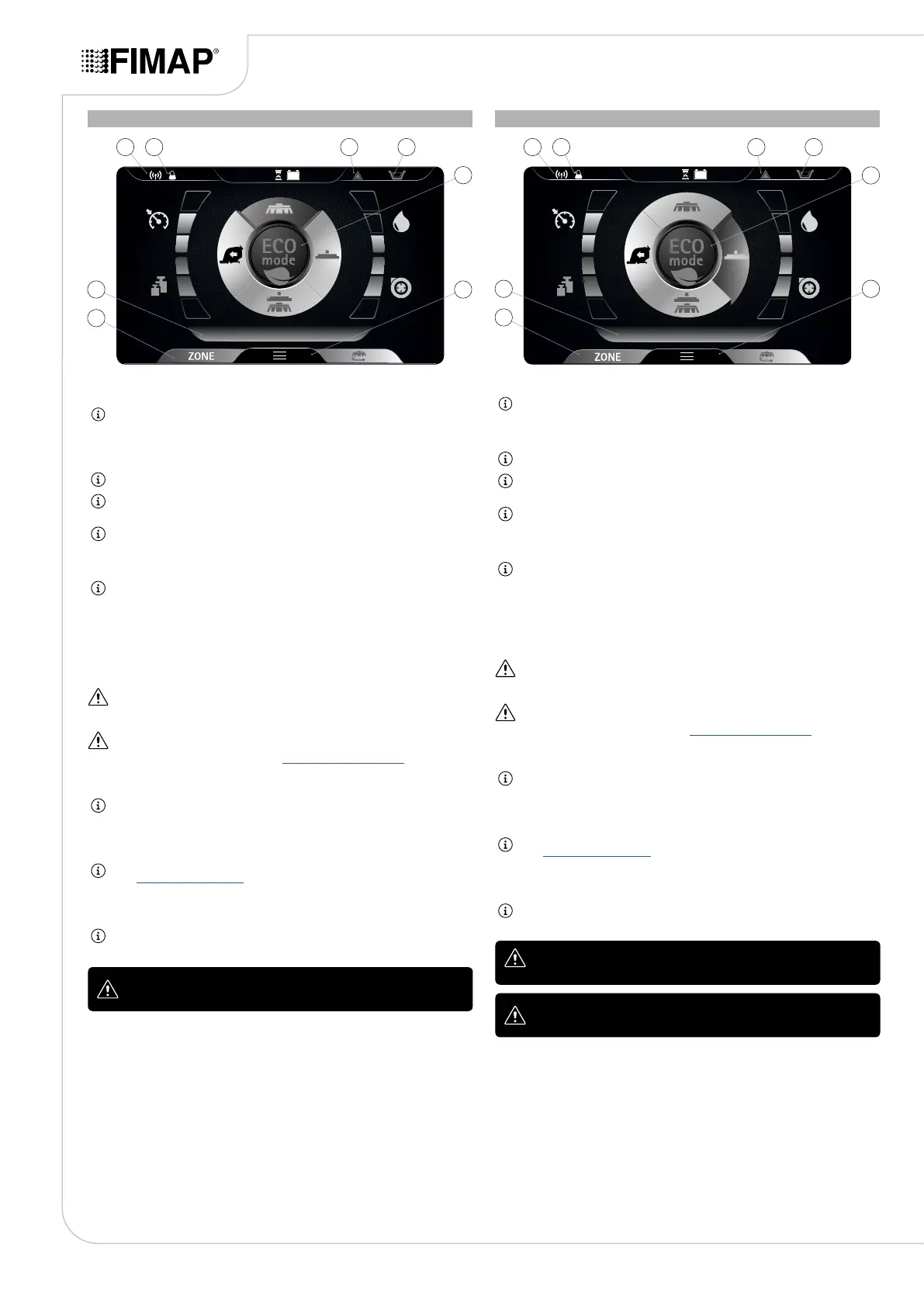
Selecting the program “SCRUBBING WITHOUT DRYING”, the control display screen will appear as
shown in the gure.
NB: with this working program, the pressing of the dead man's lever only brings the brush
head to the work position (in contact with the oor); the squeegee remains in the idle position
(raised from the oor). The brush head solenoid valve and the water system pump are
powered up (only if the detergent solution is other than zero). When the dead man's lever is
pressed, the brush head, solenoid valve, electric pump and traction motor are powered.
NB: on the DS selector, the symbol of the “scrubbing without drying” program (B) is green.
NB: the grey symbols show working programs that are not active. the green symbols show
working programs that are active.
NB: when the dead man's lever is released, the brush head motor stops with the relative delay.
After the “Reset Delay” time, the brush head is taken to its idle position (raised o the oor).
When the dead man's lever is pressed, work will resume with the same working program and
parameters used prior to the stop.
NB: if you reverse while this program is active, the brush head body will remain in contact with
the oor and the motor will continue working, but the solenoid valve will not deliver detergent
solution to the brushes.
The icons that may be visible are:
1. FFM symbol, if visible it shows that the “FIMAP FLEET MANAGEMENT” system operating.
2. FSS symbol, if visible it shows that the “FIMAP SOLUTION SAVER” system is operating.
3. General alarm symbol.
ATTENTION: if visible, stop the machine. To continue working, see “ALARM SCREEN”.
4. Solution tank empty oat symbol.
ATTENTION: if visible, it indicates that the detergent solution in the tank has a reached a level
beyond which the solenoid valve cannot deliver solution onto the brushes, so the tank needs to
be lled up before continuing the work (see “FILLING THE SOLUTION TANK”).
5. ECO-MODE button.
NB: if the Eco-Mode button (5) is pressed in transfer mode, the “scrubbing with drying”
program is activated in economic mode.
6. Menu button.
7. Zone button.
NB: if the Zone button (8) is pressed in transfer mode, the window for selecting the zone opens
(see “ZONE PROGRAM BUTTON”). Once you have selected an area, “scrubbing with drying”
is activated for the area selected.
8. Text indicator.
NB: the text indicator (8) shows which zone program has been selected, or whether the
machine is in transport mode if the word “DRIVE” is visible.
ATTENTION: never switch off the machine while the brush head is
in contact with the oor
DRYING
Selecting the program “DRYING”, the control display screen will appear as shown in the gure.
NB: with this working program, the pressing of the dead man's lever only brings the squeegee
to the work position (in contact with the oor); the brush head remains in the idle position
(raised from the oor). When the dead man's lever is pressed, both the vacuum motor and the
traction motor are powered.
NB: on the DS selector, the symbol of the drying program (C) is green.
NB: the grey symbols show working programs that are not active. the green symbols show
working programs that are active.
NB: when the dead man's lever is released, the vacuum motor stops with the relative delay.
After the “Reset Delay” time, the squeegee support is taken to its idle position (raised o the
oor). When the dead man's lever is pressed, work will resume with the same working program
and parameters used prior to the stop.
NB: if you reverse while this program is active, the squeegee support is taken to its idle
position (raised o the oor) and the vacuum motor is switched o with the relative delay.
The icons that may be visible are:
1. FFM symbol, if visible it shows that the “FIMAP FLEET MANAGEMENT” system operating.
2. FSS symbol, if visible it shows that the “FIMAP SOLUTION SAVER” system is operating.
3. General alarm symbol.
ATTENTION: if visible, stop the machine. To continue working, see “ALARM SCREEN”.
4. Solution tank empty oat symbol.
ATTENTION: if visible, it indicates that the detergent solution in the tank has a reached a level
beyond which the solenoid valve cannot deliver solution onto the brushes, so the tank needs to
be lled up before continuing the work (see “FILLING THE SOLUTION TANK”).
5. ECO-MODE button.
NB: if the Eco-Mode button (5) is pressed in transfer mode, the “scrubbing with drying”
program is activated in economic mode.
6. Menu button.
7. Zone button.
NB: if the Zone button (8) is pressed in transfer mode, the window for selecting the zone opens
(see “ZONE PROGRAM BUTTON”). Once you have selected an area, “scrubbing with drying”
is activated for the area selected.
8. Text indicator.
NB: the text indicator (8) shows which zone program has been selected, or whether the
machine is in transport mode if the word “DRIVE” is visible.
ATTENTION: never switch off the machine with the squeegee in
contact with the oor
ATTENTION: the drying without scrubbing operation should only be
carried out if the device was used beforehand to carry out a scrubbing
without drying operation.
18
6
5
7
8
1 32 4
1 32 4
68
7
5


 To Next Page