MONITOR FUNCTION VIEWING THE LIST OF ALARMS
To perform a preliminary machine diagnosis, proceed as follows:
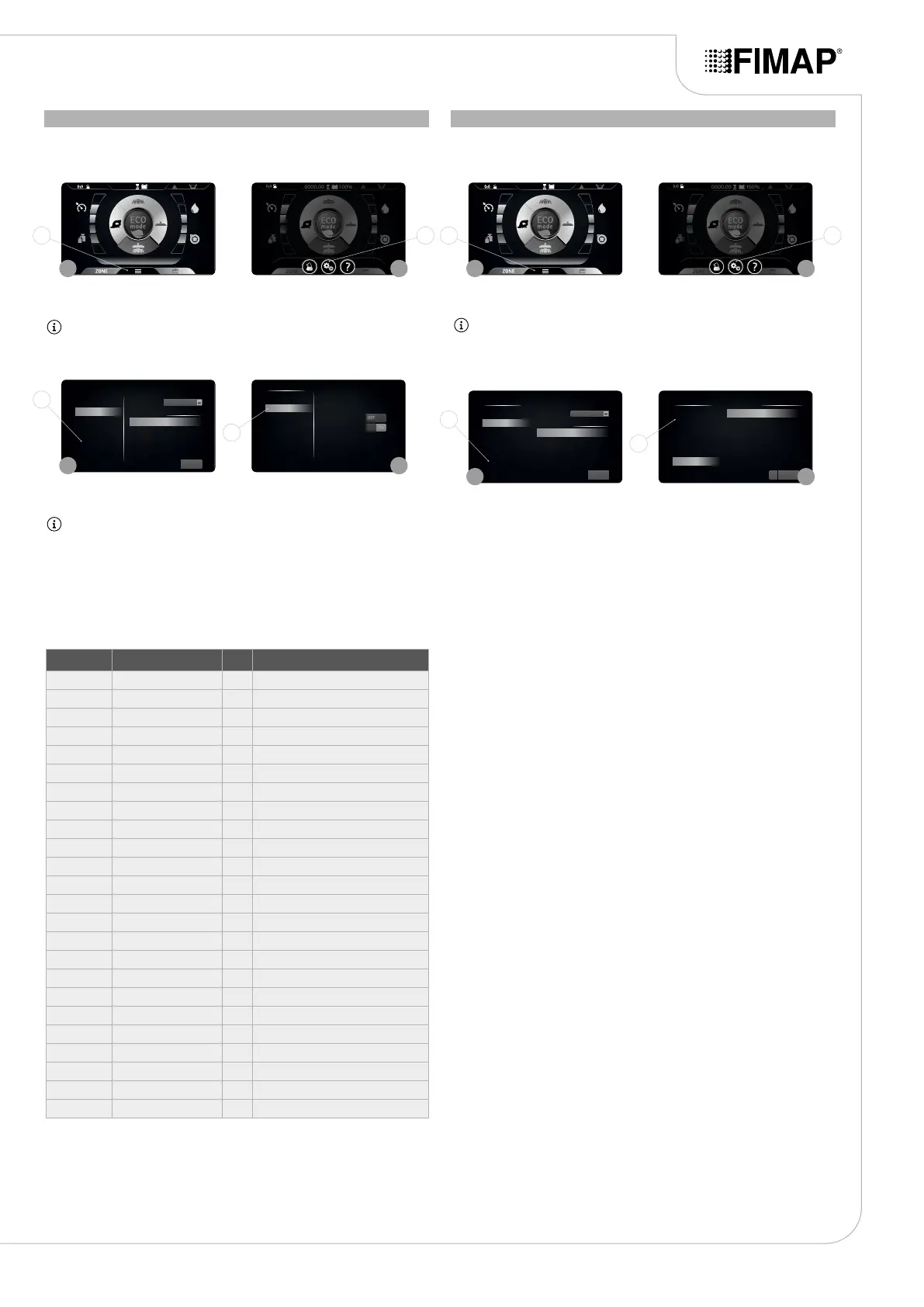
1. With the machine on, press the menu button (1) on the working screen (Fig. 1).
2. Press the setting (2) (Fig. 2).
To view the list of alarms that have been active on the machine, proceed as follows:
1. With the machine on, press the menu button (1) on the working screen (Fig. 1).
2. Press the setting (2) (Fig. 2).
3. In the “MAIN MENU” screen, select the “MONITOR” option (3) on the left-hand side of the screen
(Fig. 3).
NB: when an option is selected from the list, this is highlighted.
4. As soon as the “MONITOR” option is selected, the machine diagnostics screen will appear on the
display (Fig. 4).
3. In the “MAIN MENU” screen, select the “MONITOR” option (3) on the left-hand side of the screen
(Fig. 3).
NB: when an option is selected from the list, this is highlighted.
4. As soon as the “ALARMS” option is selected, the machine diagnostics screen will appear on the
display (Fig. 4).
5. To return to the work scree, press the “EXIT” key.
5. Select which machine function you want to perform the diagnosis on, choosing one of the options
displayed on the left-hand side of the screen (Fig. 5).
NB: the machine functions are divided as follows:
• General
• Brush
• Pump
• Vacuum
• Traction
6. As soon as one of the functions is selected, the information relating to the actuators for this
function appears on the right of the screen (Fig. 4).
The table below provides a list of the variables that can be viewed:
7. To return to the program zone menu, press the “BACK” key.
8. To return to the main menu, press the “EXIT” key.
9. To return to the work scree, press the “EXIT” key.
35
Reset
Menu principale
Lingua
Contaore
Programmazione Zone
Parametri
Monitor
Allarmi
Esci
VISUALIZZATO
TOTALE PARZIALE
Chiave 0000.00 0000.00
Trazione 0000.00 0000.00
Spazzole 0000.00 0000.00
Aspirazione 0000.00 0000.00
Chiave
Reset
Menu principale
Lingua
Contaore
Programmazione Zone
Parametri
Monitor
Allarmi
Esci
VISUALIZZATO
TOTALE PARZIALE
Chiave 0000.00 0000.00
Trazione 0000.00 0000.00
Spazzole 0000.00 0000.00
Aspirazione 0000.00 0000.00
Chiave
Monitor
General
Brush
Pump
Vacuum
Traction
Esci
Valore 1 100
Valore 2 23.5
Valore 3
Valore 4
A
V
? Reset
Menu principale COUNT
Lingua
Contaore
Programmazione Zone
Parametri
Monitor
Allarmi
Esci
Allarme 1 000 0000.00
Allarme 2 000 0000.00
Allarme 3 000 0000.00
Allarme 4 000 0000.00
HOUR METER
1 1
3
3
2 2
4
4
1 1
3
3
2 2
4
4
UNIT
VARIABLE U/M DESCRIPTION
General Battery voltage V Battery voltage
General Solution empty switch Solution tank empty oat
General Recovery empty switch Recovery tank empty oat
General Reverse button Reverse button
General Power button Power button
Brush Current Brush A Brush head brush current
Brush Actuator Base Brush head actuator
Brush Heatsink Temp. °C Functions stage temperature
Pump Flow rate % Water ow rate percentage
Pump ELV base Brush head solenoid valve
Vacuum Current A Vacuum cleaner current
Vacuum Voltage V Vacuum cleaner voltage
Vacuum Actuator Squeegee actuator
Vacuum Heatsink Temp. °C Functions stage temperature
Traction Voltage V Traction motor voltage
Traction Current A Traction motor current
Traction Overload level % Current limit status
Traction Heatsink Temp. °C Traction stage temperature
Traction Handle POT ref. V Gear potentiometer reference voltage
Traction Handle En. Dead man's lever pressed


 To Next Page