130
000877BG-F
7 - Operation
Firmware Update
By accessing to the Firmware Update sub-menu you can upgrade the
rmware of the inverter and his components selecting a Remote rm
-
ware Update or a Local rmware Update.
Perform the update during good irradiation conditions (avoid the dawn and dusk hours).
An interruption of updating process could damage the inverter!
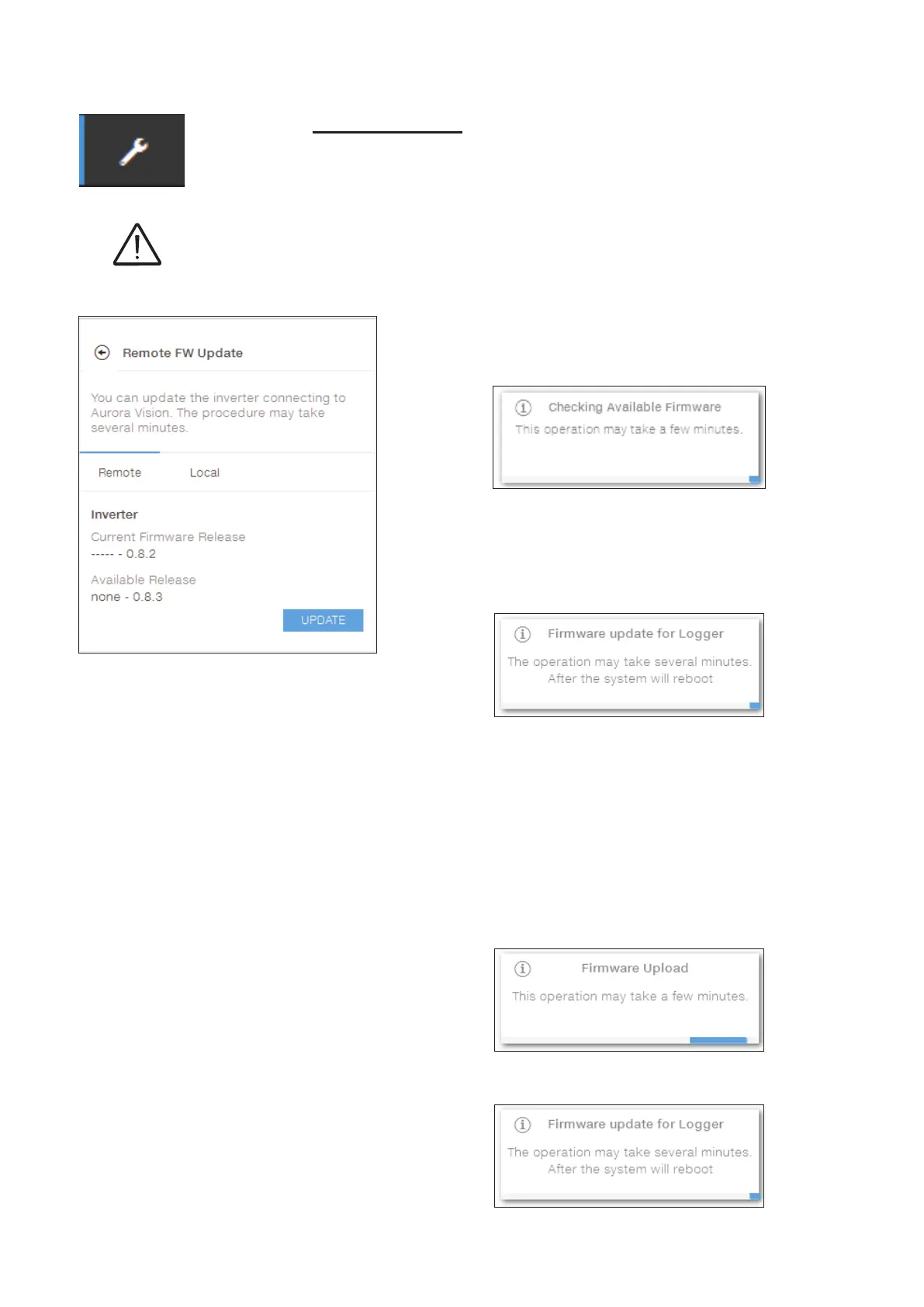
• Remote rmware Update:
-
In remote mode, the rmware will update automati-
cally, searching the last available rmware on FIM-
ER servers, by clicking the “CHECK” button.
- After the nish of the checking process the availa-
ble release will be notied on the bottom part of the
section
- Click on “UPDATE” button to start with the updating
process.
• Local rmware Update:
By updating in local mode, the rmware have to be selected and upload-
ed from local folder of the used devices to access to the web server.
The latest rmware version is available from the download area of the
website www.mer.com or from https://registration.solar.mer.com.
-
Click on “FW SELECT” and select the rmware
package previously downloaded.
- Click on “UPDATE” button to start with the updating
process.


 To Next Page