71
000870BG-F
5 - Installation
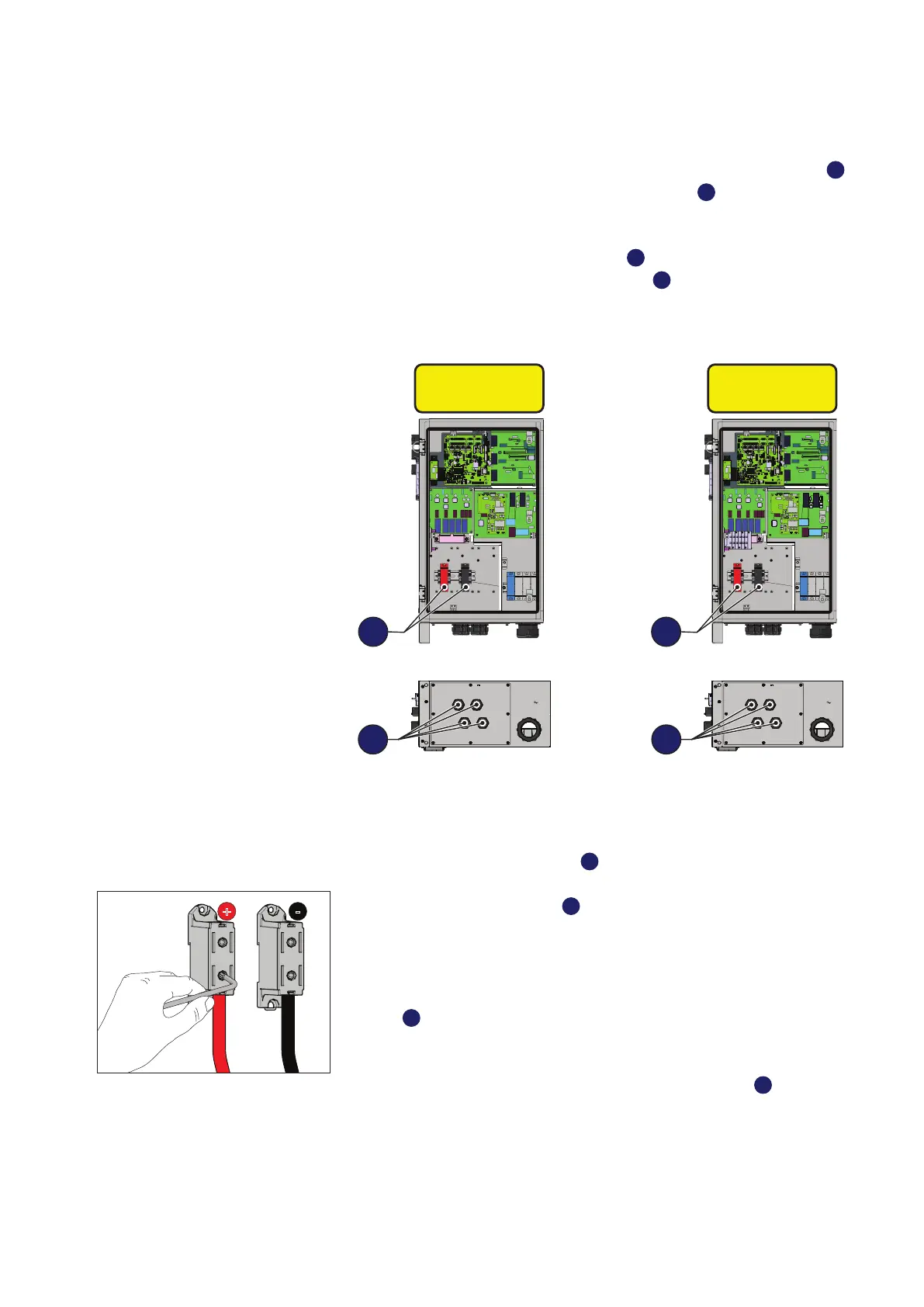
Connection of inputs on the Standard and -S models
For these two models connection with the DC input screw terminal block
39
is made by inserting the cables into the cable glands
17
.
To carry out the connections, the cables (
13 to 21mm diameter)
must
be passed through the DC cable gland
17
.
Connection of DC cables is
made to the DC input screw terminal block
39
;
the screw terminal block
accepts cables with a maximum-cross section of 95 mm
2
(copper or alu-
minum).
OUTPUT AC
INPUT DC
OUTPUT AC
INPUT DC
PVS-50-TL
PVS-60-TL
39
PVS-50-TL-S
PVS-60-TL-S
39
17 17
DC cable installation:
• Open the wiring box front cover
04
.
• Unscrew the DC cable gland
17
• Introduce the cable with a suitable cross-section
• Connect the cables to the terminals on the DC input screw terminal
block
39
with a tightening torque of 20 Nm. During this operation con-
nect the cables with the right polarity.
• Once connection to the DC input screw terminal block
39
has been
completed, retighten (8.0 Nm torque) the cable gland rmly and check
seal.
• Check datasheet of terminal block to indicate which kind of cables are
allowed.
+ -


 To Next Page