20
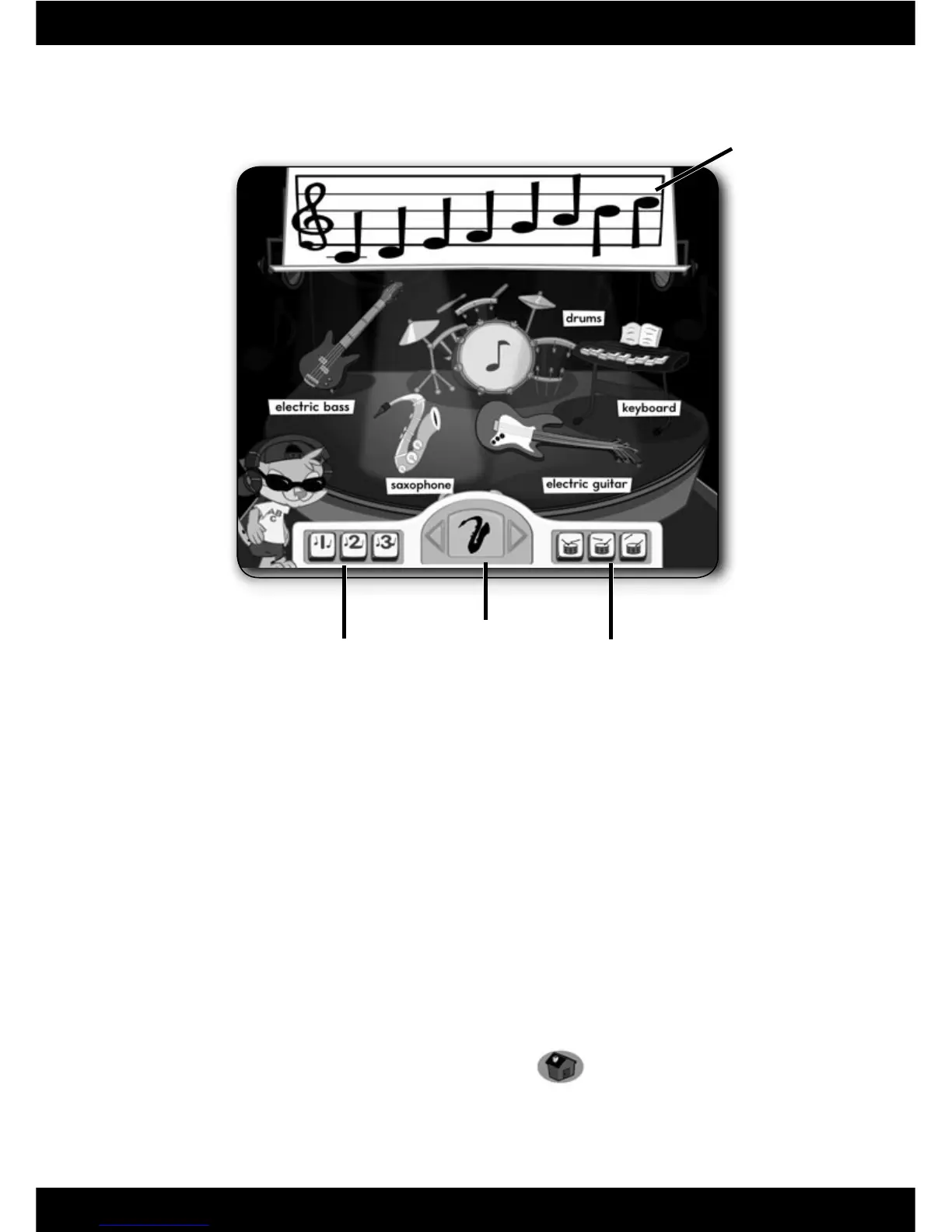
Song Select Buttons Tempo Buttons
Music Centre
Scale
Instrument
Select Arrows
• Click on an instrument to learn about it and hear the different notes it plays.
• Click on the 1, 2 or 3 button for a song to play along with Leo. Click on any
of the instruments during the song to turn them on or off.
Note: You can also press the letters on the keyboard to play along with the
selected instrument with Leo.
• Click on the drum buttons at the bottom of the screen to change the tempo
of the song to slow, medium or fast.
• Click on the 1, 2 or 3 button again to stop the song.
• Choose an instrument to play a scale. Click on the instrument select arrows
to choose an instrument. Then, click on a note on the scale to hear that
instrument play it.
Note: You can also press the letters on the keyboard to hear different notes
from that instrument.
• When fi nished, press the classroom button
on the
Computer Cool School
™
keyboard to return to the classroom or press
another learning centre button for a different activity.







 To Next Page