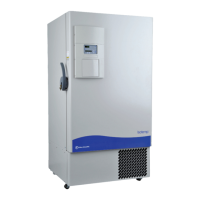
All Isotemp Basic freezers have an operating temperature range of -50°C to
-86°C, depending on ambient temperature. The freezer is shipped from the
factory with a temperature set point of -80°C. To change the operating
temperature set point:
1. Press the Mode key until the Set Temperature indicator lights.
2. Press the up/down arrow key until the desired temperature set point is
displayed.
3. Press Enter to save the set point.
4. Press the Mode key until the Run indicator lights for Run mode
If no keys are pressed, the freezer will automatically return to RUN mode
after 5 minutes.
The high temperature alarm will activate an audible/visual warning when
the freezer chamber temperature has reached or exceeded the high
temperature alarm set point. To set the high temperature alarm set point:
1. Press the Mode key until the Set High Alarm indicator lights.
2. Press the up or down arrow key until the desired high temperature
alarm set point is displayed.
3. Press Enter to save the setting.
4. Press the Mode key until the Run indicator lights for Run mode
If no control keys are pressed, the freezer will automatically return to RUN
mode after 5 minutes.
Note The high alarm set point must be set at least 5°C from the control
set point.
s
Note At initial start-up, the high temperature alarm is disabled until the
cabinet reaches set point or 12 hours elapse.
s
Isotemp Basic 1-7Fisher Scientific
Section 1
Installation and Start-Up
Set the Operating
Temperature
Set the High Temperature
Alarm



 To Next Page