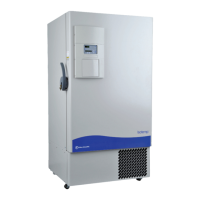
1. Grasp the bottom left corner of the lower door to access the battery.
The battery is rectangular in shape, located on the front left corner of
the compressor compartment and is secured in place by a mounting
bracket.
2. Directly above the battery(s) is the battery power switch. Turn the
battery power switch to the off position (O).
3. Disconnect the battery connections.
4. Remove the old battery and install the new battery.
6. Reconnect the battery (red to positive and black to negative).
7. Turn the battery power switch to Standby mode ( ).
8. Close lower panel door.
Caution The % of charge can vary depending on the age, usage and
condition of the battery. For a consistent and dependable charge, replace
the battery every 2 years. Replacement batteries must be rechargeable and
are available from Fisher. Refer to the parts list for stock number and
description of the replacement batteries. Dispose of the used batteries in a
safe manner and in accordance with good environmental practices.
s
1. To gain access to the battery, open the lower door by grasping the
bottom left corner. The battery is rectangular in shape, located on the
front left corner of the compressor compartment and is secured in
place by a mounting bracket.
2. Directly above the battery(s) is the battery power switch. Turn the
battery power switch to the off position (O).
3. Cut the tie wrap securing the battery to the mounting bracket. Lift the
battery out of the bracket.
4. Disconnect the red and black wires from the battery.
5. Use a voltmeter set to DC volts. Matching the wire colors, connect the
meter to the battery.
6. If the voltage reads less than 10.8 volts, replace the battery. If above
10.8, re-install as previously.
7. Turn the battery power switch to Standby mode ( ).
8. Close lower panel door.
Isotemp Basic 4-5Fisher Scientific
Section 4
Maintenance
Replace the
Battery(s)
Check the Battery(s)



 To Next Page