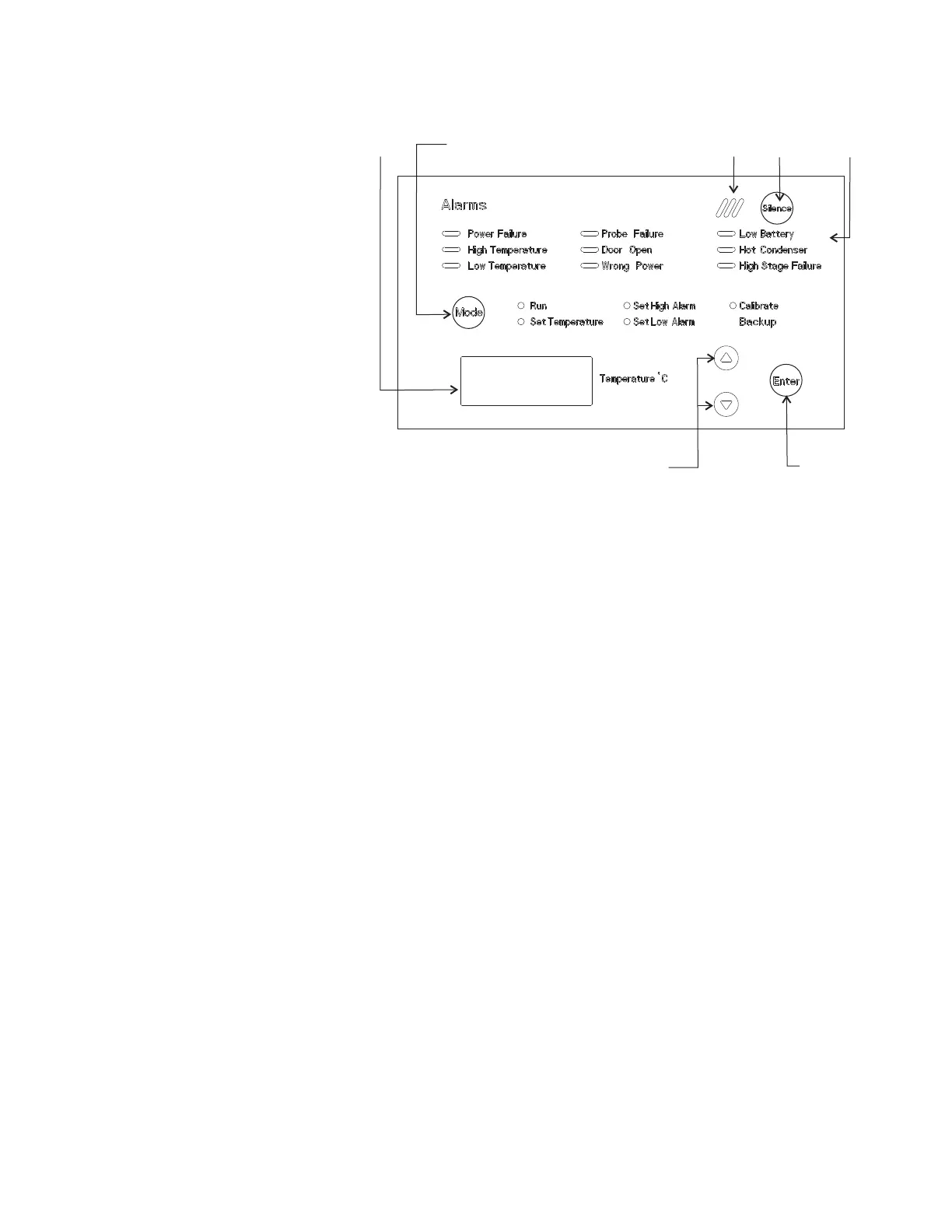
Figure 1-6. Control Panel
Refer to Figure 1-6 for the items indicated.
• Temperature Display - Displays temperature in degrees Celsius.
• Mode Select Switch - Used to select Run, Set Temperature, Set High
Alarm, Set Low Alarm, Calibrate, Backup.
• Alarm Indicator - Light pulses on/off during an alarm condition of the
cabinet.
• Silence - Silences the audible alarm.
• Alarm Panel - indicates the current alarm condition.
• Up and Down Arrows - Increases or decreases values, toggles between
choices.
• Enter - Stores the value into memory.
This Isotemp freezer has five basic modes which allow freezer setup and
operation. Press the Mode key to scroll through the mode selections.
Up Arrow: Increases or toggles the parameter value.
Enter: Must press Enter key to save to memory all changed values.
Down Arrow: Decreases or toggles the parameter value.
Silence Key: Press to silence the audible alarm. See Section 3 for alarm
ringback times.
Control Panel Keys,
Displays/Indicators
Keypad Operation



 To Next Page