4.4.1. Remote control Modbus
By clicking on Remote Control Modbus, the status changes to «on» (green) and remote
control via Modbus is activated.
If no data is sent to the device via the Modbus interface and the remote control is
activated, the pump output drops to 10% (a fixed value that cannot be undercut).
The following settings are possible via Modbus:
• Turn device on and off
• Activate and deactivate normal/continuous operation
• Adjust pump output for normal operation
• Adjust pump output for continuous operation
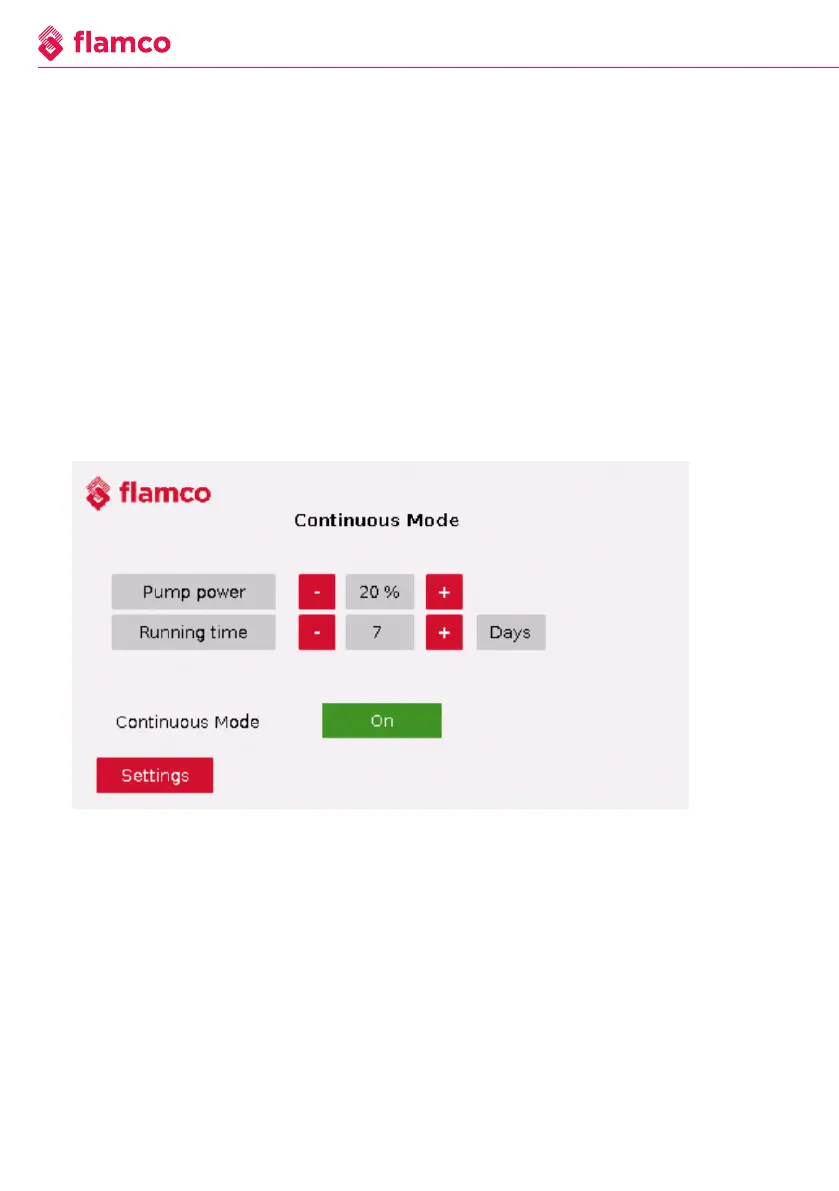
4.4.2. Continuous operation
Figure 4.4.1. Continuous - ON
The following settings can be made on this page:
• Adjust the pump output in continuous operation from 10-100% in steps of 5.
• The duration in days during which continuous operation should be active [1-31 days].
• Continuous operation can be activated/deactivated via ''On/Off''.
22 We reserve the right to change the design and technical specifications of our products.



 To Next Page