The slicing profiles available in FlashPrint 5 are configured based on extensive
testing with various types of filaments. We recommend using the recommended
temperature settings provided in the profiles. If you believe a specific filament
requires a different temperature, you can make minor adjustments and print
smaller objects at the set temperature for testing to ensure smooth operation.
1. Download the latest slicing software from the official website:
https://www.flashforge.com/download-center.
2. Find the FlashPrint 5 software package on the USB flash drive and
install the version that matches your system.
Download Instructions
* The steps are illustrated for one machine type.
FlashPrint 5 is not open-source. It is user-friendly and suitable for users with no 3D printing
experience or those who don't require parameter adjustments.
Flashforge's Official Slicing Software - FlashPrint 5
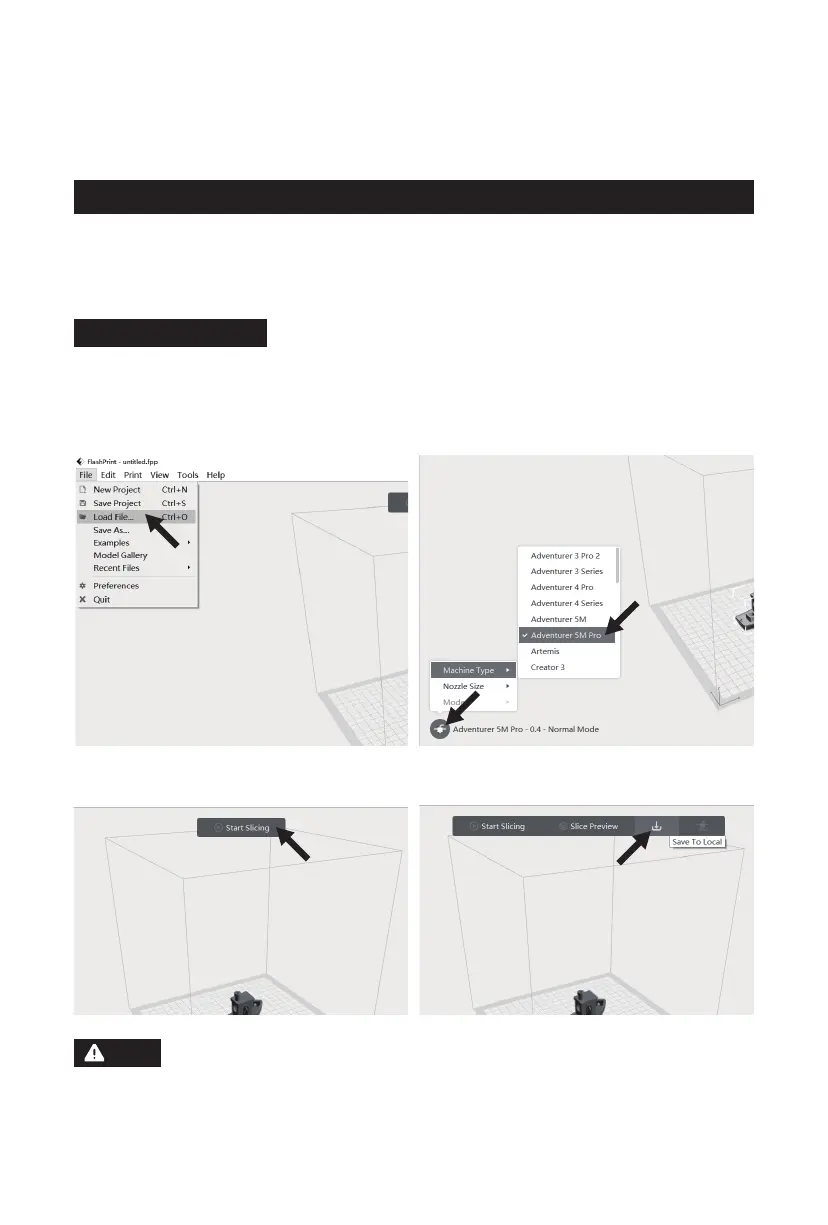
1. After installing the slicing software, import
the model file.
2. Select the corresponding printer type.
3. Click [Start Slicing]. 4. After slicing is completed, save the file to a
USB flash drive for printing.
Note
18















 To Next Page