08
First Print
Internal Memory
Select Driver
Hunter
File List
20mm_Box-Standard
1/1
Model View
FileName:
Material: FH1100(Stan...
Total Layer: 204
Layer Height: 0.05 MM
Build Time: 0 H 45 M
20mm...dard
Print
Name:
Layer: 0/204
Time Remaining:
20mm_B...andard
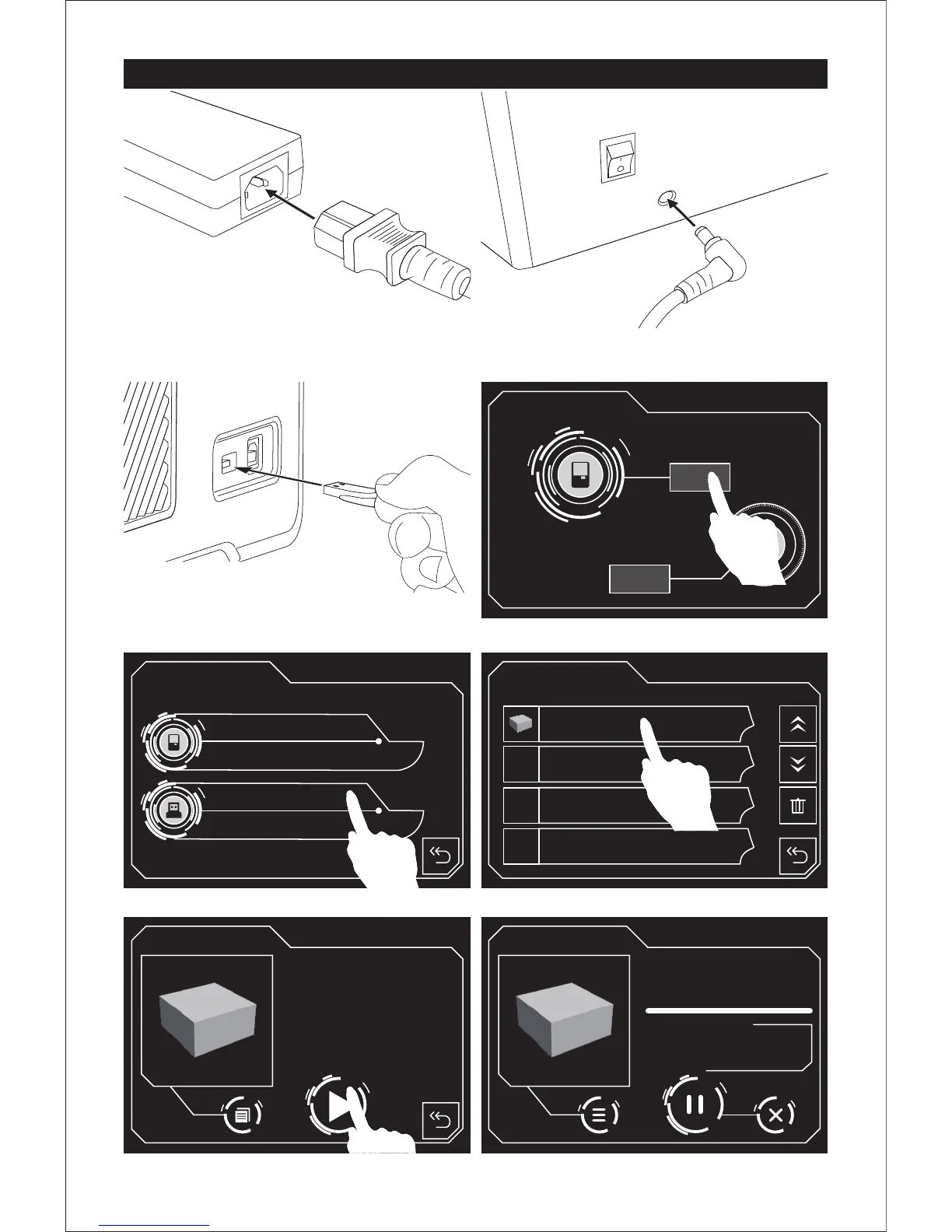
1. Connect power cable and power adapter.
2. Plug the power cable into the input on the
back of Hunter and turn on the power switch.
3. Insert the attached USB stick into Hunter.
Print
Settings
USB Memory
0H 45M
4. Press stand-by switch, then tap [Print].
5. Tap [ USB Memory ]. 6. Tap [20mm_box-Standard].
7. Then tap start icon to start printing.















 To Next Page