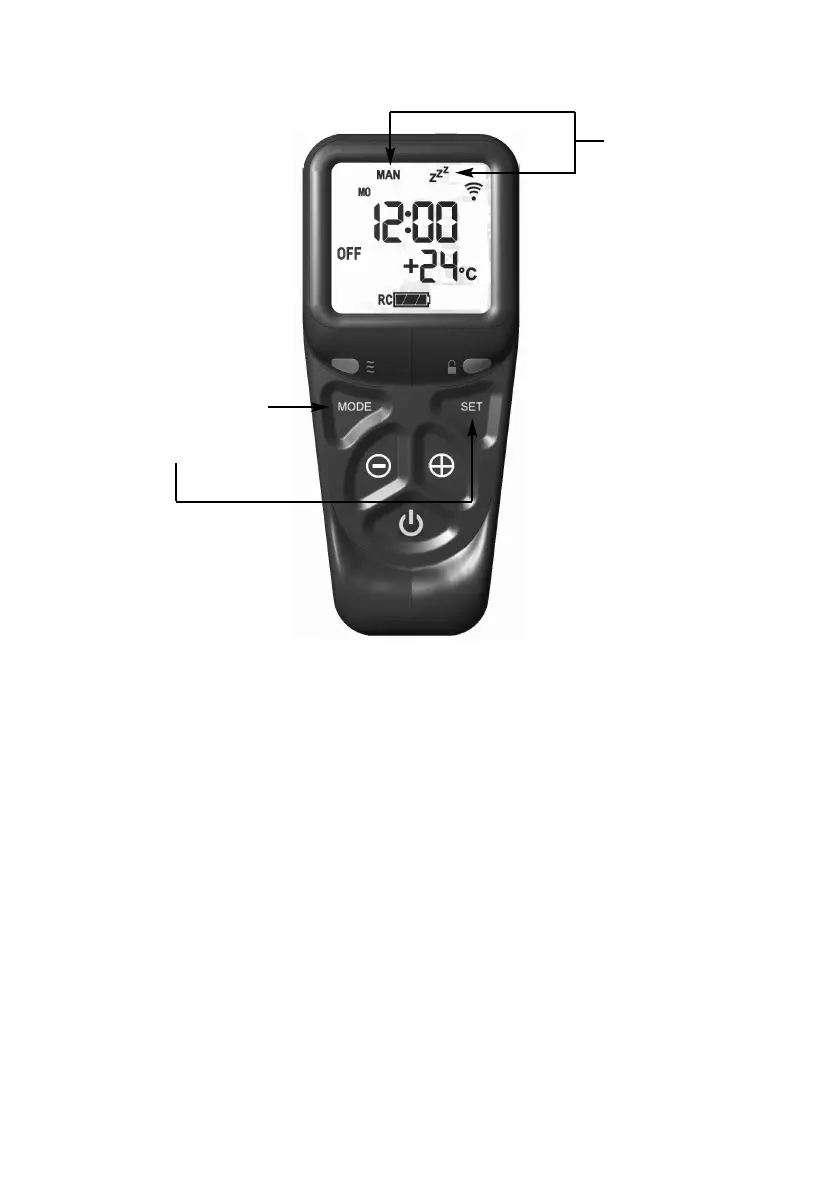
Fig. 47
3.9.1.6 Pressing the set button again will now show you the snooze time period
remaining. The snooze time period can be adjusted by pressing the +
or - buttons on the handset. This time period can be set ranging from 1
minute to 4:00 hours.
3.9.1.7 To adjust the snooze period, hold the handset with one hand ensuring
your hand is wrapped around the back and that your hand is in contact
with both sides of the handset. The green light of the “unlock” symbol
should light. Press the set button and the screen will show how long is
left of the snooze period as shown overpage in figure 48.
42
MAN & Zzz symbols
f
lashing illuminated
Press mode button to
scroll through to MAN &
Zzz symbols, then press
and release the set button
to put the control into the
manual snooze mode.







 To Next Page