EasyManua.ls Logo

FLINTAB 47-11 - Page 20

FLINTAB 47-11
27 pages
Print Icon
To Next Page IconTo Next Page
To Previous Page IconTo Previous Page
Loading...
USER MANUAL
4-56020
2019-02-11 / Tony Kübek
Edition 1.0
\\FS01\Avd\85\Produkter\VIKTINDIKATOR\Handhavande\47-11\4-56020 rev 1-0 Weightindicator 47-11 User manual 20190211.doc
Page 20 (27)
Flintab AB
Tel 036-31 42 00
Kabelvägen 4
mail@flintab.se
553 02 JÖNKÖPING
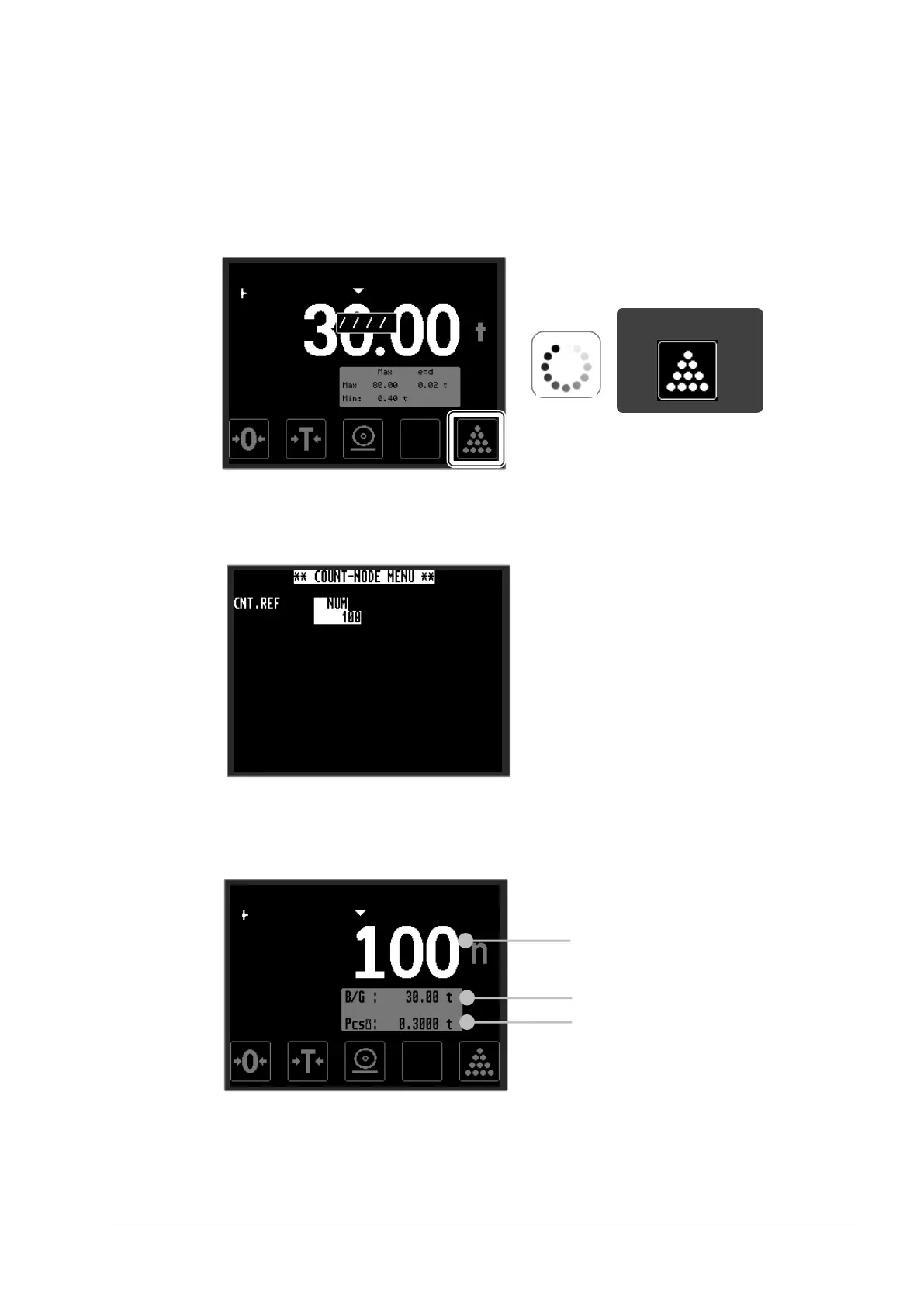
Then press, and keep depressed, the <COUNT> touch-button for
more than 3 seconds, the indicator will now acquire a high-
resolution weight-sample for the item-weight calculation.
After the weight sample has been acquired, input number of items
on the scale and confirm by pressing <Enter>.
The indicator will now enter count mode, where the display will
show number of items instead of the weight value.

Current weight
Item/part weight
Number of items/parts
>3s
Touch-button