427-0030-00-12 Version 180 March 2018 29
2 Basic Operation and Configuration
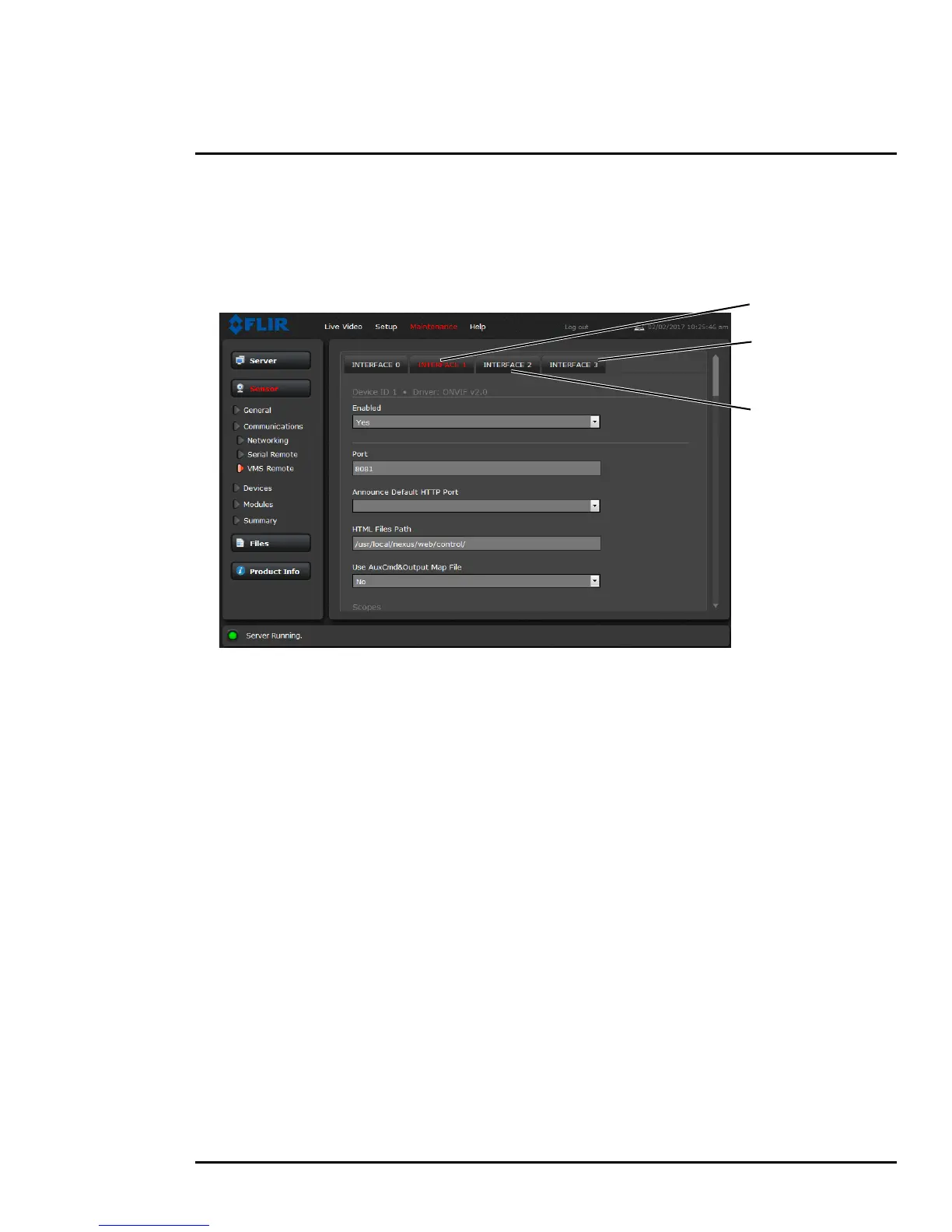
Sensor > Communications > VMS Remote
If the camera is used with a VMS that is compliant with ONVIF, the parameters can be adjusted (if
needed) to work with the VMS. Refer to the VMS documentation to determine what parameter values
are needed. By default, the camera is configured with a VMS Remote interface with ONVIF 2.0
parameters (Profile S)
.
Interface 0 is the Nexus CGI interface used by the camera server. Select INTERFACE 0 and scroll
down to enable password authentication.
Authentication when enabled uses the same passwords set from the Server Security Options page.
Refer to
Server > Security Options, pg. 27. Several types of third-party Video Management Systems
(VMS) are supported by FLIR IP cameras. Because these systems tend to evolve and change over
time, contact the local FLIR representative or FLIR Technical Support to resolve any difficulties or
questions about using this feature.
ONVIF-Interface 1
NTCIP-Interface 3
Lenel-Interface 2



 To Next Page