Operation
16
5 Operation
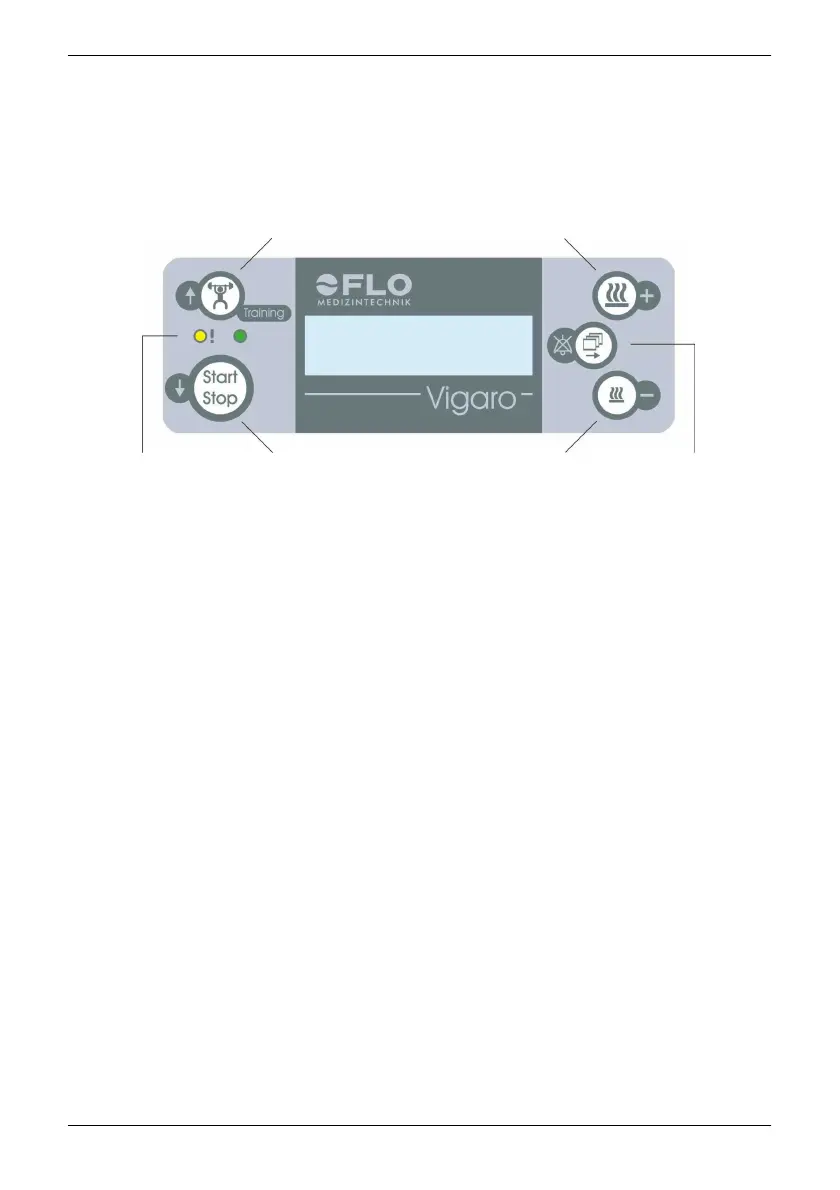
5.1 Display and keys
- Training mode
- Previous menu item
- Increase humidifier output
- Change value (+)
Error and
standby display
(yellow / green)
- Start /
Stop key
- Next
menu item
- Ramp
- Reduce
humidifier output
- Change value (-)
- Menu key
- Confirm
alarm
indefinitely
The display shows the current operating status, parameters in the appropriate
menus, and any alarms that occur.
The backlighting of the display is always switched on during standby (no
treatment).
The backlighting stays on for about 1 minute after treatment starts. If a key is
pressed during treatment, the backlighting switches on again for 1 minute.
Additional displays:
Das FLO Vigaro features 2 additional LEDs:
-
The green LED is always on when the device is in standby. Once the
motor starts, the green LED goes out.
-
The yellow LED is constantly lit up or flashes when an error occurs.


 To Next Page