▪ Clear total
The value for total can be reset. To do so, press the CLEAR/ key twice. When the key is
pressed once, the text "PUSH CLEAR" is shown. To avoid a reset at this stage, press another
key other than the CLEAR/ key or wait for 20 seconds. A reset of the total does not influence
the accumulated total.
▪ Display accumulated total
When the SELECT/ key is pressed, total and accumulated total are shown. The accumulated
total cannot be reset. The value will count up to 99,999,999,999. The unit and number of
decimals are shown according to the settings for the total.
▪ Display Flow rate-A, Flow rate-B, (accumulated) total-A, (accumulated) total-B
The display can be configured to show the differential or summed flow rate. By pressing the
SELECT/
accumulated total A, flowrate B and accumulated total B.
▪ Low-battery alarm
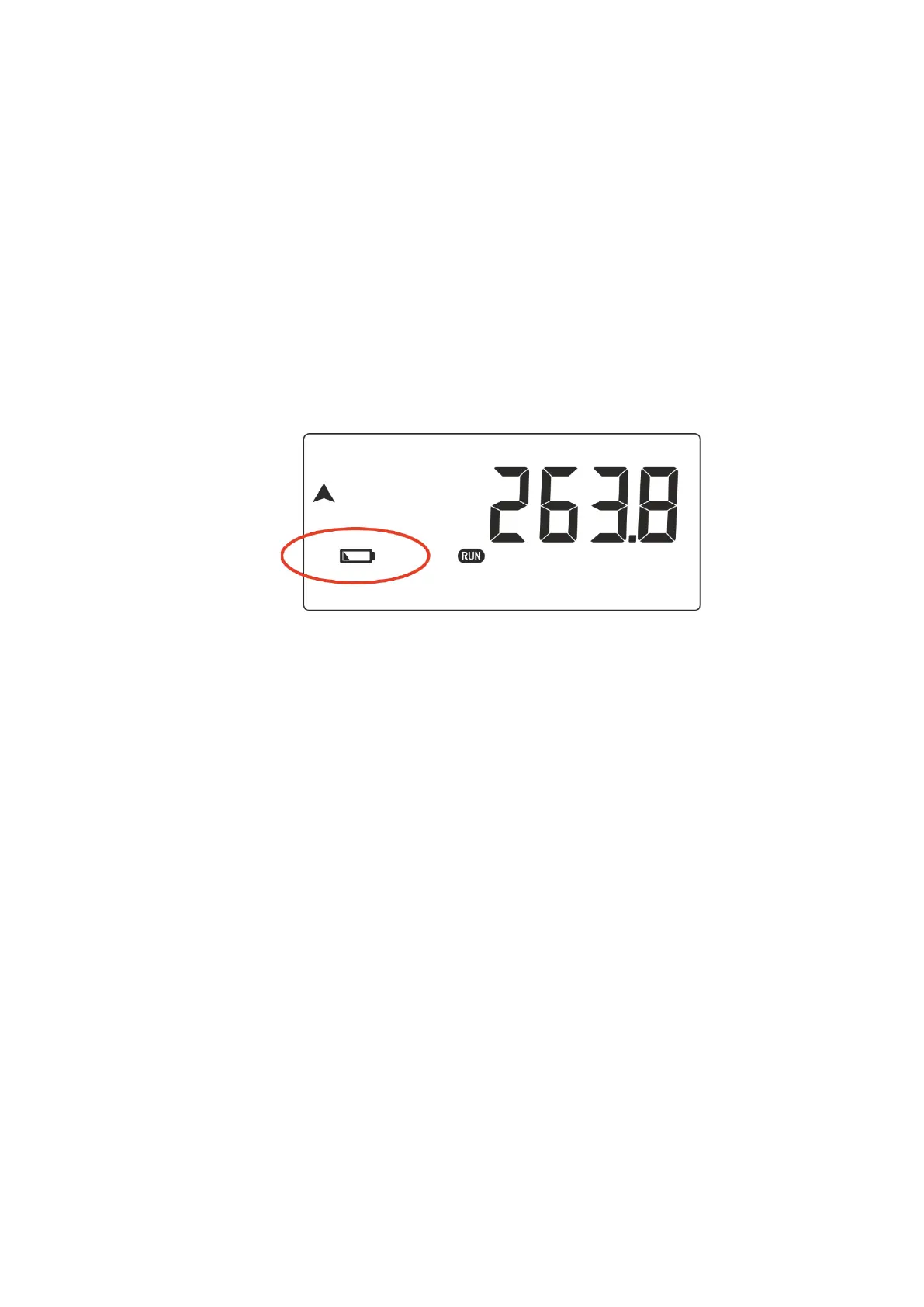
When the battery voltage drops, the "low-battery" icon will be displayed continuously. The battery
MUST be replaced shortly after!
The remaining lifetime after the first moment of indication is generally several days up to some
weeks. See paragraph 6.3 for further information on battery replacement.
Fig. 4: Example of low-battery alarm.
▪ Alarm
When the alarm indicator is shown, refer to Appendix B: Problem Solving.



 To Next Page