Setting up the Analyzer
FUNCTION PREFerences20
20-9
14
F2 – AGGREGation INTERVAL: access to the menu to choose
between a 3 seconds aggregation interval of 150/180 cycles (50/60 Hz)
or a 200 ms interval of 10/12 cycles (50/60 Hz). This feature is used for
rms based readings in: Volts/Amps/Hertz, Power & Energy, Harmonics
Table (Volt, Amp), Unbalance (Unbal (%), Vfund, Afund), Logger.
The screen header indicates ‘3s’ if the 3 second interval is active.
15
F4 - ALL DEFAULT: resets all settings in this menu to factory default.
16
F5 - BACK: return to SETUP entry menu.
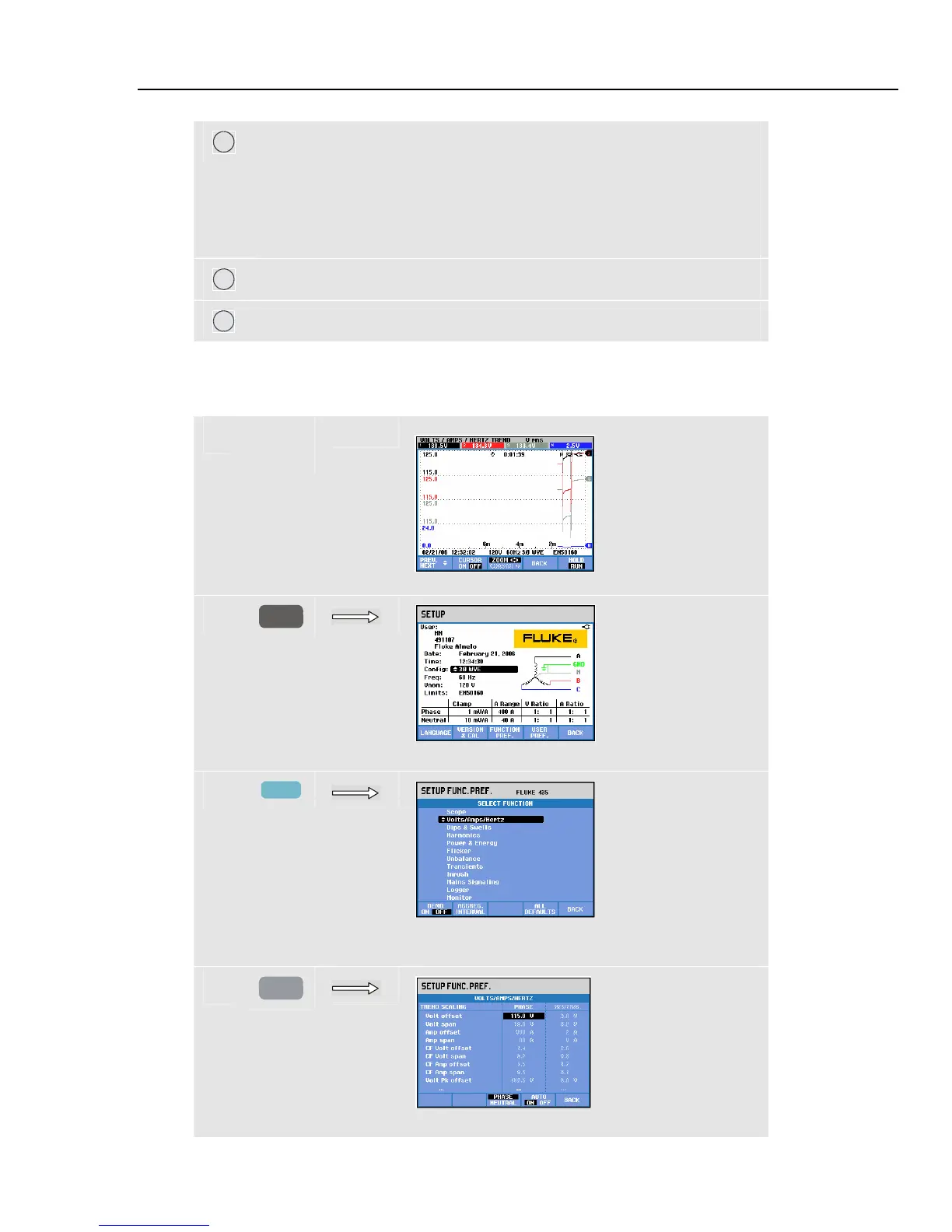
The example below shows stepwise how to adjust offset and span of a Volts/Amps/Hertz
trend after a voltage change has occurred.
c
Trends are outside their window.
d
SETUP
Press SETUP to access setup entry screen.
e
F3
Press function key F3 to access select function
screen.
f
ENTER
Press the ENTER key to access trend scaling.



 To Next Page