EasyManua.ls Logo

Fluke 540B - Page 24

Fluke 540B
76 pages
Print Icon
To Next Page IconTo Next Page
To Previous Page IconTo Previous Page
Loading...
540B
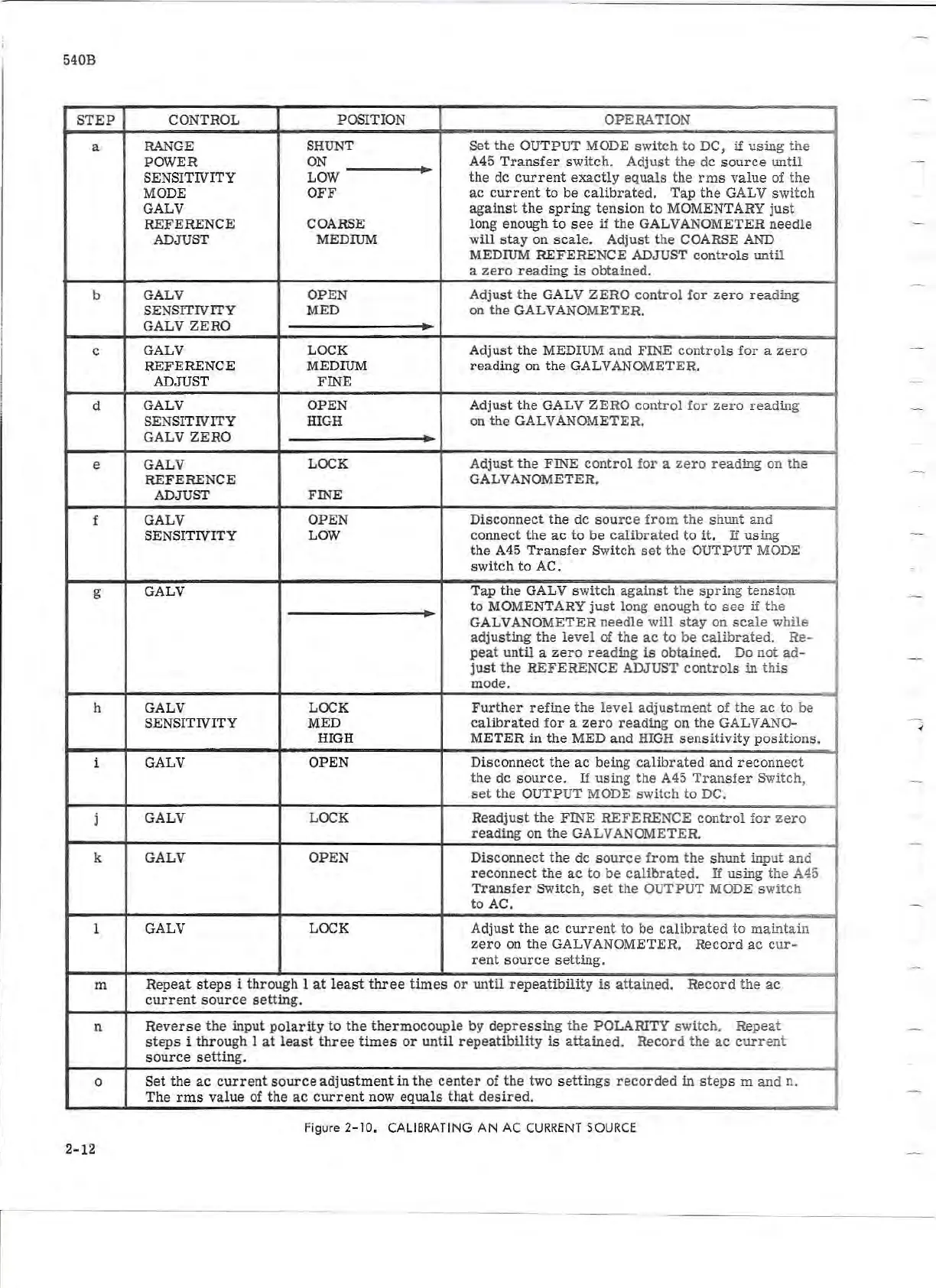
STEP
CONTROL
POSITION OPERATION
a RANGE
SH
UNT
Set
the
OUTPUT MODE
switch
to DC,
if
using
the
POWER
ON
A45
Transfer
swi
tch.
Adjust
the
de
source
until
SE
NS
ITIVITY LOW
the
de
current
exactl
y
equals
the
rms
value
of
the
MODE
OFF
ac
current
to
be
calibrat
ed.
Tap
the
GAL V switch
GALV
against
the
spring
t
ensio
n to MOMENTARY
just
REFERENCE
COARSE long enough
to
see
if
the
GALVANOMETER
needle
ADJUST MEDIUM
will
stay
on
scale.
Adjust
the
COARSE AND
MEDIUM REFERENCE ADJUST
control
s
until
a
zero
reading
is
obtained.
b
GALV OPEN
Adjust
the
GALV
ZERO
control
for
zero
reading
SENSITIVITY MED on
the
GALVANOMETER.
GALV
ZERO
c GALV LOC K
Adju
st
the
MEDIUM
and
FINE
control
s
for
a
zero
REF
EREN
CE
MEDIUM
reading
on t he GALVANOMETER.
ADJUST F
IN
E
d GALV
OPEN Adjust
the
GALV Z
ERO
control
for
zero
reading
SENSITIVITY
HIGH on
the
GALVANOMETER.
GALV
ZERO
e
GALV
LOCK
Adjust
the
FlNE
control
f
or
a
ze
r o
reading
on
the
REFERENCE
GALVANOMETER.
ADJUST
FINE
f GALV
OPEN
Disconnect
the de s
ource
f
ro
m
the
shunt
an
d
SENSIT
IV
I
TY
LOW
connect
the
ac
to
be
calibrated
to
it.
If
using
the
A45
Tran
s
fer
Switch
set
the
OUTPUT MODE
switch
to
AC.
g GALV
Tap
the
GALV s
witch
against
the
spring
tension
to
MOMENTARY
just
long enough
to
see
if
t he
GALVANOMETER
needle
w
ill
stay
on
scale
while
adjusting
the
level
of
the
ac
to
be
calibrated.
Re-
peat
until
a
zero
reading
is
obtained
. Do n
ot
ad -
just
the
REFERENCE
ADJUST
controls
in t
his
mode.
h
GALV
LOCK
Further
refine
the
level
adjus
t
ment
of
the
ac
to
be
SENSIT
IV
IT
Y MED
calibrat
ed
for
a
zero
reading
on
the
GALV ANO-
HIG
H
METER
in
the
MED
and
HIGH
sensitivity
posi
tions.
1 GALV OPEN
Disconnect
the
ac
being
calibrated
and
reconnect
the
de
source.
If
using
the
A45
Tra
n
sfer
Switch,
set
the
OUTP
UT MODE s wi
tch
to
DC.
j GALV
LOCK
Readjust
th
e FINE
REFERE
N
CE
control
for
ze
ro
re
adin
g on
th
e GALVANOMETER.
k GALV OPEN
Disconnect
the
de
sourc
e
from
the
shunt
inp
ut
an
d
reconnect
the
ac
to
be
calir>rated.
If
using
t he A45
T
ransfer
Switch,
set
the
OUTPUT
MODE
s
wit
ch
to
AC.
1 GALV LOCK Adjust
the
ac
curren
t to be
calibrated
to
maint
a in
zero
on
the
GALVANOMETER.
Record
ac
cur -
rent
source
se
tting.
m
Repeat
steps
i
through
l
at
least
three
times
or
un
til
repeatibility
is
at
tained.
Record
the
ac
current
source
setting.
n
Reverse
the
input
polarity
to
the
thermocouple
by
depressing
the
POLARITY
switc
h.
Repea
t
steps
i
through
l
at
least
three
times
or
until
repeatibility
is
attained.
Record
th
e
ac
curre
nt
source
setting.
0
Set
th
e
ac
current
source
adjustment
in
the
cent
er of
the
two
settings
recorded
in
steps
m
and
n.
The
rm
s
value
of the ac
curren
t now
equals
that
desired.
Figure
2-
1
0,
CALI
BRATI
NG
AN
AC
CU
RRENT
SOURCE
2-12
r-