GPU26.EPS
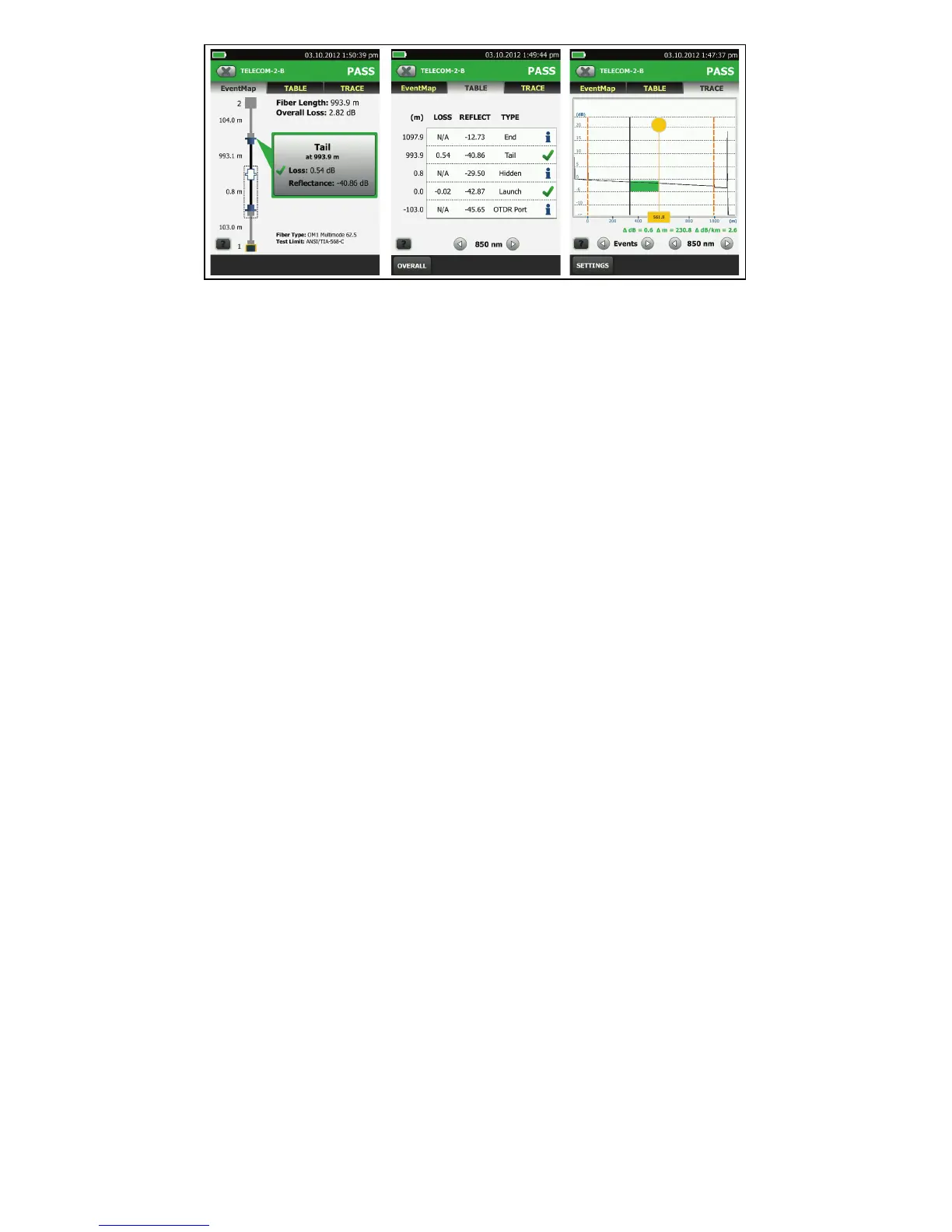
Figure 5. Examples of OTDR Results Screens
6.
Save the Results
6-1
Tap SAVE if the test passed or FIX LATER if the test
failed.
6-2
If the Cable ID box shows the correct ID, tap SAVE.
To enter a cable ID, tap the Cable ID box on the SAVE RESULT
screen, use the keyboard to enter a name for the results, tap
DONE, then tap SAVE.
The tester saves the results in the DEFAULT project, unless you
selected a different project.
About Projects
You can set up a project to specify the settings and tests
necessary for a job, monitor the status of a job, and organize the
test results.
To start a new project, tap PROJECT on the home screen, tap
CHANGE PROJECT, then tap NEW PROJECT. See the Users Manual
or Technical Reference Handbook for more information.
About Fluke Networks Cloud Services
With a Fluke Networks web account and a wired or wireless
network connection, you can use the LinkWare Live web
application to store and manage projects in the cloud.
Go to https://www.linkwarelive.com/signin or see the Users
Manual or Technical Reference Handbook for more information.
Registration
Registering your product with Fluke Networks gives you access
to valuable information on product updates, troubleshooting
tips, and other support services.
To register, use LinkWare PC software. Download LinkWare PC
from the Fluke Networks website.
Shop for Fluke Networks products at:
1.800.561.8187
ShopFlukeNetworks.ca


 To Next Page